
Welcome to Smart Home Forum by FIBARO
Dear Guest,
as you can notice parts of Smart Home Forum by FIBARO is not available for you. You have to register in order to view all content and post in our community. Don't worry! Registration is a simple free process that requires minimal information for you to sign up. Become a part of of Smart Home Forum by FIBARO by creating an account.
As a member you can:
- Start new topics and reply to others
- Follow topics and users to get email updates
- Get your own profile page and make new friends
- Send personal messages
- ... and learn a lot about our system!
Regards,
Smart Home Forum by FIBARO Team


Quick Apps
The category contains Quick Apps submitted by users.
Downloading and submission terms have to be accepted.
Quick Apps have to be described properly, screen shots are optional.
Support topics are created automatically here Quick Apps
Report topics and files that are no longer supported by authors.
All the files submitted have to be approved by administrators.
32 files
-
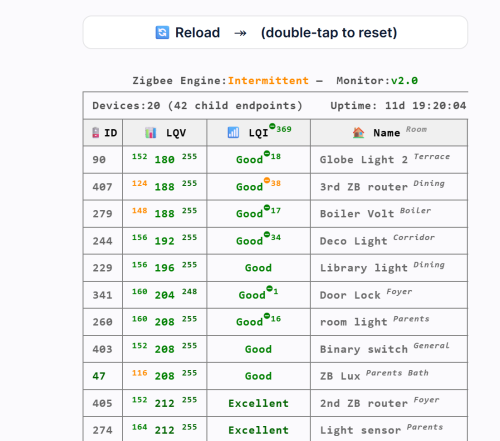
ZigBee Monitor
By cag014
⚡ Zigbee Monitor – A Complete Health Dashboard for Your Zigbee
This QuickApp gives you a real‑time, high‑precision diagnostic view of your entire ZigBee network.
It tracks every device, evaluates link quality, detects ZigBee Engine freezes or crashes, highlights weak or unstable nodes, monitors battery health, and records communication drops over time.
Automatic sorting, color‑coded warnings, min/max LQI history, and intelligent ZigBee Engine health scoring, it turns your HC3 into a full ZigBee analytics console—making mesh problems visible instantly instead of guessing in the dark.
📑 Table Columns
🪫 ID Device ID with battery status. Battery devices show color‑coded percentage; routers show “Serves as Router.” Ghost nodes appear as 👻.
📊 LQV (LQI value) Shows min / current / max LQI values recorded since last reset. Helps identify unstable or fluctuating devices.
📶 LQI (Quality Status) Color‑coded signal quality label: Excellent, Good, Weak, Poor, Critical. Includes drop‑severity superscripts when applicable.
❤️ Alive Displayed only when at least one device is dead. Shows “false” in red for non‑responsive nodes.
🏠 Name Room Device name with room shown in superscript. Ghost devices show their IEEE address instead.
📦 Type Indicates whether the device is Battery‑Powered (with percentage) or Serves as Router.
🔖 Vendor Manufacturer reported by the ZigBee device.
🔢 Model Device model identifier (e.g., E1743, SNZB‑02).
🧬 Family Routing family chain showing how HC3 child devices relate to each other (e.g., 123👥🡒456🡒789).
Requirements
HC3 with ZigBee enabled
QuickApp variables: user, password (secured)
User and Password
The QuickApp needs credentials to access the internal ZigBee API through the HC3 proxy.
Enter its username and password in the QA’s Variables tab.
The QA automatically encodes these values and uses them only for read‑only Zigbee queries.
Note: For security, you can create a dedicated HC3 user with limited permissions (not your main admin account)
What It Shows
ZigBee Engine status
ID, LQV (with min/max range), LQI status, Alive (if needed), Name and Room, Type, Vendor, Model, Family.
Please download and review the ZigBee Monitor User’s Guide for further details.
You can also download the ZigBee & HC3 Capacity Planning Guide, which helps you build a more stable and reliable ZigBee network.
138 downloads
-
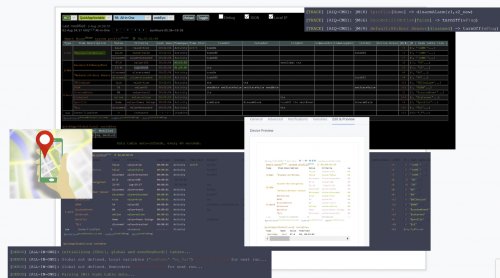
HC3: All-in-One QA
By cag014
🧠 What AOQ (All-in-One QuickApp) Offers
Multi-System Control: Seamlessly manages HC3, HC2, and HCL controllers using master/slave architecture. Unified Automation: Replaces scattered Lua and Block scenes with one centralized QA. Device Intelligence: Auto-detects Z-Wave, ZigBee, Nice, QA devices, and scenes. Alarm Zone Management: Identifies breached zones/sensors and triggers actions. Custom Events & Profiles: Supports dynamic profiles and custom rule-based automation. 🛠️ Core Configuration: Job Management - jM{} Hash Table
Each line in jM{} includes:
Field Description
Time Span Duration in minutes for monitoring or action. 0 = activity only, negative = suspended
IDs List Devices/scenes/variables/keywords (e.g., `"137,630"or"_45"` for scenes)
Criteria & Rules Optional conditions like state="value=true" or property="power"
Action Tables Optional commands: trueAct{}, falseAct{}, trigAct{}, etc.
🔄 Device Aliasing with jS2n{}
Avoid hardcoding device IDs:
jS2n = {mSensor=200, boiler=137, dryer=630, light=230, timeScene="_17"} Use aliases in jM{}:
jM={ {15,"`mSensor`",{state="value=true", trueAct={"`light`", "turnOn"},falseAct={"`light`", "turnOff"}}} } 🔍 Monitor Option
Detects inactivity or failure to report:
{8, "`timeScene` and _545", {timeSlot="10:00~22:00"}} -- scenes must be active every 8 min between 10am to 22pm {10, "`boiler`and 145", {property="power"}} -- must report power every 10 min {30, "`boiler`", {state="power>100"}} -- alert if power >100 for 30 min ⚙️ Control Option
Example: Turn on light when motion sensor is breached, turn off after 3 min when motion sensor back to safe:
jM={"`mSensor`",{state="value=true",trueAct={"`lightSw`","turnOn"},falseAct={"`lightSw`","turnOff", "180"}}} To restrict to nighttime:
jM={"`mSensor`",{state="value=true",timeslot="18:00~07:00", trueAct={"`lightSw`","turnOn"},falseAct={"`lightSw`","turnOff", "180"}}}
Example: Turn on light when motion sensor is breached, turn off after 3 min (regardless of when motion sensor back to safe)
jM={"`mSensor`",{state="value=true", trueAct={{"`lightSw`","turnOn"},{"`lightSw`","turnOff", "180"}}}} 🧪 Debug & Table View
Debugger Output: Shows executed commands with color-coded status. Table Header: Displays system info, sunrise/sunset, home/vacation mode, system traffic. Columns: Device type, ID, name, battery status Criteria evaluation Alerts and elapsed time Action tables and active rules 📊 Top Active Monitor (New) AOQ now includes an enhanced Top Active Devices monitor designed to identify devices that may destabilize HC3 performance.
It analyzes lifetime activity, current load per hour, and burst behavior to detect devices generating excessive or abnormal traffic.
The table highlights devices that may cause delays, radio congestion, disconnects, or even controller restarts.
A Peak/h column appears only when abnormal bursts are detected, helping users quickly locate problematic devices without cluttering the interface.
📘 Want to Go Deeper?
You can find the full documentation and guides on the Smart Home Forum by FIBARO, including:
AOQ Advanced User’s Guide AOQ Quick Guide AOQ HC-WebEye Viewer4,307 downloads
-
Alexa Text-To-Speech
By cag014
Sending Text-to-Speech message from your Fibaro hub to Alexa devices and Alexa app on mobile phones (Android and iOS).
Give a voice to your smart home. Alexa on your mobile will speak all messages/alerts or any other monitoring messages that you need to know at real time.
You will know real time what happens, wherever you are.... (internet connection requires)
The QA uses 3rd party "Voice Monkey" skill for free. You are just a few minutes away to make your home speaks.📣🔊
The provided QA is an open source and feel free to change it per your requirements.
279 downloads
- cag014
- text-to-speech
- (and 3 more)
-

Alexa Trigger
By cag014
Attached Quick App. enables your Fibaro hub to control all 3rd party devices integrated into Alexa using Voice Monkey skill.
Now you can control your smart devices like Air Conditioners, Hue devices, Dishwashers, TV, Washing machine and etc.
Let's take our smart home functionality to the next level
HC2/HCL users can use HTTP to achieve same command and control. See HC2/HCL section in Alexa Triggers.v1.pdf
All-in-one QA (AOQ) supports Alexa triggers also.
Any feedback will be appreciated
284 downloads
(0 reviews)0 comments
Updated
-
WeatherAPI weather provider QA
By Sankotronic
WeatherAPI weather provider QA standalone v1.0
INTRODUCTION
WeatherAPI weather provider QA brings current weather state and forecast provided by Weather API to your home automation. Can be selected as default weather provider on HC3, HC3L and Yubii Home.
PREREQUISITES
Fibaro HC3, HC3Lite or Yubii Home with firmware 5.160 or greater User account on WeatherAPI with free subscription
FEATURES
QA can be set as default weather provider to update HC weather condition, temperature, humidity and wind. Current weather and weather forecast measurements and are shown on child devices added, while current weather and forecast condition is shown by icon and description on main QA. The QA checks measurement units setup on user's Fibaro controller and adjusts values accordingly. QA has built in multi-language support with 32 languages included (see APPENDIX 1 for the list). QA can use HC selected language or user can select any other available language.
DOWNLOAD PACKAGE CONTENT
WeatherAPI weather provider QA v1.0 WeatherAPI weather provider QA User manual v1.0 Icon set
INSTALL & UPGRADE
MPORTANT NOTE - Due to upload file type restrictions imposed by Fibaro for Quick Apps, after downloading file with FQA extension, change this extension to ZIP and then unzip package. In this ZIP package you will find PDF User manual, WeatherAPI weather provider QA v1.0 Standalone.fqax and folder with icons. Please follow User manual for installation & upgrade. I hope that Fibaro will remove this limitation in near future since there is no such limitation on Fibaro Marketplace and even here for Virtual Devices.
NOTE - I know that some users will not like that this QA is encrypted. Since license is now changed to donationware, I can send original code or even unencrypted QA, but only to users that will donate or at least write a review and vote. Thank you for understanding!
TERMS AND CONDITIONS
Permission to use, copy and distribute this software and its documentation for educational, research, personal use and non-profit purposes, without fee and without a signed licensing agreement is hereby granted, provided that the copyright notice, with "Terms and conditions" and "Disclaimer" appear in all copies, modifications and distributions. It is strictly forbidden to sell, rent, lease and/or lend this software for profit without prior consent from the Author.
DISCLAIMER
This software is provided by copyright owner "as is" and any express or implied warranties, including, but not limited to, the implied warranties of merchantability and fitness for a particular purpose are disclaimed. In no event shall the author and distributor be liable for any direct, indirect, incidental, special, exemplary, or consequential damages (including, but not limited to, procurement of substitute goods or services; loss of use, data, or profits; or business interruption) however caused and on any theory of liability, whether in contract, strict liability, or tort (including negligence or otherwise) arising in any way out of the use of this software, even if advised of the possibility of such damage.
Fibaro a Nice company and their employees are not responsible for support of this QA. Please contact the author Sankotronic, on the Fibaro Forum, for any questions or support required.
VERSION HISTORY
1.0 - first public release as donationware.
LOOK & FEEL
Enjoy coding and your new WeatherAPI weather provider QA!
Sankotronic
32 downloads
- weatherapi
- weather provider
- (and 5 more)
-
Enphase Envoy Monitor QA
By Sankotronic
Enphase Envoy Monitor QA standalone v1.1
INTRODUCTION
Enphase Envoy Monitor QA brings seamless integration of the Enphase Envoy Metering EU with Fibaro Home Center.
PREREQUISITES
Fibaro HC3, HC3Lite or Yubii Home with firmware 5.161 or greater Enphase Envoy Metering EU gateway with firmware D7.6.177 or greater User account on https://enlighten.enphaseenergy.com/login/login.json
FEATURES
The QA retrieves production, consumption and net-balance from Enphase Envoy gateway and show on child devices.
The QA also retrieves production data from all Enphase micro-inverters found in the system and can show on separately added inverter child devices.
Today production, today consumption and instantaneous production and consumption child devices can be selected in Fibaro Home Center energy panel settings.
After setting up Envoy gateway IP address and user name and password QA will immediately get all other necessary data like gateway serial number, session number and access token. Time of access token generation is stored and used to refresh after period of 180 days. NOTE – for now, generated token lifetime is 1 year according to the Enphase information.
This version of Enphase Envoy Monitor QA provides calculated values for today’s exported energy and today’s imported energy shown on child devices. It also provides child devices for calculated values of grid dependence and production capacity
QA has built in multi-language support with 32 languages included (see APPENDIX 1 for the list). QA can use HC selected language or user can select any other available language.
NOT SUPPORTED BY THIS VERSION
Q-relays Battery packs
DOWNLOAD PACKAGE CONTENT
Enphase Envoy Monitor QA v1.1 Enphase Envoy Monitor QA User manual v1.1 Icon set
INSTALLATION
IMPORTANT NOTE - Due to upload file type restrictions imposed by Fibaro for Quick Apps, after downloading file with FQA extension, change this extension to ZIP and then unzip package. In this ZIP package you will find PDF User manual, Enphase Envoy Monitor QA v1.1 Standalone.fqax and folder with icons. Please follow User manual for installation & upgrade. I hope that Fibaro will remove this limitation in near future since there is no such limitation on Fibaro Marketplace and even here for Virtual Devices.
NOTE - I know that some users will not like that this QA is encrypted. Since license is now changed to donation-ware, I can send original code or even unencrypted QA, but only to users that will donate. For more information please check provided user manual, Thank you for understanding!
TERMS AND CONDITIONS
Permission to use, copy and distribute this software and its documentation for educational, research, personal use and non-profit purposes, without fee and without a signed licensing agreement is hereby granted, provided that the copyright notice, with "Terms and conditions" and "Disclaimer" appear in all copies, modifications and distributions. It is strictly forbidden to sell, rent, lease and/or lend this software for profit without prior consent from the Author.
DISCLAIMER
This software is provided by copyright owner "as is" and any express or implied warranties, including, but not limited to, the implied warranties of merchantability and fitness for a particular purpose are disclaimed. In no event shall the author and distributor be liable for any direct, indirect, incidental, special, exemplary, or consequential damages (including, but not limited to, procurement of substitute goods or services; loss of use, data, or profits; or business interruption) however caused and on any theory of liability, whether in contract, strict liability, or tort (including negligence or otherwise) arising in any way out of the use of this software, even if advised of the possibility of such damage.
Fibaro a Nice company and their employees are not responsible for support of this QA. Please contact the author Sankotronic, on the Fibaro Forum, for any questions or support required.
VERSION HISTORY
1.1 - first public release as donation-ware.
LOOK & FEEL
ENPHASE ENVOY MONITOR QA CHILD DEVICES AND ENLIGHTEN APP COMPARISON
What you get with this integration is best explained with the next few pictures:
Enlighten status screen with appropriate QA child devices:
Enlighten live status screen with appropriate QA child devices:
Enlighten Total Energy screen with appropriate QA child devices:
Here are provided icons:
- Envoy main icon
- Envoy updating icon (shown during communication with Envoy gateway)
- Envoy exporting icon (shown when production is higher than consumption and energy is exported to the grid)
- Envoy production/importing icon (shown when production is lower than consumption and part of the consumption power is importing from the grid)
- Envoy importing icon (show when there is no production and all consumption power is importing from the grid)
- Envoy error icon (only shown if there is a communication problem with the Envoy gateway)
- Envoy production icon (all child devices related to the production get this icon)
- Envoy consumption icon (all child devices related to the consumption get this icon)
- Envoy net-ballance icon (all child devices related to the net-balance [import/export from the grid] get this icon)
- Envoy voltmeter icon for child device showing system voltage
- Envoy amp meter icon (for child devices showing consumption, production and net-ballance current)
- Envoy inverter icon (for all child devices related to micro-inverters)
NOTE - This QA code is not fork or modified version of any existing similar QA. There are several Enphase Envoy QA available on the french forum ( @lazer,@TitiXsi ) and Fibaro marketplace (JJSM, Twan van Eijk, ReneNL), but none of them were used to build this QA.
Enjoy coding and your new Enphase Envoy Monitor QA!
Sankotronic
46 downloads
- sankotronic
- hc3
- (and 5 more)
(1 review)0 comments
Submitted
-
Netatmo Weather Station QA Standalone
By Sankotronic
Netatmo Weather Station QA standalone v2.1
INTRODUCTION
Netatmo Weather station QA brings complete integration of Netatmo weather station to HC3, HC3Lite and Yubii Home users including rain and wind gauges and support for more than one station.
PREREQUISITES
Fibaro HC3, HC3Lite or Yubii Home with firmware 5.150 or greater
One or more Netatmo Weather station
FEATURES
QA type is now weather provider and can be selected to update Fibaro Home Center weather
Complete integration of Netatmo weather station with HC3, HC3Lite and Yubii Home including rain gauge and anemometer
Only one QA is needed for any number of Netatmo Weather stations and their included modules.
Support for Netatmo weather station main module without outdoor module included
Support for maximum 3 additional indoor modules per station
Smart update system that follows Netatmo weather station cloud updates
Netatmo weather station measurements are shown on child devices added for each measurement of all stations and their modules found
QA has built in multi-language support with 32 languages included. QA can use HC selected language or user can select any other available language.
AVAILABLE DOWNLOAD
Netatmo Weather station QA v2.1 Netatmo Weather station QA User manual v2.0 Icons set
INSTALLATION & UPGRADE
IMPORTANT NOTE - Due to upload file type restrictions imposed by Fibaro for Quick Apps, after downloading file with FQA extension, change this extension to ZIP and then unzip package. In this ZIP package you will find PDF User manual, Netatmo Weather Station QA v2.1 Standalone.fqax and folder with icons. Please follow User manual for installation & upgrade. I hope that Fibaro will remove this limitation in near future since there is no such limitation on Fibaro Marketplace and even here for Virtual Devices.
NOTE - I know that some users will not like that this QA is encrypted. Since license is now changed to donationware, I can send original code or even unencrypted QA, but only to users that will donate. Thank you for understanding!
TERMS AND CONDITIONS
Permission to use, copy, modify and distribute this software and its documentation for educational, research, personal use and non-profit purposes, without fee and without a signed licensing agreement is hereby granted, provided that the copyright notice, with "Terms and conditions" and "Disclaimer" appear in all copies, modifications and distributions. It is strictly forbidden to sell, rent, lease and/or lend this software for profit without prior consent from the Author.
DISCLAIMER
This software is provided by copyright owner "as is" and any express or implied warranties, including, but not limited to, the implied warranties of merchantability and fitness for a particular purpose are disclaimed. In no event shall the author and distributor be liable for any direct, indirect, incidental, special, exemplary, or consequential damages (including, but not limited to, procurement of substitute goods or services; loss of use, data, or profits; or business interruption) however caused and on any theory of liability, whether in contract, strict liability, or tort (including negligence or otherwise) arising in any way out of the use of this software, even if advised of the possibility of such damage.
Fibaro a Nice company and their employees are not responsible for support of this QA. Please contact the author Sankotronic, on the Fibaro Forum, for any questions or support required.
VERSION HISTORY
1.1 - first public release as open source. 2.0 - second release as donationware. For more details please check below. 2.1 - updated Netatmo server domain to api.netatmo.com since old one will be removed
LOOK & FEEL
Enjoy coding and your new Netatmo weather station QA!
Sankotronic
314 downloads
- yubii home
- hc3l
- (and 5 more)
-
Weather Underground weather provider QA
By Sankotronic
Weather Underground weather provider QA standalone v1.2
INTRODUCTION
Weather Underground weather provider QA brings current weather state and forecast provided by Wunderground to your home automation. Can be selected as default weather provider on HC3, HC3L and Yubii Home.
PREREQUISITES
Fibaro HC3, HC3Lite or Yubii Home with firmware 5.160 or greater At least one personal weather station connected to Weather Underground User account on Weather underground with free subscription
FEATURES
QA can be set as default weather provider to update HC weather condition, temperature, humidity and wind. Current weather and weather forecast measurements and are shown on child devices added, while current weather and forecast condition is shown by icon and description on main QA. The QA checks measurement units setup on user's Fibaro controller and adjusts values accordingly. QA has built in multi-language support with 32 languages included (see APPENDIX 1 for the list). QA can use HC selected language or user can select any other available language.
DOWNLOAD PACKAGE CONTENT
Weather Underground weather provider QA v1.2 Weather Underground weather provider QA User manual v1.2 Icon set
INSTALL & UPGRADE
MPORTANT NOTE - Due to upload file type restrictions imposed by Fibaro for Quick Apps, after downloading file with FQA extension, change this extension to ZIP and then unzip package. In this ZIP package you will find PDF User manual, Weather Underground weather provider QA v1.0 Standalone.fqax and folder with icons. Please follow User manual for installation & upgrade. I hope that Fibaro will remove this limitation in near future since there is no such limitation on Fibaro Marketplace and even here for Virtual Devices.
NOTE - I know that some users will not like that this QA is encrypted. Since license is now changed to donationware, I can send original code or even unencrypted QA, but only to users that will donate or at least write a review and vote. Thank you for understanding!
TERMS AND CONDITIONS
Permission to use, copy and distribute this software and its documentation for educational, research, personal use and non-profit purposes, without fee and without a signed licensing agreement is hereby granted, provided that the copyright notice, with "Terms and conditions" and "Disclaimer" appear in all copies, modifications and distributions. It is strictly forbidden to sell, rent, lease and/or lend this software for profit without prior consent from the Author.
DISCLAIMER
This software is provided by copyright owner "as is" and any express or implied warranties, including, but not limited to, the implied warranties of merchantability and fitness for a particular purpose are disclaimed. In no event shall the author and distributor be liable for any direct, indirect, incidental, special, exemplary, or consequential damages (including, but not limited to, procurement of substitute goods or services; loss of use, data, or profits; or business interruption) however caused and on any theory of liability, whether in contract, strict liability, or tort (including negligence or otherwise) arising in any way out of the use of this software, even if advised of the possibility of such damage.
Fibaro a Nice company and their employees are not responsible for support of this QA. Please contact the author Sankotronic, on the Fibaro Forum, for any questions or support required.
VERSION HISTORY
1.0 - first public release as donationware. 1.1 - corrected handling of units of measurement 1.2 - added child devices for weather current and forecast conditions that can be used in other user code. Bug corrections for translations and debugging.
LOOK & FEEL
Enjoy coding and your new Weather Underground weather provider QA!
Sankotronic
83 downloads
-
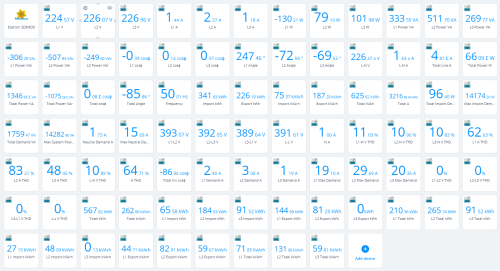
EASTRON SDM 630 Modbus V3, 3-Phase Smart Meter
By uwuertz
QuickApp to read the EASTRON SDM630 V3 Modbus Smart Meter for HC3
This QuickApp is for querying pretty much most of the parameters of an Eastron SDM630 Modbus device. It reads directly from the Modbus server, for example a Modbus Device Waveshare RS485 to RJ45 Ethernet Industrial Serial Server Modbus Gateway.
Some important information:
After installation, only the parent device will be created. You can now use your own icons for parent and child devices; these must be entered as a variable with the icon ID. As soon as the device is activated, these are then used when the ChildDevices are created. Hint: you can use http://<hc3-ip-address>/api/icons to get a list of your icons and icon-id's. The query and creation of ChilDevices remains inactive until the variable SDM_ACTIVE is set to true. This allows you to adjust the other parameters, which are also set on the "Variables" tab, as required. After SDM_ACTIVE has been set to true, the ChildDevices are created automatically. Further ChildDevices can be added or removed by setting the "enabled" parameter to true or false in the LUA code under "ChildDevicesDetails". If you have a V2 device, simply delete the last two lines in "ChildDevices Details", these are for V3 only. Tip: If you make changes and save the QA file, make sure that you delete all variables on the "Variables" tab beforehand. Otherwise, the variable settings of your saved QA file will be used and the entry "SDM_ACTIVE = false" will probably not be present and the QA will immediately try to create ChildDevices and read in values.
Variables:
MODBUS_IP contains the IP address of the Modbus adapter, e.g. from Waveshare MODBUS_PORT is the standard port of the adapter, 502 UNIT_ID is the ID of the Eastron SDM 630 meter INTERVALL defines the polling intervals in seconds ICON_PARENT sets the ID of the icon to be used for the parent device ICON_CHILDS sets the ID of the icon to be used for the child device SDM_ACTIVE stops all processes if false and continues them if true.
Important: If ChildDevices are deleted using "enabled=false", the data stored for this ChildDevice up to that point is also deleted! If this is not desired, the device should be managed via the interface. I would not recommend reading all the parameters as the QuickApp has otherwise put too much load on the HC3 memory in my case.
Use at your own risk, I have written the device myself and the code can be used at will, without any guarantee of completeness and accuracy. Code is still subject to change.
Have fun!
26 downloads
(0 reviews)0 comments
Updated
-
Weerlive weather provider QA
By Sankotronic
Weerlive weather provider QA standalone v1.1
INTRODUCTION
Weerlive weather provider QA brings current weather state provided by Weerlive Nederland to your home automation. Can be selected as default weather provider on HC3, HC3L and Yubii Home.
NOTE - This weather provider is working only for Nederland!
PREREQUISITES
Fibaro HC3, HC3Lite or Yubii Home with firmware 5.160 or greater User account on Weerlive with free subscription
FEATURES
QA can be set as default weather provider to update HC weather condition, temperature, humidity and wind. Weerlive measurements are shown on child devices added while weather condition is shown by icon and description on main QA. The QA checks measurement units setup on user's Fibaro controller and adjusts values accordingly.
QA has built in multi-language support with 32 languages included (see APPENDIX 1 for the list). QA can use HC selected language or user can select any other available language.
DOWNLOAD PACKAGE CONTENT
Weerlive weather provider QA v1.1 Weerlive weather provider QA User manual v1.1 Icon set
INSTALLATION & UPGRADE
IMPORTANT NOTE - Due to upload file type restrictions imposed by Fibaro for Quick Apps, after downloading file with FQA extension, change this extension to ZIP and then unzip package. In this ZIP package you will find PDF User manual, Weerlive weather provider QA v1.0 Standalone.fqax and folder with icons. Please follow User manual for installation & upgrade. I hope that Fibaro will remove this limitation in near future since there is no such limitation on Fibaro Marketplace and even here for Virtual Devices.
NOTE - I know that some users will not like that this QA is encrypted. Since license is now changed to donationware, I can send original code or even unencrypted QA, but only to users that will donate or at least write a review and vote. Thank you for understanding!
TERMS AND CONDITIONS
Permission to use, copy and distribute this software and its documentation for educational, research, personal use and non-profit purposes, without fee and without a signed licensing agreement is hereby granted, provided that the copyright notice, with "Terms and conditions" and "Disclaimer" appear in all copies, modifications and distributions. It is strictly forbidden to sell, rent, lease and/or lend this software for profit without prior consent from the Author.
DISCLAIMER
This software is provided by copyright owner "as is" and any express or implied warranties, including, but not limited to, the implied warranties of merchantability and fitness for a particular purpose are disclaimed. In no event shall the author and distributor be liable for any direct, indirect, incidental, special, exemplary, or consequential damages (including, but not limited to, procurement of substitute goods or services; loss of use, data, or profits; or business interruption) however caused and on any theory of liability, whether in contract, strict liability, or tort (including negligence or otherwise) arising in any way out of the use of this software, even if advised of the possibility of such damage.
Fibaro a Nice company and their employees are not responsible for support of this QA. Please contact the author Sankotronic, on the Fibaro Forum, for any questions or support required.
VERSION HISTORY
1.0 - first public release as donationware. 1.1 - Added local variable condition to save weather condition description. Bug correction for translations and debugging
LOOK & FEEL
Enjoy coding and your new Weerlive Weather Map weather provider QA!
Sankotronic
23 downloads
(0 reviews)0 comments
Updated
-
Air Quality Worldwide QA v1.0 Standalone
By Sankotronic
Air Quality Worldwide QA standalone v1.1
INTRODUCTION
Air Quality Worldwide QA brings current air quality provided by nearest station to your home automation.
PREREQUISITES
Fibaro HC3, HC3Lite or Yubii Home with firmware 5.160 or greater Request API token at: https://aqicn.org/data-platform/token/
FEATURES
The QA retrieves air quality data from the nearest station found depending on user location settings. Air Quality Worldwide QA measurements are shown on child devices added while air quality index is shown by icon and description on main QA. QA has built in multi-language support with 32 languages included (see APPENDIX 1 for the list). QA can use HC selected language or user can select any other available language.
DOWNLOAD PACKAGE CONTENT
Air Quality Worldwide QA v1.1 Air Quality Worldwide QA User manual v1.1 Icon set
INSTALL & UPGRADE
MPORTANT NOTE - Due to upload file type restrictions imposed by Fibaro for Quick Apps, after downloading file with FQA extension, change this extension to ZIP and then unzip package. In this ZIP package you will find PDF User manual, Air Quality Worldwide QA v1.1 Standalone.fqax and folder with icons. Please follow User manual for installation & upgrade. I hope that Fibaro will remove this limitation in near future since there is no such limitation on Fibaro Marketplace and even here for Virtual Devices.
NOTE - I know that some users will not like that this QA is encrypted. Since license is now changed to donationware, I can send original code or even unencrypted QA, but only to users that will donate or at least write a review and vote. Thank you for understanding!
TERMS AND CONDITIONS
Permission to use, copy and distribute this software and its documentation for educational, research, personal use and non-profit purposes, without fee and without a signed licensing agreement is hereby granted, provided that the copyright notice, with "Terms and conditions" and "Disclaimer" appear in all copies, modifications and distributions. It is strictly forbidden to sell, rent, lease and/or lend this software for profit without prior consent from the Author.
DISCLAIMER
This software is provided by copyright owner "as is" and any express or implied warranties, including, but not limited to, the implied warranties of merchantability and fitness for a particular purpose are disclaimed. In no event shall the author and distributor be liable for any direct, indirect, incidental, special, exemplary, or consequential damages (including, but not limited to, procurement of substitute goods or services; loss of use, data, or profits; or business interruption) however caused and on any theory of liability, whether in contract, strict liability, or tort (including negligence or otherwise) arising in any way out of the use of this software, even if advised of the possibility of such damage.
Fibaro a Nice company and their employees are not responsible for support of this QA. Please contact the author Sankotronic, on the Fibaro Forum, for any questions or support required.
VERSION HISTORY
1.0 - first public release as donationware. 1.1 - corrected bugs with translations and debugging.
LOOK & FEEL
Enjoy coding and your new Weather Underground weather provider QA!
Sankotronic
17 downloads
(0 reviews)0 comments
Updated
-
Open Weather Map weather provider QA
By Sankotronic
Open Weather Map weather provider QA standalone v1.3
INTRODUCTION
Open Weather Map weather provider QA brings current weather state provided by Open Weather Map to your home automation. Can be selected as default weather provider on HC3, HC3L and Yubii Home.
PREREQUISITES
Fibaro HC3, HC3Lite or Yubii Home with firmware 5.160 or greater User account on Open Weather Map with free subscription
FEATURES
QA can be set as default weather provider to update HC weather condition, temperature, humidity and wind. Open Weather Map measurements are shown on child devices added while weather condition is shown by icon and description on main QA. The QA checks measurement units setup on user's Fibaro controller and adjusts values accordingly.
QA has built in multi-language support with 32 languages included (see APPENDIX 1 for the list). QA can use HC selected language or user can select any other available language.
DOWNLOAD PACKAGE CONTENT
Open Weather Map weather provider QA v1.3 Open Weather Map weather provider QA User manual v1.3 Icon set
INSTALLATION & UPGRADE
IMPORTANT NOTE - Due to upload file type restrictions imposed by Fibaro for Quick Apps, after downloading file with FQA extension, change this extension to ZIP and then unzip package. In this ZIP package you will find PDF User manual, weather provider QA v1.1 Standalone.fqax and folder with icons. Please follow User manual for installation & upgrade. I hope that Fibaro will remove this limitation in near future since there is no such limitation on Fibaro Marketplace and even here for Virtual Devices.
NOTE - I know that some users will not like that this QA is encrypted. Since license is now changed to donationware, I can send original code or even unencrypted QA, but only to users that will donate or at least write a review and vote. Thank you for understanding!
TERMS AND CONDITIONS
Permission to use, copy and distribute this software and its documentation for educational, research, personal use and non-profit purposes, without fee and without a signed licensing agreement is hereby granted, provided that the copyright notice, with "Terms and conditions" and "Disclaimer" appear in all copies, modifications and distributions. It is strictly forbidden to sell, rent, lease and/or lend this software for profit without prior consent from the Author.
DISCLAIMER
This software is provided by copyright owner "as is" and any express or implied warranties, including, but not limited to, the implied warranties of merchantability and fitness for a particular purpose are disclaimed. In no event shall the author and distributor be liable for any direct, indirect, incidental, special, exemplary, or consequential damages (including, but not limited to, procurement of substitute goods or services; loss of use, data, or profits; or business interruption) however caused and on any theory of liability, whether in contract, strict liability, or tort (including negligence or otherwise) arising in any way out of the use of this software, even if advised of the possibility of such damage.
Fibaro a Nice company and their employees are not responsible for support of this QA. Please contact the author Sankotronic, on the Fibaro Forum, for any questions or support required.
VERSION HISTORY
1.0 - first public release as donationware. 1.1 - corrected handling of units of measurement 1.2 - added child devices for minimum and maximum temperature for the current day 1.3 - Added child device for weather condition code, added local variables to store weather condition code and description and corrected bugs for translation and debugging
LOOK & FEEL
Enjoy coding and your new Open Weather Map weather provider QA!
Sankotronic
52 downloads
- yubii
- sankotronic
- (and 5 more)
(0 reviews)0 comments
Updated
-
WeatherBit weather provider QA
By Sankotronic
WeatherBit weather provider QA standalone v1.2
INTRODUCTION
WeatherBit weather provider QA brings current weather state provided by WeatherBit.io to your home automation. Can be selected as default weather provider on HC3, HC3L and Yubii Home.
PREREQUISITES
Fibaro HC3, HC3Lite or Yubii Home with firmware 5.160 or greater User account on WeatherBit.io with free subscription
FEATURES
QA can be set as default weather provider to update HC weather condition, temperature, humidity and wind. WeatherBit measurements are shown on child devices added while weather condition is shown by icon and description on main QA. The QA checks measurement units setup on user's Fibaro controller and adjusts values accordingly. QA has built in multi-language support with 32 languages included (see APPENDIX 1 for the list). QA can use HC selected language or user can select any other available language.
DOWNLOAD PACKAGE CONTENT
WeatherBit weather provider QA v1.2 WeatherBit weather provider QA User manual v1.2 Icon set
INSTALL & UPGRADE
MPORTANT NOTE - Due to upload file type restrictions imposed by Fibaro for Quick Apps, after downloading file with FQA extension, change this extension to ZIP and then unzip package. In this ZIP package you will find PDF User manual, WeatherBit weather provider QA v1.0 Standalone.fqax and folder with icons. Please follow User manual for installation & upgrade. I hope that Fibaro will remove this limitation in near future since there is no such limitation on Fibaro Marketplace and even here for Virtual Devices.
NOTE - I know that some users will not like that this QA is encrypted. Since license is now changed to donationware, I can send original code or even unencrypted QA, but only to users that will donate or at least write a review and vote. Thank you for understanding!
TERMS AND CONDITIONS
Permission to use, copy and distribute this software and its documentation for educational, research, personal use and non-profit purposes, without fee and without a signed licensing agreement is hereby granted, provided that the copyright notice, with "Terms and conditions" and "Disclaimer" appear in all copies, modifications and distributions. It is strictly forbidden to sell, rent, lease and/or lend this software for profit without prior consent from the Author.
DISCLAIMER
This software is provided by copyright owner "as is" and any express or implied warranties, including, but not limited to, the implied warranties of merchantability and fitness for a particular purpose are disclaimed. In no event shall the author and distributor be liable for any direct, indirect, incidental, special, exemplary, or consequential damages (including, but not limited to, procurement of substitute goods or services; loss of use, data, or profits; or business interruption) however caused and on any theory of liability, whether in contract, strict liability, or tort (including negligence or otherwise) arising in any way out of the use of this software, even if advised of the possibility of such damage.
Fibaro a Nice company and their employees are not responsible for support of this QA. Please contact the author Sankotronic, on the Fibaro Forum, for any questions or support required.
VERSION HISTORY
1.0 - first public release as donationware. 1.1 - corrected handling of units of measurement 1.2 - Added child device for weather condition code, added local variables to store weather condition code and description and corrected bugs for translation and debugging
LOOK & FEEL
Enjoy coding and your new WeatherBit weather provider QA!
Sankotronic
13 downloads
(0 reviews)0 comments
Updated
-
Tempest Weather Station QA
By Sankotronic
Tempest Weather Station QA v1.1 Standalone
INTRODUCTION
Tempest Weather station QA brings complete integration of Tempest weather station to HC3, HC3Lite and Yubii Home users.
PREREQUISITES
Fibaro HC3, HC3Lite or Yubii Home with firmware 5.150 or greater
One or more Tempest Weather station
FEATURES
Complete integration of Tempest weather station with HC3, HC3Lite and Yubii Home
Automatically changes measurement units and recalculates them when user change the units in the mobile app.
After adding child QA by using button on main QA user can remove unwanted ones. Removed child QA can be added again.
Has button for manually update QA.
QA has built in multi-language support with 32 languages included. QA can use HC selected language or user can select any other available language.
AVAILABLE DOWNLOAD
Tempest Weather station QA v1.1 Standalone Tempest Weather station QA User manual v1.1EN Icons set
INSTALLATION & UPGRADE
IMPORTANT NOTE - Due to upload file type restrictions imposed by Fibaro for Quick Apps, after downloading file with FQA extension, change this extension to ZIP and then unzip package. In this ZIP package you will find PDF User manual, Tempest Weather Station QA v1.1 Standalone.fqax and folder with icons. Please follow User manual for installation & upgrade. I hope that Fibaro will remove this limitation in near future since there is no such limitation on Fibaro Marketplace and even here for Virtual Devices.
NOTE - I know that some users will not like that this QA is encrypted. Since license is now changed to donationware, I can send original code or even unencrypted QA, but only to users that will donate. Thank you for understanding!
TERMS AND CONDITIONS
Permission to use, copy, modify and distribute this software and its documentation for educational, research, personal use and non-profit purposes, without fee and without a signed licensing agreement is hereby granted, provided that the copyright notice, with "Terms and conditions" and "Disclaimer" appear in all copies, modifications and distributions. It is strictly forbidden to sell, rent, lease and/or lend this software for profit without prior consent from the Author.
DISCLAIMER
This software is provided by copyright owner "as is" and any express or implied warranties, including, but not limited to, the implied warranties of merchantability and fitness for a particular purpose are disclaimed. In no event shall the author and distributor be liable for any direct, indirect, incidental, special, exemplary, or consequential damages (including, but not limited to, procurement of substitute goods or services; loss of use, data, or profits; or business interruption) however caused and on any theory of liability, whether in contract, strict liability, or tort (including negligence or otherwise) arising in any way out of the use of this software, even if advised of the possibility of such damage.
Fibaro a Nice company and their employees are not responsible for support of this QA. Please contact the author Sankotronic, on the Fibaro Forum, for any questions or support required.
VERSION HISTORY
1.0 - first public release as open source. 1.1 - second release with changed licensing and improved code. For details please see below.
LOOK & FEEL
Enjoy coding and your new Tempest weather station QA!
Sankotronic
43 downloads
(0 reviews)0 comments
Updated
-

Panasonic comfort Cloud
By mike79
Panasonic comfort Cloud app
What it does:
Control you Panasonic comfort cloud compatible heat pump devices.
just like the android or apple app, but from you home center 3
Comfort Cloud
installation:
Upload the quick app to the hc3.
Go to the variable panel and change the email and password.
Wait a coble off second then press on button.
Variable settings:
for setting start temperature in the aircon modes.
WARNING!!
Do not set it to a number that larger or smaller than you Panasonic is capable of.
so do not set cooling start temp to 5 degrees when minimum is 15
or heat to 65 degrees when max is 30, you get the point.
Extra fun stuff:
Since there is a thermometer in the inside & outside unit,
i added two global variables that you can use in other apps
GlobalVariable('inside heatpump temperature') GlobalVariable('Outside heatpump') Added a function for retrieving energy and more for.
it can be viewed via the debug buttons.
located in Oninit and use function QuickApp:getHis()
Plan is to make a app that just shows energy data and more.
Troubleshoot:
it is crucial that app retrieve token before app runs.
i have very fast internet
so could be that with slow internet that timers have to be adjusted up.
located in Oninit
important that they execute in that order!
fibaro.setTimeout(1500, function() QuickApp:turn1()() end) --token first fibaro.setTimeout(3000, function() QuickApp:turn2() end) --when we got token we can run the rest. fibaro.setTimeout(604800000, function() QuickApp:onInit() end) --token restart every month
Full Code on my Github page:
Code
Last words:
Damn this was hard to make when never haven writing Lua before.
Enjoy!
75 downloads
- panasonic
- remote control
- (and 2 more)
-
Nanoleaf Aurora QA
By Sankotronic
Nanoleaf Aurora QA standalone v1.1
INTRODUCTION
Nanoleaf Aurora QA brings complete integration of Nanoleaf Aurora light panels to HC3, HC3Lite and Yubii Home.
PREREQUISITES
Fibaro HC3, HC3Lite or Yubii Home with firmware 5.160 or greater
Nanoleaf Aurora light panels
FEATURES
Enables HC3, HC3Lite and Yubii Home to control Nanoleaf Aurora lights and show their status
Can control brightness, hue, saturation, color temperature and activate color effects
QA automatically updates list of the available effects when added or deleted with Nanoleaf mobile application
Has buttons for light effects selection and activation
Selected and running effect type can be recognized by emoji icon in front of the of the effect name.
If Nanoleaf Aurora light has attached Rhythm module this QA will recognize it and enable selection between built in microphone or AUX input. Rhythm module is automatically activated when rhythm effect is activated
Has button for generating authorization token for easy connection to the Nanoleaf Aurora light
QA has built in multi-language support with 32 languages included. QA can use HC selected language or user can select any other available language.
AVAILABLE DOWNLOAD
Nanoleaf Aurora QA v1.1 Nanoleaf Aurora QA User manual v1.1
INSTALLATION & UPGRADE
IMPORTANT NOTE - Due to upload file type restrictions imposed by Fibaro for Quick Apps, after downloading file with FQA extension, change this extension to ZIP and then unzip package. In this ZIP package you will find PDF User manual, Nanoleaf Aurora QA v1.1 Standalone.fqax. Please follow User manual for installation & upgrade. I hope that Fibaro will remove this limitation in near future since there is no such limitation on Fibaro Marketplace and even here for Virtual Devices.
NOTE - I know that some users will not like that this QA is encrypted. Since license is now changed to donationware, I can send original code or even unencrypted QA, but only to users that will donate. Thank you for understanding!
TERMS AND CONDITIONS
Permission to use, copy and distribute this software and its documentation for educational, research, personal use and non-profit purposes, without fee and without a signed licensing agreement is hereby granted, provided that the copyright notice, with "Terms and conditions" and "Disclaimer" appear in all copies, modifications and distributions. It is strictly forbidden to sell, rent, lease and/or lend this software for profit without prior consent from the Author.
DISCLAIMER
This software is provided by copyright owner "as is" and any express or implied warranties, including, but not limited to, the implied warranties of merchantability and fitness for a particular purpose are disclaimed. In no event shall the author and distributor be liable for any direct, indirect, incidental, special, exemplary, or consequential damages (including, but not limited to, procurement of substitute goods or services; loss of use, data, or profits; or business interruption) however caused and on any theory of liability, whether in contract, strict liability, or tort (including negligence or otherwise) arising in any way out of the use of this software, even if advised of the possibility of such damage.
Fibaro a Nice company and their employees are not responsible for support of this QA. Please contact the author Sankotronic, on the Fibaro Forum, for any questions or support required.
VERSION HISTORY
1.0 - first public release as open source. 1.1 - second release as donationware. For details please check below.
LOOK & FEEL
Enjoy coding and your new Nanoleaf Aurora QA!
Sankotronic
34 downloads
(0 reviews)0 comments
Updated
-

Nanoleaf Shapes QA
By Sankotronic
Nanoleaf Shapes QA standalone v1.1
INTRODUCTION
Nanoleaf Shapes QA brings complete integration of Nanoleaf Canvas, Shapes, Lines and Elements lights to HC3, HC3Lite and Yubii Home.
PREREQUISITES
Fibaro HC3, HC3Lite or Yubii Home with firmware 5.160 or greater
Nanoleaf Canvas, Shapes, Lines or Elements light
FEATURES
Enables HC3, HC3Lite and Yubii Home to control Nanoleaf lights and show their status
Can control brightness, hue, saturation, color temperature and activate color effects
QA automatically updates list of the available effects when added or deleted with Nanoleaf mobile application
Has buttons for light effects selection and activation
Selected and running effect type can be recognized by emoji icon in front of the of the effect name.
Nanoleaf Canvas, Shapes, Lines and Elements light control panel has built in Rhythm module and there is no AUX input available. Rhythm module is automatically activated when rhythm effect is activated
Has button for generating authorization token for easy connection to the Nanoleaf light
QA has built in multi-language support with 32 languages included. QA can use HC selected language or user can select any other available language.
AVAILABLE DOWNLOAD
Nanoleaf Shapes QA v1.1 Nanoleaf Shapes QA User manual v1.1
INSTALLATION & UPGRADE
IMPORTANT NOTE - Due to upload file type restrictions imposed by Fibaro for Quick Apps, after downloading file with FQA extension, change this extension to ZIP and then unzip package. In this ZIP package you will find PDF User manual, Nanoleaf Shapes QA v1.1 Standalone.fqax. Please follow User manual for installation & upgrade. I hope that Fibaro will remove this limitation in near future since there is no such limitation on Fibaro Marketplace and even here for Virtual Devices.
NOTE - I know that some users will not like that this QA is encrypted. Since license is now changed to donationware, I can send original code or even unencrypted QA, but only to users that will donate. Thank you for understanding!
TERMS AND CONDITIONS
Permission to use, copy and distribute this software and its documentation for educational, research, personal use and non-profit purposes, without fee and without a signed licensing agreement is hereby granted, provided that the copyright notice, with "Terms and conditions" and "Disclaimer" appear in all copies, modifications and distributions. It is strictly forbidden to sell, rent, lease and/or lend this software for profit without prior consent from the Author.
DISCLAIMER
This software is provided by copyright owner "as is" and any express or implied warranties, including, but not limited to, the implied warranties of merchantability and fitness for a particular purpose are disclaimed. In no event shall the author and distributor be liable for any direct, indirect, incidental, special, exemplary, or consequential damages (including, but not limited to, procurement of substitute goods or services; loss of use, data, or profits; or business interruption) however caused and on any theory of liability, whether in contract, strict liability, or tort (including negligence or otherwise) arising in any way out of the use of this software, even if advised of the possibility of such damage.
Fibaro a Nice company and their employees are not responsible for support of this QA. Please contact the author Sankotronic, on the Fibaro Forum, for any questions or support required.
VERSION HISTORY
1.0 - first public release as open source. 1.1 - second release as donationware. For details please check below.
LOOK & FEEL
Enjoy coding and your new Nanoleaf Shapes QA!
Sankotronic
30 downloads
- sankotronic
- nanoleaf
- (and 4 more)
(0 reviews)0 comments
Updated
-
Netatmo Indoor Air Quality Monitor QA
By Sankotronic
Netatmo Indoor Air Quality Monitor QA standalone v2.1
INTRODUCTION
Netatmo Indoor Air Quality Monitor QA brings complete integration of Netatmo Indoor Air Quality Monitor (coach) to HC3, HC3Lite and Yubii Home users with support for more than one monitor.
PREREQUISITES
Fibaro HC3, HC3Lite or Yubii Home with firmware 5.150 or greater
One or more Netatmo Indoor Air Care Monitor (coach)
FEATURES
Complete integration of Netatmo Indoor Air Quality Monitor(s)
Only one QA is needed for multiple Netatmo Indoor Air Quality Monitors
Smart update system that follows Netatmo Indoor Air Quality Monitors cloud updates
Netatmo Indoor Air Quality Monitor measurements are shown on child devices added for each measurement of all monitors
QA has built in multi-language support with 32 languages included. QA can use HC selected language or user can select any other available language.
DOWNLOAD PACKAGE CONTENT
Netatmo Indoor Air Quality Monitor QA v2.1 Netatmo Indoor Air Quality Monitor QA User manual v2.0 Icons set
INSTALLATION & UPGRADE
IMPORTANT NOTE - Due to upload file type restrictions imposed by Fibaro for Quick Apps, after downloading file with FQA extension, change this extension to ZIP and then unzip package. In this ZIP package you will find PDF User manual, Netatmo Indoor Air Quality Monitor QA v2.0 Standalone.fqax and folder with icons. Please follow User manual for installation & upgrade. I hope that Fibaro will remove this limitation in near future since there is no such limitation on Fibaro Marketplace and even here for Virtual Devices.
NOTE - I know that some users will not like that this QA is encrypted. Since license is now changed to donationware, I can send original code or even unencrypted QA, but only to users that will donate. Thank you for understanding!
TERMS AND CONDITIONS
Permission to use, copy and distribute this software and its documentation for educational, research, personal use and non-profit purposes, without fee and without a signed licensing agreement is hereby granted, provided that the copyright notice, with "Terms and conditions" and "Disclaimer" appear in all copies, modifications and distributions. It is strictly forbidden to sell, rent, lease and/or lend this software for profit without prior consent from the Author.
DISCLAIMER
This software is provided by copyright owner "as is" and any express or implied warranties, including, but not limited to, the implied warranties of merchantability and fitness for a particular purpose are disclaimed. In no event shall the author and distributor be liable for any direct, indirect, incidental, special, exemplary, or consequential damages (including, but not limited to, procurement of substitute goods or services; loss of use, data, or profits; or business interruption) however caused and on any theory of liability, whether in contract, strict liability, or tort (including negligence or otherwise) arising in any way out of the use of this software, even if advised of the possibility of such damage.
Fibaro a Nice company and their employees are not responsible for support of this QA. Please contact the author Sankotronic, on the Fibaro Forum, for any questions or support required.
VERSION HISTORY
1.1 - first public release as open source. 2.0 - second release with changed licese to donationware. For more details please check below. 2.1 - updated Netatmo server domain to api.netatmo.com since old one will be removed
LOOK & FEEL
Enjoy coding and your new Netatmo Indoor Air Quality Monitor QA!
Sankotronic
82 downloads
- yubii home
- hc3l
- (and 5 more)
(0 reviews)0 comments
Updated
-
Sonos API Player QA standalone
By Sankotronic
Sonos API Player standalone
INTRODUCTION
Sonos is the ultimate wireless home sound system that brings brilliant sound to all parts of house, room by room. Sonos API Player QA enables Fibaro Home Center 3 to control Sonos Wi-Fi multi-room speakers and show their status using node-sonos-http-api as mediator between Sonos and Fibaro.
PREREQUISITES
Fibaro Home Center 3, HC3L or Yubii Home with firmware 5.070 or greater
Node.js capable device such as Raspberry PI with installed jishi node-sonos-http-api
One or more Sonos Wi-Fi multi-room speaker
FEATURES
Support for My Sonos stations and playlists. User can easily get list of My Sonos stations and playlist to QA and start playing from QA or other QA and scene code Support for grouping actions join and leave Support for Spotify, Apple Music and Amazon music Support for text to speech TTS for Google, VoiceRSS and AWS Poly Support for playing clips for e.g. doorbell or alarm functions Supports all standard audio commands PLAY, PAUSE, STOP, PREVIOUS, NEXT, MUTE/UNMUTE, SHUFFLE, REPEAT and CROSSFADE Support for all other functions available by jishi node-sonos-http-api User can restart QA device Debug mode with different levels
Multi language support with 25 languages included (see APPENDIX 1 for the list). QA can use HC3 selected language or user can select any other available language. QA will be automatically translated to the selected language
User can also setup icons to show current status of the player or leave HC3 default icon
INSTALLATION
Please check provided User Manual
UPGRADE
To upgrade from version 1.0 to 1.1 please download this file: Sonos API Player QA v1.1 update.zip Unzip it and copy/paste code for each file as named main, common and app
After saving QA please change settings of QA variables TTSlanguage and/or TTSvoice as necessary.
AVAILABLE DOWNLOAD
Sonos API Player QA v1.1 User manual EN v1.1
TERMS AND CONDITIONS
Permission to use, copy, modify and distribute this software and its documentation for educational, research, personal use and non-profit purposes, without fee and without a signed licensing agreement is hereby granted, provided that the copyright notice, with "Terms and conditions" and "Disclaimer" appear in all copies, modifications and distributions. It is strictly forbidden to sell, rent, lease and/or lend this software for profit without prior consent from the Author.
DISCLAIMER
This software is provided by copyright owner "as is" and any express or implied warranties, including, but not limited to, the implied warranties of merchantability and fitness for a particular purpose are disclaimed. In no event shall the author and distributor be liable for any direct, indirect, incidental, special, exemplary, or consequential damages (including, but not limited to, procurement of substitute goods or services; loss of use, data, or profits; or business interruption) however caused and on any theory of liability, whether in contract, strict liability, or tort (including negligence or otherwise) arising in any way out of the use of this software, even if advised of the possibility of such damage.
Fibar Group S.A. and their employees are not responsible for support of the ABC VD. Please contact the author Sankotronic, on the Fibaro Forum, for any questions or support required.
VERSION HISTORY
1.1.0 - corrected say and sayall commands language handling error, added Korean language for QA and changed TTS language handling to enable usage of all available languages by selected TTS service. 1.0.0 - First public release
Look and feel:
Enjoy coding and your new Sonos API Player QA!
Sankotronic
804 downloads
-

Internet Status QA
By Sankotronic
Internet Status QA
INTRODUCTION
This simple QA is monitoring internet connection and if connection is lost it can reboot HC3 after delay set by user and if HC3 reboot is enabled.
PREREQUISITES
Fibaro Home Center 3, HC3L or Yubii Home with firmware 5.070 or greater
INSTALLATION
Just import QA and setup variables provided:
reboot_delay - delay time in seconds after which HC3 will be rebooted if internet connection is lost. Default value is 30 sec. hc3user - superuser login name, required to initiate reboot from QA code hc3pwd - superuser password, required to initiate reboot from QA code
AVAILABLE DOWNLOAD
Internet Status QA v1.1
TERMS AND CONDITIONS
Permission to use, copy, modify and distribute this software and its documentation for educational, research, personal use and non-profit purposes, without fee and without a signed licensing agreement is hereby granted, provided that the copyright notice, with "Terms and conditions" and "Disclaimer" appear in all copies, modifications and distributions. It is strictly forbidden to sell, rent, lease and/or lend this software for profit without prior consent from the Author.
DISCLAIMER
This software is provided by copyright owner "as is" and any express or implied warranties, including, but not limited to, the implied warranties of merchantability and fitness for a particular purpose are disclaimed. In no event shall the author and distributor be liable for any direct, indirect, incidental, special, exemplary, or consequential damages (including, but not limited to, procurement of substitute goods or services; loss of use, data, or profits; or business interruption) however caused and on any theory of liability, whether in contract, strict liability, or tort (including negligence or otherwise) arising in any way out of the use of this software, even if advised of the possibility of such damage.
Fibar Group S.A. and their employees are not responsible for support of the Internet Status QA. Please contact the author @Sankotronic, on the Fibaro Forum, for any questions or support required.
352 downloads
(0 reviews)0 comments
Submitted
-
Smart Underfloor or any electrical heating Thermostat
By BusterB1959
Smart Underfloor heating thermostat.
Gets temperature from any device that displays temperature
Uses the Outside temperature from your defaut weather provider
Controls any Switch/Relay that controls your element
Why Smart:
makes use of a Hysteresis value to stop Switch/Relay constantly truning on/off when Temp = SetPoint
Users a Duty Cycle to switch the Element On/Off under a duty cycle 100% if Temp - Setpoint > x, then as the Difference between SetPoint and Temperature gets closer, gose down in 4 steps to 25% on and 75% off thus
if you had 1Kwh Element it would start at 1KW /H and at 25% on would reduce the heating capacity to 250W /H thus stopping over shooting the temperature
Finally it will use the outside temperature to adjust the OffSet - Duty cycle start dependant on the outside temperature so in milder days will start the duty cycle early and on colder days stat the duty cycle closer to the setpoint.
Fell free use and modify, any smart LUA programmers please feel free to modify/improve, but let me have a copy please so my knowledge improves.
100 downloads
(0 reviews)0 comments
Submitted
-
Boiler Controller
By BusterB1959
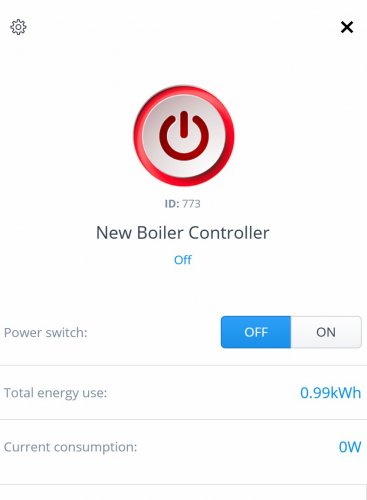
I am not a Lua Programmer but have made this Quick App for my own use and thought I would share with the community.
I am using a Secure / Horsman Boiler Controller
This is based on Zones and has the option to exclude Zones
I have been using this for several months now and it is working well in the house
It is written as Object Programming so should easily be read and edited by most familiar with LUA and Fibaro
I would love some support in modifying this and refining it, especially around boiler on time.
148 downloads
(0 reviews)0 comments
Submitted
-
LOQED Touch Smart Lock QuickApp for Yubii Home, FIBARO Home Center 3, zooz Z-Box
By tinman
What features does the LOQED Touch Smart Lock offer with Fibaro?
The LOQED Touch Smart Lock & Fibaro integration is done via the local bridge API.
Currently, the following functionalities are supported:
Send real-time status changes of the lock (open, unlock, lock) and battery, Wi-Fi, Bluetooth state to the Fibaro gateway. Battery level, if below 5%, will display om tje QuickApp as dead.
Receive commands from the Fibaro gateway to change the lock state (open, unlock, lock).
English, German and Dutch languagesupported (the QuickApp tkaes your local language setting). You can change the language by editting the QuickApp sourcecode yourself.
When using multiple LOQED locks, simply add extra QuickApp instance and setup with proper data.
Currently this QuickApp can’t decode json data POSTed by the bridge, as FIBARO/Yubii/elero/zooz API simply ignores any unknown data and accept only JSON key args:[{}]. Therefore, one can’t decode who opened/closed the LOQED via App (or if it was manually, with knob).
Security consideration: the LOQED bridge sends any status change (e.g. "the door was opened") to Fibaro over an unsecure HTTP connection in your Wi-Fi network, but with a digital signature. Fibaro uses the digital signature to ensure the status change is not sent by someone else than the LOQED Bridge (thus, to ensure that nobody can make the Fibaro device think the door opened, while in fact that was not the case). Only the HC3 (not the Yubii Home / HC3L) supports this. Note that this does not affect opening/locking the door, it is only concerns the status information.
Requirements
A supported gateway, such as:
Fibaro Home Center 3 (note that the Home Center 2 is not supported)
Fibaro Home Center 3 Lite
Yubii Home
elero Yubii Home
zooz Z-Box Hub
Installation
Step 1: create API key
Go to https://app.loqed.com/API-Config and log in with your LOQED app e-mail address and password (note that you will be logged out of the LOQED app). Click on the “API Configuration tool" button. Click the “Add new API key” button. Set any name and create the API key. It is normal the “Remove unlocking/locking checkbox is greyed out.
After the key is created, click on the "view / edit" button. Leave this screen open.
Step 2: install the Fibaro QuickApp
Login into your Fibaro gateway. If you have a Fibaro branded device, you should be able to go to http://find.fibaro.com/to find your gateway's IP address.
Download the QuickApp, go to "settings" -> "Devices" and click the plus-icon to add a new device. Next, find the device called "Upload file" and upload the Quick App file.
Step 3: Create a user on the Fibaro gateway
Create a local user on your gateway with permissions for the LOQED Quick App. Please do not use any special characters. This user is used to update the gateway of lock state changes as soon as they happen. While not recommended, you can also skip this step and user your administrator username and password (if they do not contain special characters).
Step 4: configure the Quick App
Click the variables tab.
Now, set the variables to the correct value. Each value can be find on https://app.loqed.com/API-Config.
Variable
Where to find the value
bridge_ip
LOQED API Config -> "Outgoing Webhooks via LOQED Bridge" -> "IP address"
bridge_auth_key
LOQED API Config -> "Outgoing Webhooks via LOQED Bridge" -> "Authentication Key (base64)"
key
LOQED API Config -> "API Keys (incoming webhooks)" -> "Key"
lock_id
LOQED API Config -> "API Keys (incoming webhooks)" -> "Lock ID"
You can also use any name you like, this is just to identify the lock.
local_key_id
LOQED API Config -> "API Keys (incoming webhooks)" -> "Local Key ID"
refresh_time (default 600)
How often (in seconds) the Quick App will poll for a lock status change. We recommend to keep this value low. It is actually only required to poll after the gateway boots, as any lock state change is directly sent to the gateway.
Battery and online status information is only received via polling, although the LOQED bridge does support sending it.
extra_errors (default 0)
Set to 1 to see HTTP information.
webhook_user
Use the username from step 3.
webhook_pass
Use the password from step 3.
Note: you have to delete this "secret" field, and then create it again, giving it again the name "webhook_pass".
home_center_ip
Set the IP address of your gateway here. Do not use a loopback IP (127.0.0.1), but the local network IP address.
use_webhooks (default 1)
When set to 1, all Quick App functions (related to webhooks) are enabled using the user/password you created. Set it to 0 if you wish to use loop / poll instead (see refresh_time above).
Step 5: create webhooks on LOQED bridge
The LOQED bridge can send any status change of the lock to your gateway as soon as they happen. For this, you need to set some URL's on the LOQED Bridge. There are two ways to do this:
If you have a Fibaro Home Center 3, you can do this by just clicking a button.
These buttons are not available on Home Center 3 Lite, Yubii Home nor Z-Box gateways, due to missing support for 53-bit floating point numbers in 32bit CPU LUA environment (as used by these gateways).
Otherwise, you have to do this manually.
Step 5a: create webhooks if you have Fibaro Home Center 3
Go to the "Edit & Preview" tab. Click the "Create Webhooks" button.
You can verify the action was successfull by going to https://app.loqed.com/API-Config --> "Outgoing Webhooks via LOQED Bridge" --> click the button "Add/delete webhooks". On that page, you should see multiple entries with an URL to your gateway.
Note: if you click by mistake multiple times on the button, don't worry, as the bridge will not create duplicate webhooks.
This QuickApp will generate only webhooks for "open", “latch”, “night lock” and “unknown” events, as these are normally sufficient for most users. Battery or online status events are polled every 10 minutes by default.
Step 5b: create webhooks manually (if you do not have a Fibaro Home Center 3)
Skip this step if you have done step 5a.
You need to create 4 webhooks on the LOQED Bridge to inform the gateway about the 4 different lock statuses.
Go to https://app.loqed.com/API-Config --> "Outgoing Webhooks via LOQED Bridge" --> click the button "Add/delete webhooks". On that page, add the following URLs:
http://gw_user:gw_password@gw_ip/api/devices/thisQAID/action/webhookNightLock (only for the night lock trigger)
http://gw_user:gw_password@gw_ip/api/devices/thisQAID/action/webhookDayLock (only for the latch trigger)
http://gw_user:gw_password@gw_ip/api/devices/thisQAID/action/webhookOpen (only for the open trigger)
http://gw_user:gw_password@gw_ip/api/devices/QAID/action/webhookUnknown (only for the unknown state trigger)
Above, "gw_user" and "gw_password" is your gateway's username and password created in step 3, "gw_ip" is the IP of the gateway, "QAID" is the device ID of the QuickApp, which can be found in the device list (see below image where it is 22)
Done
That's it! You can now control your LOQED Touch using Fibaro.
Questions?
If you have any questions regarding this QuickApp, comments or improvements requests,please send me PM
tinman
115 downloads
-
Onkyo 2021-06-23.fqa
By JeroenL
About This File
Onkyo QuickApp
INTRODUCTION
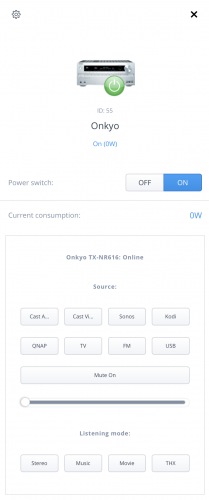
Onkyo has a range of network connected Audio/Video receivers that can be controlled via a network UTP connection. This QuickApp provides basic control of the A/V receiver.
Tested on an Onkyo TX-NR616.
QuickApp should be easy to adapt to other models if required.
This is my first QuickApp, any suggestion to make it better highly appreciated.
PREREQUISITES
Tested on Fibaro Home Center HC3L and Yubii Home with firmware 5.071.52
An Onkyo AV Receiver
FEATURES
Basic On/Off Volume Control Mute On/Off toggle switch 8 Input selectors, label can be customised using variables 4 Listening Modes On/off line status indicator
INSTALLATION
Please check provided User Manual.
Upload file in the device section.
AVAILABLE DOWNLOAD
Onkyo 2021-06-23.fqa Icons - found on the forum and slightly adapted
TERMS AND CONDITIONS
Permission to use, copy, modify and distribute this software and its documentation for educational, research, personal use and non-profit purposes, without fee and without a signed licensing agreement is hereby granted, provided that the copyright notice, with "Terms and conditions" and "Disclaimer" appear in all copies, modifications and distributions. It is strictly forbidden to sell, rent, lease and/or lend this software for profit without prior consent from the Author.
DISCLAIMER
This software is provided by copyright owner "as is" and any express or implied warranties, including, but not limited to, the implied warranties of merchantability and fitness for a particular purpose are disclaimed. In no event shall the author and distributor be liable for any direct, indirect, incidental, special, exemplary, or consequential damages (including, but not limited to, procurement of substitute goods or services; loss of use, data, or profits; or business interruption) however caused and on any theory of liability, whether in contract, strict liability, or tort (including negligence or otherwise) arising in any way out of the use of this software, even if advised of the possibility of such damage.
Fibar Group S.A. and their employees are not responsible for support of the ABC VD.
VERSION HISTORY
1.0.2 - First public release112 downloads
-
Memory QuickApp
I created this QuickApp when a user had a requirement. The user was not satisfied with just using his scenes. He wanted scenes to have memory. Say, he turned on a set of room lights and when he left the room, he switched them all OFF by a single click, when he came back, only those devices that he turned OFF previously must be activated. So he did not want a regular scene, instead a scene/quickapp with memory of the state of the room. This quickapp does that.
I made a video to explain how this quickapp works, what variables to be added etc. ⬇️
60 downloads
(0 reviews)0 comments
Submitted
-
Download Statistics
-
New reviews
-
 By Bornheim · PostedI integrated two HUE bridges in my HC3. It works perfect (and much better and more powerful then the app integrated in HC3). In particular, also sensors, temperature measures etc. are available and can be used in Scenes. However, in both cases after installing and entering the IP adress of my HUEs I had to restart the HC3 to get the authentification running. So I assume to install one has to (i) upload / install the QuickApp, (ii) enter the IP address of the HUE in the local LAN, (iii) rest
 -

-

-

-
 By Sankotronic · PostedVery useful solution to help with gradually moving from HC2 to HC3. I have tested few of the QA and used them to test some of my new solutions on HC3 keeping HC2 still having main controll of our house. Thank you @cag014 for yet another excellent solution!
 -

-

-

-
 By SmartHomeEddy · PostedGreat QuickApp and excellent configuration manual. QuickApp works smooth. Thanks!
 -

-
-
Highest Rated Submitters
No ratings this week.
No ratings this month.
No ratings this year.
-
1

-
2

-
3

-
4
-
5

-