Welcome to Smart Home Forum by FIBARO
Dear Guest,
as you can notice parts of Smart Home Forum by FIBARO is not available for you. You have to register in order to view all content and post in our community. Don't worry! Registration is a simple free process that requires minimal information for you to sign up. Become a part of of Smart Home Forum by FIBARO by creating an account.
As a member you can:
- Start new topics and reply to others
- Follow topics and users to get email updates
- Get your own profile page and make new friends
- Send personal messages
- ... and learn a lot about our system!
Regards,
Smart Home Forum by FIBARO Team
Search the Community
Showing results for tags 'autolights'.
Found 1 result
-
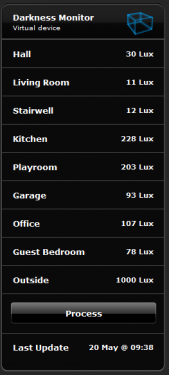
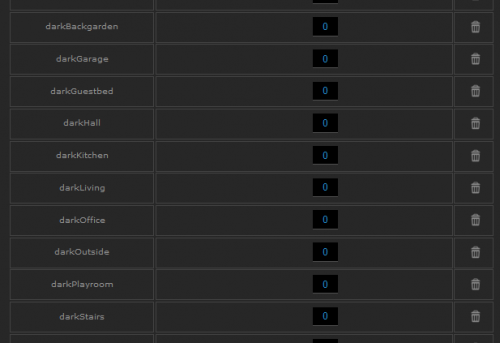
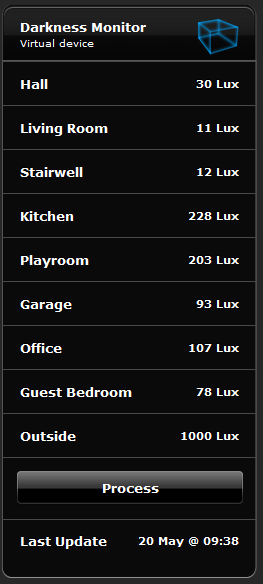
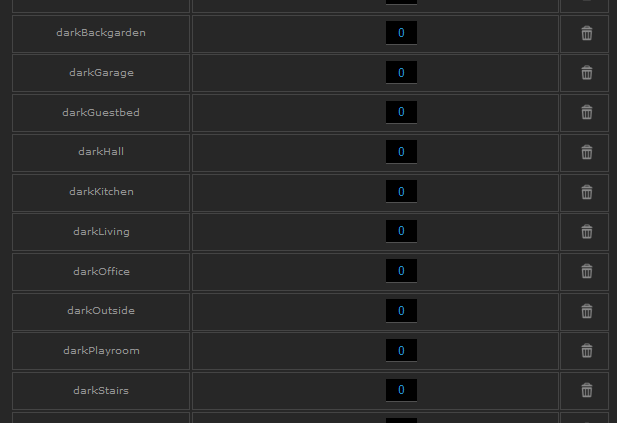
Hi, A while back somebody asked me to share my darkness monitor/autolights approach I use. (Sorry for the delay but I recently had to rebuild my system) I took this decentralised approach as some of my house is well lit and some slightly darker at given times of the day. It is nowhere near as powerful or flexible as @Sankotronic VSL (which is worth checking first) but if you are looking for something much more basic then this might give you some help. The solution is essentially 3 parts A VD to track light level in the different spaces and trigger off a defined light level (it used a Process/Update button and Main Scene executing it every 5 mins) A global variable (1 or 0) for each space you want to monitor .. darkHall, darkLiving, darkOutside, darkKitchen .. etc A scene (triggered from the global variable ) to turn on the light/lamp when the required light level is reached. PART 1 - Virtual Device - Darkness Monitor Each space I want to monitor has a label and a block of code in the Update button code -- Hall if tonumber(fibaro:getValue(jT.hall.Lux, "value")) < 40 then fibaro:setGlobal("darkHall", 1) fibaro:call(thisId, "setProperty", "ui.hall.value", "Dark") else fibaro:setGlobal("darkHall", 0) fibaro:call(thisId, "setProperty", "ui.hall.value", fibaro:getValue(jT.hall.Lux, "value").." Lux") end My full darkness monitor VD looks like this... My MainScene entry is as follows It's the 5th entry in the list below. -- REPEATING VIRTUAL DEVICE SETUP ---------------------------------------- local runVDRepeatID = {jT.vd.HC2Monitor, jT.vd.houseClimate, jT.vd.RackTempControl, jT.vd.humidityCtrl, jT.vd.DarknessMonitor, jT.vd.AlarmClock}; local runVDRepeatButton = {5, 23, 12, 4, 10, 12}; local runVDRepeatTime = {11, 15, 2, 4, 5, 6}; local runVDRepeatPushFlag = {0, 0, 0, 0, 0, 0}; local runVDRepeatPushMessage = {"", "", "", "", "", ""}; local runVDRepeatCount = {count, count, count, count, count, count}; local runVDAtStart = {"Yes", "Yes", "Yes", "Yes", "Yes", "Yes"}; I'll share the VD at the end of the post PART 2 - Global Variables I decided to one per space and not a table as I wanted to trigger the scene from the global variable change. PART 3 - Auto Lights scenes I use one scene per space/device you want to trigger I use a couple of types so I'll share a few examples I also send a message using the message hub when triggered on as well as using sleepstate. I also use HomeTable for my id's so replace with device ID's but it makes it a bit more readable Delete what you don't need .. Hall - simple one, switch on lamp ( I also track sleepstate for this one ) --[[ %% autostart %% properties %% events %% globals darkHall SleepState --]] -- SCENE HALL LAMP -- Modified May 11th if (fibaro:countScenes()>2) then fibaro:abort() end local jT = json.decode(fibaro:getGlobalValue("HomeTable")) local sleepState = "SleepState"; local sleepStateMapping = {Sleep="Sleep", Awake="Awake"}; function main() if tonumber(fibaro:getGlobalValue("darkHall")) == 1 and fibaro:getGlobalValue(sleepState) == sleepStateMapping.Awake then fibaro:call(jT.hall.Lamp, "turnOn") fibaro:startScene(jT.sc.SMsgH, {"Hall Lamp turned on", "pushover", "", "SCENE: A-Light Hall"}) else fibaro:call(jT.hall.Lamp, "turnOff") end end main() Living Room - check other lights and also check is lamp is on --[[ %% properties %% events %% globals darkLiving --]] -- SCENE Living Room Lights -- Modified May 13th if (fibaro:countScenes()>2) then fibaro:abort() end local jT = json.decode(fibaro:getGlobalValue("HomeTable")) function main() if tonumber(fibaro:getGlobalValue("darkLiving")) == 1 then if (fibaro:getValue(jT.living_room.Light, "value") == "0") and (fibaro:getValue(jT.living_room.Lamp, "value") == "0") and (fibaro:getValue(jT.living_room.libraryLight, "value") == "0") then fibaro:call(jT.living_room.Lamp, "turnOn") fibaro:startScene(jT.sc.SMsgH, {"Living Room Light turned on", "pushover", "", "SCENE: A-Light Living Room"}) end end end main() Kitchen - same as Living room but this is also motion triggered --[[ %% autostart %% properties %% events %% globals darkStairs darkOffice darkGuestbed --]] -- AUTO LIGHTS STAIRS scene -- Main Scene scheduler - runs every 2 mins local jT = json.decode(fibaro:getGlobalValue("HomeTable")) if (fibaro:countScenes()>2) then fibaro:abort() end function main() if tonumber(fibaro:getValue(jT.office.Lux, "value")) < 10 and tonumber(fibaro:getValue(jT.guest_bedroom.Lux, "value")) < 10 and tonumber(fibaro:getValue(jT.Landing_Stairs.Lux, "value")) < 10 then if tonumber(fibaro:getValue(jT.Landing_Stairs.stairsLight, "value")) == 0 then fibaro:call(jT.Landing_Stairs.stairsLight, "setValue", "30") fibaro:startScene(jT.sc.SMsgH, {"Landing Light set to 30", "pushover", "", "Scene: AutoLight Stairs "}) --fibaro:startScene(jT.sc.kidsToBed) end else if tonumber(fibaro:getValue(jT.Landing_Stairs.stairsLight, "value")) >= 30 then fibaro:call(jT.Landing_Stairs.stairsLight, "turnOff") fibaro:startScene(jT.sc.SMsgH, {"Landing Light turned off", "pushover", "", "Scene: AutoLight Stairs"}) end end end main() Stairwell Light - Our stairwell doesn't have a window so I check three light levels and determine from that. --[[ %% autostart %% properties %% events %% globals darkStairs darkOffice darkGuestbed --]] -- AUTO LIGHTS STAIRS scene -- Main Scene scheduler - runs every 2 mins local jT = json.decode(fibaro:getGlobalValue("HomeTable")) if (fibaro:countScenes()>2) then fibaro:abort() end function main() if tonumber(fibaro:getValue(jT.office.Lux, "value")) < 10 and tonumber(fibaro:getValue(jT.guest_bedroom.Lux, "value")) < 10 and tonumber(fibaro:getValue(jT.Landing_Stairs.Lux, "value")) < 10 then if tonumber(fibaro:getValue(jT.Landing_Stairs.stairsLight, "value")) == 0 then fibaro:call(jT.Landing_Stairs.stairsLight, "setValue", "30") fibaro:startScene(jT.sc.SMsgH, {"Landing Light set to 30", "pushover", "", "Scene: AutoLight Stairs "}) --fibaro:startScene(jT.sc.kidsToBed) end else if tonumber(fibaro:getValue(jT.Landing_Stairs.stairsLight, "value")) >= 30 then fibaro:call(jT.Landing_Stairs.stairsLight, "turnOff") fibaro:startScene(jT.sc.SMsgH, {"Landing Light turned off", "pushover", "", "Scene: AutoLight Stairs"}) end end end main() I use the following icons as well depending on what is triggering the light/lamp VD code attached - Darkness_Monitor.vfib Enjoy _f