
Welcome to Smart Home Forum by FIBARO
Dear Guest,
as you can notice parts of Smart Home Forum by FIBARO is not available for you. You have to register in order to view all content and post in our community. Don't worry! Registration is a simple free process that requires minimal information for you to sign up. Become a part of of Smart Home Forum by FIBARO by creating an account.
As a member you can:
- Start new topics and reply to others
- Follow topics and users to get email updates
- Get your own profile page and make new friends
- Send personal messages
- ... and learn a lot about our system!
Regards,
Smart Home Forum by FIBARO Team
- 0

Question
Kvoet 0
Hello,
First my apologies if this has been discussed elsewhere but I couldn't find any posts with the same question.
As the title says, I'm trying to configure the fob to close my roller shutters from any state (fully or partially open) with double tapping a button but this won't work.
I'm wondering if this has to do with the scenes I've already created? Both opening and stopping works, just not the double tap to close. I'm hoping that someone can tell me what I'm doing wrong?
I've configured the buttons like this:
1x to open roller shutter
Please login or register to see this image.
/monthly_2024_11/image.png.611e1df5b61e05a025fa7f086b100e27.png" />Held stop roller shutter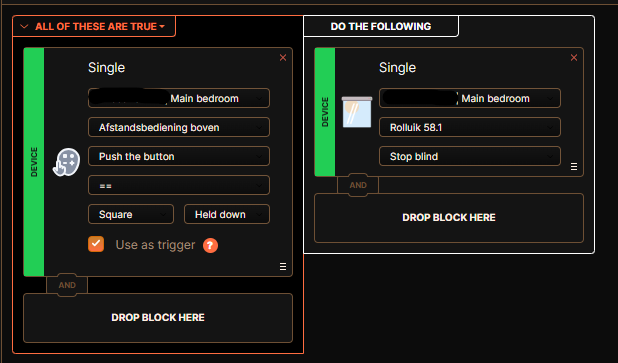
2x close roller shutter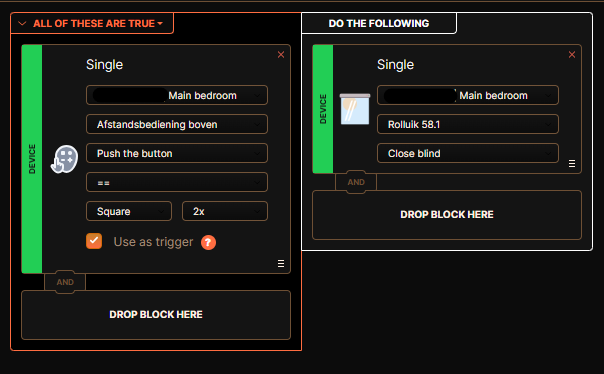
Thanks in advance.
Kevin
2 answers to this question
Recommended Posts
Join the conversation
You can post now and register later. If you have an account, sign in now to post with your account.