


About This File
Initially it was supposed to be a simple Sleep Timer, similar to what we have in TV but later I added some new functions and now it is a simple Scheduler and Sleep Timer in one VD.
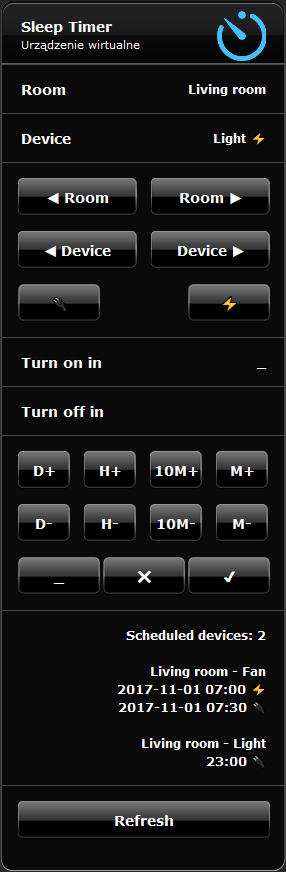
Features:
- Sleep Timer - just set the time after which the device will be turned off or turned on
- Scheduler - set the time when the the device should be turned on and the time when the the device should be turned off (or in the reverse order - first turn off and then turn on)
- Filtering devices - you can choose only devices with turnOff action attribute
- Filtering rooms - you can choose only rooms which have devices with turnOff action attribute
- _ - change on/off setting time
- ✔ - add device to schedule
- ❌ - remove device from schedule; triple click to clear the schedule
- Refresh button - you don't need to touch it. It's called programmatically
- Displaying the current schedule
- Logging the events to debug window: add, remove, turn on, turn off
- automatic support for plugins with turnOff action attribute
- support for custom virtual devices and plugins
- instant turn on/off (VD and plugins also)
- presenting the current device state ( ⚡ when the device is on, and - when is off)
Customization:
- change the VD labels to your own language
- change the texts in the Refresh button code and in the main code:
local lT = {
  newLine = "<br/>", -- change to "\n" if you use this VD on iOS mobile mainly or " " for Android
  scheduledDevices = "Scheduled devices"
}
Actually there is a problem with breaking lines in labels, so you can choose new line char. More details here.
-
add your own virtual devices or plugins in main loop code:
local extraDevices = {
-- deviceId,    commandOn,      parameterOn,  commandOff,     parameterOff
  ["335"] =  {  "pressButton",  "2",          "pressButton",  "3"  },
  ["339"] =  {  "setVolume",    "20",         "setMute",      ""   },
}
icons:

.png.a2a23e9ebe1a01b9def7d1e66fbb88b5.png)
.png.a0cf4cf3a0312abdf94c29c8d415d7a8.png)
.png.caadc2e516cde688b414dc3bd9120171.png)
.png.69a65d044c58e16e880c171e48ea72de.png)

Enjoy...
What's New in Version 1.4 See changelog
Released
VERSION HISTORY:
- 2017-10-09: v. 1.0 - first release
- 2017-10-11: v. 1.1 - changed device filtering. Instead of power interface now is checked turnOff action attribute. Thanks @tampiss for helping to find the correct filter.
- 2017-10-16: v. 1.1a - bug fix for the "Room ▶" button. It was checking power interface instead of turnOff action attribute. Thanks @Figlio for finding the bug.
- 2017-10-18: v. 1.2 - plugins and VD support. Thanks @petr23 for idea and your code.
- 2017-10-25: v. 1.3 - instant turn on/off buttons. Thanks @campos for good idea.
- 2017-10-31: v. 1.4 - changed layout and button icons. Removed 2 rows to save some space. Thanks @Bodyart for good design.



Recommended Comments
Join the conversation
You can post now and register later. If you have an account, sign in now to post with your account.