Welcome to Smart Home Forum by FIBARO
Dear Guest,
as you can notice parts of Smart Home Forum by FIBARO is not available for you. You have to register in order to view all content and post in our community. Don't worry! Registration is a simple free process that requires minimal information for you to sign up. Become a part of of Smart Home Forum by FIBARO by creating an account.
As a member you can:
- Start new topics and reply to others
- Follow topics and users to get email updates
- Get your own profile page and make new friends
- Send personal messages
- ... and learn a lot about our system!
Regards,
Smart Home Forum by FIBARO Team
All Activity
- Today
-

Roller shutter controller - slats angle error over time
mneek replied to mneek's question in Scenes and Interface
Okay, then maybe the issue is that I never actually open the blinds, just rotate the slates. If I understand correctly, my scene should work perfectly if I just open the blinds for 1% (or 10%) and close it again - following by setting the slats angle, like already in my scenes. So in a few weeks, when I notice the error again, I will try to open the blinds a bit before closing and I hope it will work as it should. -

Roller shutter controller - slats angle error over time
m.roszak replied to mneek's question in Scenes and Interface
In theory full close shoud hit the end limit switch, slats returs back to previous position but staring from absolute 0% - so this should handle the synchro anyway. Maybe for some reason Close is not hitting the limit switch but this would be strange. -
Roller shutter controller - slats angle error over time
mneek replied to mneek's question in Scenes and Interface
Hm, I just tried with a scene and closed position is not enough - it does lower the blinds to 0%, but the slats open back to the angle before lowering the blinds, so I have to add the slats angle if I want to keep them fully closed. And I also reach full bottom position daily with my scene, but I think this bottom position is based on timing and not on limit switch/actual bottom. I would need the scene to close the blinds -> set the slats angle to 0° -> after hitting 0° hold the signal for 1 second, this would make sure it is really limit switch stopping the blinds and are fully closed. -
Roller shutter controller - slats angle error over time
m.roszak replied to mneek's question in Scenes and Interface
Just Close action will allign that, regarless of the next slats control position. As the bottom position (end limit switch) means closed shutter and the slats - this is the moment motor has absolute position 0, any position change from that moment between end limit switches will work on timing. So reaching full bottom position from time to time will be enough. -
Roller shutter controller - slats angle error over time
mneek replied to mneek's question in Scenes and Interface
So I understand opening/closing and slats angle as two different settings. Therefore my scenes first close the blinds (in case they are open more than e.g. 30%) and then set slats angle to 0°. Is this the correct way? -
Roller shutter controller - slats angle error over time
m.roszak replied to mneek's question in Scenes and Interface
Full closure will guaratnee the sychronisation, so hitting bottom limit switch (or upper should also work). So upening the whole blind just a bit and then closing it fully should allign that. -
Hi @tinman, I am also interested by your QA as I just bought / start to use Ecowitt with HP 2561. Thanks in advance for your support. With BR, Dan
-
 mholje joined the community
 -
Roller shutter controller - slats angle error over time
mneek replied to mneek's question in Scenes and Interface
I understand the error comes from timing. I often angle them just 30° so yes, with fully opening the error would not be that visible. Blinds should be stopped with physical switch on the motor instead of when reaching the 0°, that would be the best solution if possible (and this is what I do when I correct the slats angle rotation time). But I can try with that 10% opening next time. -
Roller shutter controller - slats angle error over time
m.roszak replied to mneek's question in Scenes and Interface
Shutters will correct slats angle staring point after normal movement of the shutter, its one motor controlling both angle and position. If you just move the shutter up and down the error will be compensated, there is no way of keeping the timing correct for the whole device life (speed changes depending on the temperature, dust and a lot of other factors during lifecycle). Maybe just make a scene which will open them up to 10% and close again fully once in a week and thats that. - Yesterday
-
Roller shutter controller - slats angle error over time
mneek posted a question in Scenes and Interface
Hi, mostly I am just tilting venetian blinds 0° -> 90° and 90° -> 0° instead of opening them. Over time it happens, I believe due to the small errors in timing, that the slats angle is not correct anymore. Usually I notice it, when the slats do not close completely anymore and this can take from a few weeks to a couple of months to be noticeable. Then I have to go to the device settings, correct the slats angle rotation to minimum and rotate them to "90°", then set the correct time and close it to 0° and it is fine again for a few weeks. Can I somehow do that with a scene, maybe some delay to not look for an angle but for a set time? Ideally, every time the slats go to 0°. -
 TadeuszP joined the community
 -
Try this and you will see the start order - it's always the same - as listed in UI. Whatever you do. If one need order of --%%file appearance in plua you need: 1) upload application (no start order guaranteed) 2) set --%%project to uploaded ID 3) run in plua and stop 4) update application (now, you can expect the same order as file directives). There's no fix of plua necessary - there is a solution only little longer. test_order.fqa
-
Well, we know nothing certain about the module loading order, and even less about the order in which QuickApps start. My impression is that whichever one manages to push its way through first is the one that starts first. Is that why you didn’t implement ER a client–server application? It’s a different topic, but I couldn’t resist asking after my recent "server-side experiences". Your request from six years ago didn’t attract any interest. My SVG proposal – which significantly improves the quality of communication with the user in a simple way – attracted four interested people...
-
 Ryba1980 joined the community
 -
Dear Jan, Enjoy the holidays... no screen for a couple of weeks sounds good. Upgraded to 0.49 and tried above, still got some errors on the reboot, no rush, posting it, as I just looked into it. Node-red work & temperature was error from my side, accidently created a table in my HomeTable. Thanks & "See you" end of Aug / early Sept [27.07.2026] [10:07:00] [DEBUG] [QUICKAPP859]: Restart HC3 [27.07.2026] [10:07:00] [ERROR] [QUICKAPP859]: ❌ RULE4: Undefined variable: 'hc3api' hc3api.post('/service/reboot',{recovery=false}) ^^^^^^ src: @10:07 & wday('mon') => _creds = fibaro.basicAuthorization('admin','password'); log('#C:red#Restart HC3'); hc3api.post('/service/reboot',{recovery=false}) [27.07.2026] [10:07:00] [ERROR] [QUICKAPP859]: ❌ RULE4: Disabled src: @10:07 & wday('mon') => _creds = fibaro.basicAuthorization('admin','password'); log('#C:red#Restart HC3'); hc3api.post('/service/reboot',{recovery=false})
-
 Sharky47 joined the community
 -
Yes, it looks like the installation is broken. It trying to load dkjson.lua instead of plus's own builtin json lib is a bad sign. Google "force an install with scoop ?" and follow the guidance from the AI answer...
-
I'm on vacation and will not be coding again until second week in August...
- 400 replies
-
- 1
-

-
- rule engine
- automation
- (and 4 more)
-
It used to be a bit random. It may be that after they fixed the QA file load bug some time ago that the order has become more predictable. However, if that was the case I would assume that they had a way to allow us to reorder the files in the edit UI ? ER7 uses a module system where each module sets a priority. < 0 loads before main code runs and > 0 loads after. There are many ways to solve it. As I proposed in the post 6 years ago we could agree about a model to make it easier to use each others modules, but there were no believers at that time.
- Last week
-
 Igor Basic joined the community
 -
If I'm wrong with my opinion, I think the load manager should be very easy to write. File ONE (file order - no matters): MODULES = MODULES or {} MODULES.database = function() --whole content of the module, even thousands of lines -- like: Database = {} local cache = {} function Database.read(id) return cache[id] end function Database.write(id, value) cache[id] = value end end File TWO (file order - no matters): MODULES = MODULES or {} MODULES.compiler = function() -- whole compiler content -- functions, locals end ...and all other files of the project. Finally, load manager: MODULES = MODULES or {} local loadOrder = { "database", "compiler", -- and more components in desired order } function QuickApp:onInit() for _, name in ipairs(loadOrder) do local loader = MODULES[name] if not loader then error("Missing module: " .. name) end print("Loading module: " .. name) loader() end MODULES = nil -- and more code of project end This ensures controlled order of loading. Name scooping behaves practically the same as not function-enclosed. * One trap: in each module do not forget final end
-
I think we can assume that the files are launched in the same order in which they appear in the box interface. And what I described above seems to happen repeatedly.
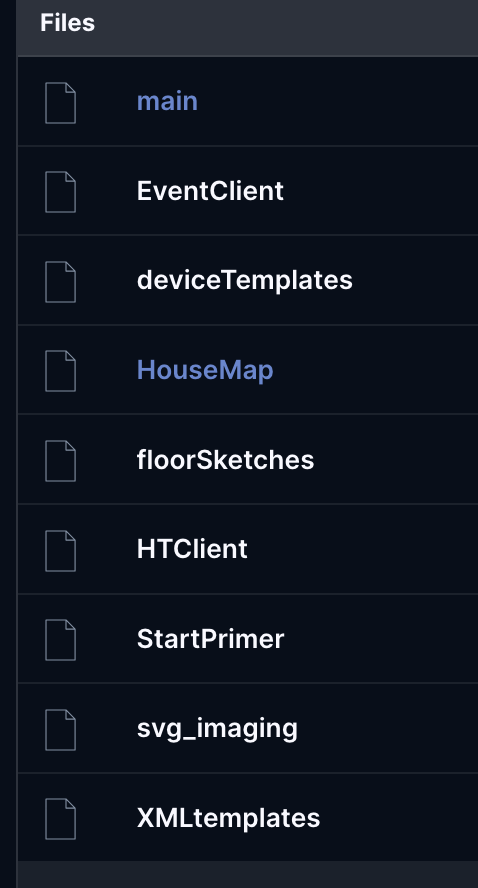
-
You can’t rely on the load order of QA files on the HC3. The only given is that :onInit() is called after all files are loaded.
-
Good morning, I’ve encountered some unexpected behavior in PLUA. Is this a bug? In my opinion, it would be worth fixing. When selecting Run Task/upload current file as QA, if the file contains --%%file=... directives, the files are not loaded into the QA in the same order as the --%%file directives. This can matter. In my case, it did. However, if a project file is created first, which, to my knowledge, essentially means starting a debugger session, and then Run Task/update QA is selected, the files are loaded in the same order as the file directives.
-
 Proktor37 joined the community
 -
In fact, I think that something went wrong during the last update as when launching a old QA code which was perfectly working before, I am getting the following message: Process started Detected host IP: 192.168.1.34 ╭──────────────────────────────────────────────────────────────────────────────╮ │ Python:3.14.2, Lua:5.4 │ │ API:8080 │ ╰──────────────────────────────────────────────────────────────────────────────╯ Fibaro SDK, offline, (0.3965s) no field package.preload['dkjson'] no file 'C:/Users/bruvi/scoop/apps/python/current/Lib/site-packages/lua/dkjson.lua' no file 'C:\Users\bruvi\scoop\apps\python\current\dkjson\init.lua' no file 'C:\Users\bruvi\scoop\apps\python\current\..\share\lua\5.4\dkjson.lua' no file 'C:\Users\bruvi\scoop\apps\python\current\..\share\lua\5.4\dkjson\init.lua' no file '.\dkjson.lua' no file '.\dkjson\init.lua' no file 'C:\Users\bruvi\scoop\apps\lua\current\bin' [C]: in function 'require' [C]: in function 'xpcall' [string "<python>"]:1: in main chunk I tried to reinstall plua and I am getting at then end of the TERMINAL log: ... Requirement already satisfied: colorama in C:\Users\bruvi\scoop\apps\python\current\Lib\site-packages (from click>=7.0->uvicorn>=0.30.0->uvicorn[standard]>=0.30.0->plua) (0.4.6) Requirement already satisfied: colorama in C:\Users\bruvi\scoop\apps\python\current\Lib\site-packages (from click>=7.0->uvicorn>=0.30.0->uvicorn[standard]>=0.30.0->plua) (0.4.6) Requirement already satisfied: colorama in C:\Users\bruvi\scoop\apps\python\current\Lib\site-packages (from click>=7.0->uvicorn>=0.30.0->uvicorn[standard]>=0.30.0->plua) (0.4.6) Requirement already satisfied: httptools>=0.6.3 in C:\Users\bruvi\scoop\apps\python\current\Lib\site-packages (from uvicorn[standard]>=0.30.0->plua) (0.7.1) Requirement already satisfied: python-dotenv>=0.13 in C:\Users\bruvi\scoop\apps\python\current\Lib\site-packages (from uvicorn[standard]>=0.30.0->plua) (1.2.1) Requirement already satisfied: pyyaml>=5.1 in C:\Users\bruvi\scoop\apps\python\current\Lib\site-packages (from uvicorn[standard]>=0.30.0->plua) (6.0.3) Requirement already satisfied: watchfiles>=0.13 in C:\Users\bruvi\scoop\apps\python\current\Lib\site-packages (from uvicorn[standard]>=0.30.0->plua) (1.1.1) WARNING: Ignoring invalid distribution ~lua (C:\Users\bruvi\scoop\apps\python\current\Lib\site-packages) WARNING: Ignoring invalid distribution ~lua (C:\Users\bruvi\scoop\apps\python\current\Lib\site-packages) Do I have to reinstall everything using scoop?
-
hi @jgab, I just started a new QA for controlling a new High Loal module from Nice, id 818 and I am getting the following error when using fibaro.getValue(818;"name") or api.get("/devices/818"): Process started Detected host IP: 192.168.1.34 ╭──────────────────────────────────────────────────────────────────────────────╮ │ Python:3.14.2, Lua:5.4 │ │ API:8080 │ ╰──────────────────────────────────────────────────────────────────────────────╯ Fibaro SDK, online, (0.7574s) [C]: in upvalue 'original_error' [C]: in function 'xpcall' [string "<python>"]:1: in main chunk This is the first time I get this... F5 was with "Plua Run Current Fibaro File with Debugger" As the line print("sunSet at",fibaro.getValue(1, "sunsetHour")) is working now, I need to check if my request has the correct format... I have corrected the format of my requests and it is working now but I wonder why I did not get previous error message with line number where the error occurs.
-
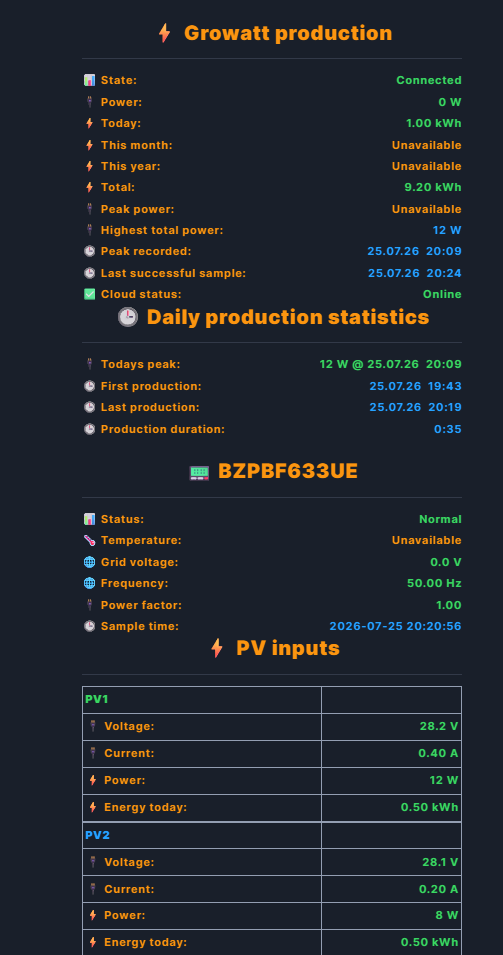
Download v1.1.0: 802.Growatt_v4.fqa QUICKAPP RELEASE | v1.1.0 802.Growatt v4 Growatt Open API v4 monitor and control for Fibaro HC3 Marketplace: https://marketplace.fibaro.com/items/802-growatt-api-v4 I'd like to share 802.Growatt v4, a QuickApp for Fibaro HC3 that discovers and monitors every inverter in a Growatt plant through the official Growatt Open API v4, and optionally lets you control them. What it does Discovers every inverter serial and exact device type in your Growatt plant/account, optionally filtered to one Plant ID. Retrieves Growatt basic device information after discovery, no more than once every five minutes. Displays a friendly name using a non-empty alias that differs from the serial, then treeName, model information, manufacturer, location, and finally the serial number. Continues using the serial number internally for API requests, stable child identifiers, inverter selection, and controls. Polls current power, today/month/year/lifetime energy, and PV1/PV2 details when supplied by the API. Creates stable standard meter children for Power, Energy Today, Total Energy, and available PV1/PV2 inputs. Sums current power and energy across all discovered inverters in the parent QuickApp. Offers guarded Inverter On/Off, active-power limit, and VPP target controls. Every action requires a continuous three-second hold and is verified by reading the setting back. Validates the Growatt HTTPS server certificate for every API request. Uses PollSeconds in daylight and a slower interval between HC3 sunset and sunrise, changing precisely at the boundary. Tracks daily peak power, first/last production, duration, rolling completed-day history, and highest combined AC output. Supports an optional EventLib fire-alarm Force ON/Force OFF action. Supports Classic HTML cards and New physical-label rows; Change View requires a five-second hold. Restores same-plugin configuration and API token backup after reinstall. The token returns to QA internal storage, not the visible ApiToken variable. Requirements Fibaro HC3 with internet access to the Growatt Open API. Growatt-issued Open API token entered once in ApiToken. PollSeconds between 60 and 3600 seconds; default 300. Growatt inverter. Tested with Neo 800. Setup Install the QuickApp, fill in ApiToken, optionally set PlantId or DeviceSn, and enable it. Discovery, child creation, friendly-name lookup, and view rendering are automatic. Keeping it up to date The QuickApp integrates with jgab's QA Dist Manager, which is detected automatically by its permanent quickAppUuid. Install QA Dist Manager once on the HC3. Use Check Update to check without installing. Enable Auto Update to install at AutoUpdateTime, default 03:33. Use Update Now when you want the available release immediately. If QA Dist Manager is not installed, the Updates section reports it as unavailable and skips update checks. Everything else keeps working normally. Links Marketplace: https://marketplace.fibaro.com/items/802-growatt-api-v4 Forum post: https://forum.fibaro.com/topic/80222-802growatt-v4/ Source code: https://github.com/Brors94/802.Growatt-v4 QA Dist Manager: https://forum.fibaro.com/topic/80052-qa-dist-manager/ Full technical documentation, API endpoints, configuration, security notes, and behavior details are included in the bundled README. Feedback, bug reports, and feature suggestions are welcome. Changelog v1.1.0 - 28 July 2026 Resolves and displays the Growatt plant name through the plant-list endpoint, with a safe fallback when no usable name is returned. Prevents tables, functions, userdata, and threads from leaking into user-facing API text. Sends inverter fault notifications only for nonzero fault or warning codes; connectivity remains handled by failed-poll and offline logic. Adds a globe for Follow Home Center Language and country flags for English, Norwegian, Dutch, and Polish. Shows the active-language flag below the Classic-view Language title as a centered 90 by 60 pixel HC3-compatible SVG data image; New view uses the Unicode fallback. Validates HTTPS certificates and keeps inverter serial numbers as stable internal identifiers while displaying friendly inverter labels when available. Support continued development If you find this QuickApp useful, donations are appreciated. Contributions help cover AI token usage while developing, testing, and improving this and future QuickApps. Donate through PayPal: https://www.paypal.com/donate/?hosted_button_id=VUADCH6HQCYM2 Disclaimer This is an independent, community-made QuickApp. It is not affiliated with, endorsed by, or supported by Growatt, Shine, or any subsidiary. Growatt and related names/trademarks belong to their respective owners. Use of the Growatt Open API is subject to Growatt terms and account permissions. Thanks for reading! 802.Growatt_v4.fqa

-
- 4
-
-
I agree, zigbee is not always stable - hopefully NICE will go finally to Alpha (not Beta)
-

SONOFF SWV / ZigBee valve reliability
Vitruv posted a question in Other Devices / Third-party devices
Hi, I run a SONOFF SWV (ID 260, battery-powered) for garden irrigation on Yubii Home Pro 5.210.12. Three months flawless — then two problems: Problem 1 — hub.call() fire-and-forget: After a command flood (watchdog sending turnOff 50x in 1h — my own bug), the valve stopped accepting any remote commands. Physical button and status messages still worked. Fix: batteries out for minimum 5 minutes (60 seconds not enough). Question: Has anyone found a way to make hub.call() more reliable for ZigBee battery devices? I now send turnOff 3x with 2s gaps — any better approaches? Problem 2 — Device parameters: The device JSON shows autoOffDefaultTime: 900 but the Auto-off toggle in Yubii is greyed out for this device. When the valve is open and I manually enable Auto-off, it works — but resets to off after the valve closes. Question: Is there any way to set device parameters like autoOffDefaultTime permanently via Lua (hub.call or API)? The device supports it — Yubii just won't let me activate it persistently. Setup: Yubii Home Pro 5.210.12 · SONOFF SWV · ZigBee · battery-powered