Welcome to Smart Home Forum by FIBARO
Dear Guest,
as you can notice parts of Smart Home Forum by FIBARO is not available for you. You have to register in order to view all content and post in our community. Don't worry! Registration is a simple free process that requires minimal information for you to sign up. Become a part of of Smart Home Forum by FIBARO by creating an account.
As a member you can:
- Start new topics and reply to others
- Follow topics and users to get email updates
- Get your own profile page and make new friends
- Send personal messages
- ... and learn a lot about our system!
Regards,
Smart Home Forum by FIBARO Team
Search the Community
Showing results for tags 'cag01'.
Found 1 result
-
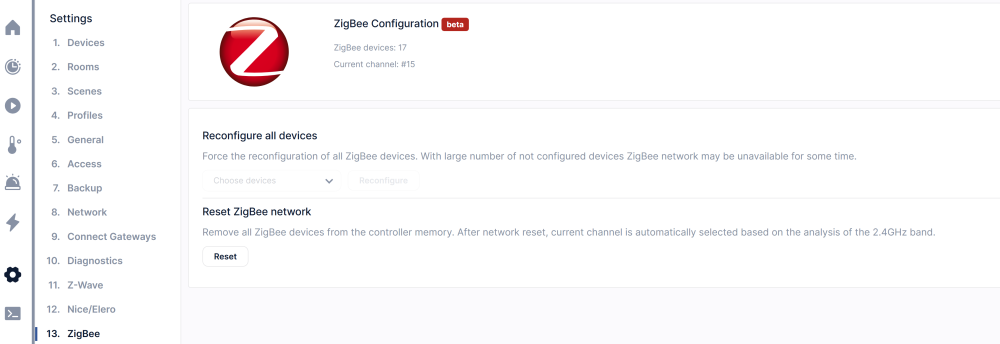
I see that many users have a problem with ZigBee, frequently all devices showed disconnected and don't work anymore. If "standard" actions (like disconnecting/reconnecting power, reloading latest backup) don't help, here some steps that could help to recover and no need to reinclude all devices again. 1. Reset Zigbee Network 2. Include any ZIgBee device that in use in your system to initiate ZigBee network. Wait about 2 minutes and verify that included ZigBee device is working properly. Don't worry it will work later with the original ID, no need to change any code 3. reboot the system with your latest working backup 4. At the beginning you might see that all ZigBee devices are still disconnecting. Please wait several minutes till the system will stabilize ZigBee communication (could take up to 10 minutes) Now all ZigBee devices should work properly as before. This procedure helped me to recover at least 7 times. In some cases, just one (or more, but not all of them) ZigBee device become unstable, meaning takes time to turn ON/OFF and frequently shown as disconnected. I suggest solving the problem as following: 1. Create a backup 2. Reinclude the device 3. Reload saved backup The device should work using his original ID. No need to change scenes or code. Hope it helps