Welcome to Smart Home Forum by FIBARO
Dear Guest,
as you can notice parts of Smart Home Forum by FIBARO is not available for you. You have to register in order to view all content and post in our community. Don't worry! Registration is a simple free process that requires minimal information for you to sign up. Become a part of of Smart Home Forum by FIBARO by creating an account.
As a member you can:
- Start new topics and reply to others
- Follow topics and users to get email updates
- Get your own profile page and make new friends
- Send personal messages
- ... and learn a lot about our system!
Regards,
Smart Home Forum by FIBARO Team
Search the Community
Showing results for tags 'zigbee'.
-
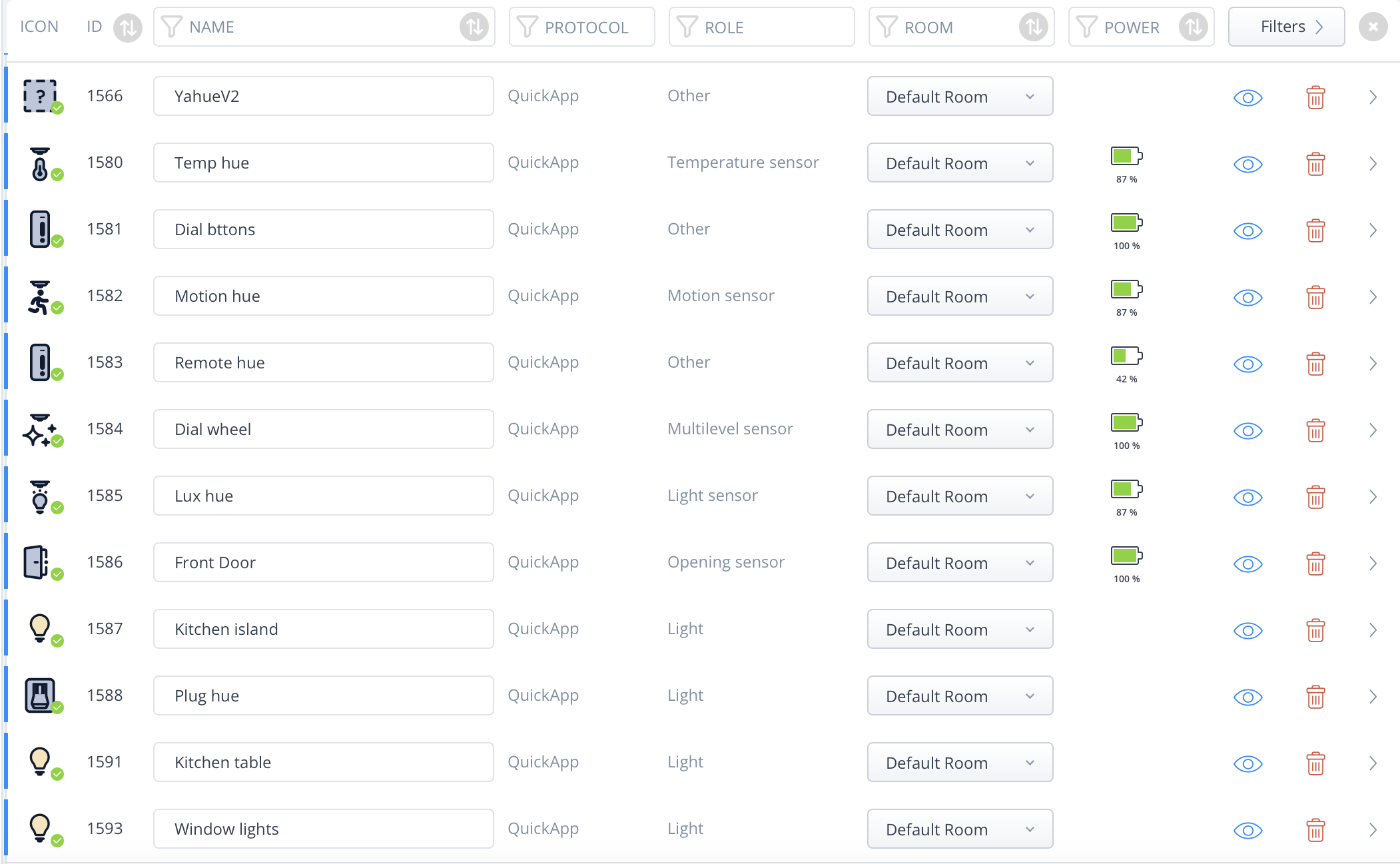
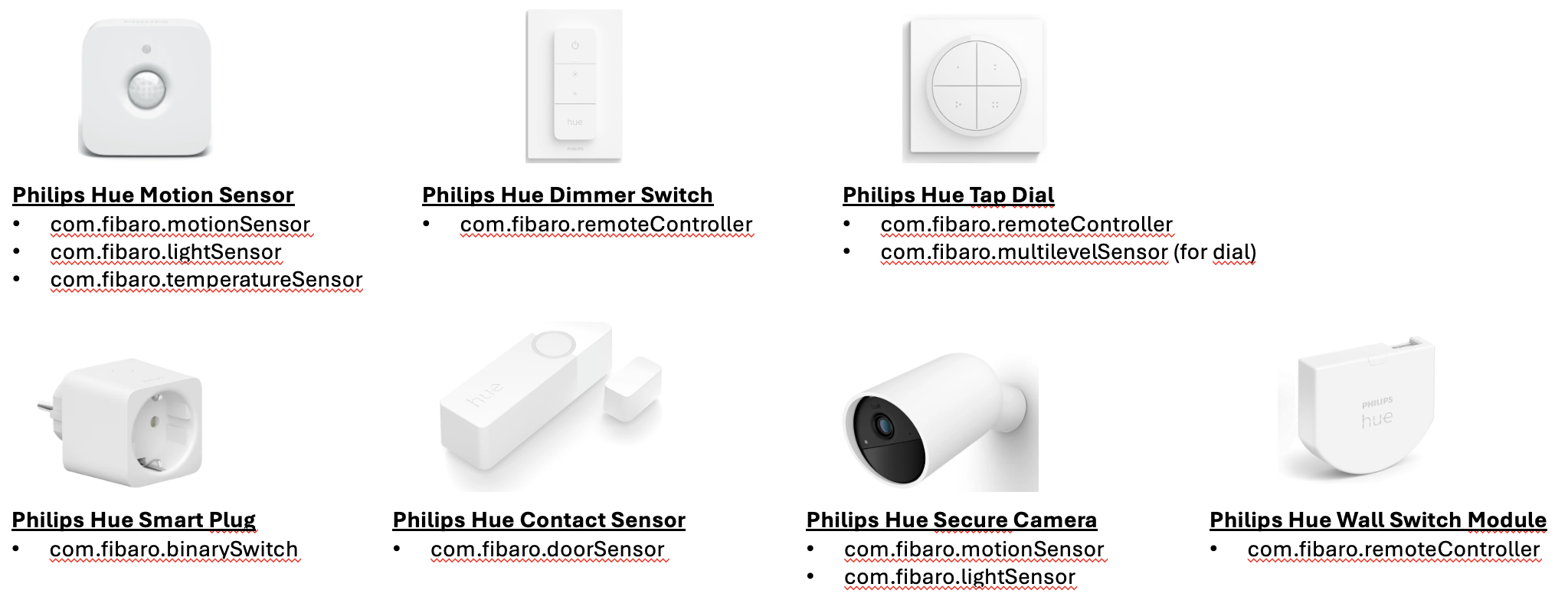
This is a new version of Yahue. We can't upgrade the old to this as some devices have changed types. Install and upgrade with QA Dist Manager Yahue — User Documentation Yahue is a Fibaro HC3 QuickApp that bridges the Philips Hue v2 API. It discovers all Hue devices and rooms on your bridge and lets you selectively expose them as native HC3 child devices — sensors, lights, switches, and room controllers — that work seamlessly with scenes, automations, and the Fibaro mobile app. Installation Prerequisites Fibaro HC3 with firmware supporting QuickApp child devices Philips Hue Bridge (v2, firmware ≥ 1.60) Installing the QuickApp The recommended way to install and keep Yahue up to date is the QA Dist Manager QuickApp. It can install Yahue directly from the GitHub releases and notify you of new versions. Manual install: Download dist/Yahue.fqa from the GitHub releases page On your HC3 go to Settings → QuickApps → Add QuickApp and upload the .fqa file Open the newly created QuickApp and set the Hue_IP QuickApp Variable to the IP address of your Hue bridge (e.g. 192.168.1.50) Save and restart the QuickApp On startup, if no application key is stored yet, the info label will show: Option A — Pair from the QuickApp panel (recommended) This is the easiest method and requires no tools. Make sure Hue_IP is set correctly and the QuickApp has been restarted Press Pair with bridge in the QuickApp panel The info label changes to "Press the button on your Hue bridge now…" Walk to your Hue bridge and press the physical link button within 30 seconds Yahue fetches the application key automatically, saves it to the Hue_User variable, and restarts itself Option B — Enter an existing key manually If you already have a Hue application key (e.g. from another app or from using the Hue developer debug tool): Open the QuickApp settings and set the Hue_User QuickApp Variable to your key Save and restart the QuickApp On startup the QuickApp connects to the bridge, discovers all devices and rooms, and populates the device selector. Selecting devices The QuickApp panel shows a multi-select list of every Hue resource that can be exposed as an HC3 child device. Each entry shows the device name and its type abbreviation in brackets. Tick the devices and rooms you want to create child devices for Press Apply selection The QuickApp restarts and creates (or removes) child devices to match your selection Child devices are persistent — they survive QuickApp restarts. You only need to use the selector when you want to add or remove devices. Device type mapping Yahue automatically picks the appropriate HC3 device type based on the Hue resource's capabilities. Sensors Hue capability HC3 type Notes Temperature service com.fibaro.temperatureSensor Reports °C Light / illuminance service com.fibaro.lightSensor Reports lux Motion service com.fibaro.motionSensor value = true when motion detected Contact report service com.fibaro.doorSensor value = true when open. Remappable — see below Button service com.fibaro.remoteController Emits centralSceneEvents (keys 1–4) Relative rotary service com.fibaro.multilevelSensor Accumulates rotation into 0–100 Motion area configuration com.fibaro.motionSensor OR-logic across all sensors in the area Lights Hue light capabilities HC3 type Notes On/off only com.fibaro.binarySwitch On + dimming com.fibaro.multilevelSwitch On + dimming + color temperature com.fibaro.colorController On + dimming + color (xy) com.fibaro.colorController Full RGB + color temperature Rooms and zones Yahue inspects each room/zone group and picks the most appropriate HC3 type based on the capabilities of the lights it contains: Group capabilities HC3 type Class Notes Any light supports color (RGB) com.fibaro.colorController RoomZoneQA Full RGB + CT + scenes No color, any light supports color temperature com.fibaro.colorController RoomZoneQA CT-only colour controller + scenes No color/CT, any light is dimmable com.fibaro.multilevelSwitch RoomZoneDimQA Dim + scenes (e.g. plain white-dim entrance lights) On/off only com.fibaro.binarySwitch RoomZoneSwitchQA On/off + scenes All three variants share the same scene dropdown and Static/Dynamic toggle (see Room / Zone controller). Configuring type overrides By default, Hue contact sensors become com.fibaro.doorSensor. If you have window sensors or garage door sensors you can remap them individually. Open the UserConfig file inside the QuickApp (or edit userconfig.lua locally before uploading). Add entries to the HUE.typeOverrides table: HUE.typeOverrides = { ["xxxxxxxx-xxxx-xxxx-xxxx-xxxxxxxxxxxx"] = "com.fibaro.windowSensor", ["yyyyyyyy-yyyy-yyyy-yyyy-yyyyyyyyyyyy"] = "com.fibaro.garageDoorSensor", } The key is the Hue device UUID — it is the part after the class prefix in the device dropdown value. For example, if the dropdown shows DoorSensor:a1b2c3d4-..., the key is a1b2c3d4-.... The UserConfig file is never overwritten by auto-update. Per-child QuickApp variables Some child device behaviours can be tuned by setting a QuickApp Variable directly on the child device. These are read once at initialisation (when the child is loaded after a restart). Variable Applies to Type Default Description dimdelay ColorLight, RoomZoneQA number (ms) 8000 Total duration of a smooth brightness ramp triggered by startLevelIncrease or startLevelDecrease. The actual ramp time is scaled proportionally to the current brightness level, so the ramp always takes at most this many milliseconds to travel the full 0–100 range. Room / Zone controller Room and zone devices give you full control over a Hue group. Yahue creates one of three variants depending on the group's capabilities (see Rooms and zones). Scene support Each Room/Zone child has a Scene dropdown and a Static/Dynamic toggle button in its panel. Scene dropdown — lists every Hue scene defined for that room/zone. Selecting a scene immediately recalls it on the Hue bridge. The selection is persisted in the QA variable lastSceneId and is restored in the dropdown on the next restart. Static/Dynamic button — toggles how scenes are recalled: Static — recalls the scene as defined (default). Dynamic — recalls the scene's dynamic palette (cycling colours on lights that support it). The choice is persisted in the QA variable sceneMode. You can also store and recall scenes programmatically: fibaro.call(deviceId, "setScene", sceneName) -- store scene name for later turnOn fibaro.call(deviceId, "turnOn") -- recalls stored scene if any fibaro.call(deviceId, "turnOn", "Relax") -- recall by name (one-off, not stored) Colour / CT changes also turn the group on For RoomZoneQA (colour or CT-only), calling setColor, setColorComponents or setColorTemperature now sends on=true together with the colour change, so the group turns on if it was off — you always see the result of the action. Brightness aggregation The group's displayed brightness (value) is computed as the average of the on-members' brightness, updated live as each member reports a new dimming level. This keeps the QA in sync with Hue scenes that set per-light brightness without emitting a group-level dimming event. Available Lua methods per device type These methods can be called from scenes, automations, and other QuickApps via fibaro.call(deviceId, "methodName", ...). All sensor types Sensors are read-only. Their value property is updated automatically from Hue SSE events. Method Description (none) No callable methods — use property triggers in scenes Battery: Devices with a battery (Hue sensors) automatically report batteryLevel and dead status. BinarySwitch — com.fibaro.binarySwitch Method Arguments Description turnOn — Turns the light on turnOff — Turns the light off DimLight — com.fibaro.multilevelSwitch Method Arguments Description turnOn — Turns on at last brightness turnOff — Turns off setValue level (0–100) Sets brightness startLevelIncrease — Smooth ramp to 100% startLevelDecrease — Smooth ramp to 0% stopLevelChange — Stops any active ramp TempLight — com.fibaro.colorController White-ambiance lights (tunable white, no colour). Method Arguments Description turnOn — Turns on turnOff — Turns off setValue level (0–100) Sets brightness setColorTemperature kelvin (2000–6500) or mirek (153–500) Sets colour temperature. HC3's standard setColorTemperature action passes Kelvin; values ≤ 1000 are treated as already-mirek for backward compatibility ColorLight — com.fibaro.colorController Full-colour lights. Method Arguments Description turnOn — Turns on turnOff — Turns off setValue level (0–100) Sets brightness setColor "RRGGBB" Sets colour from hex string, e.g. "FF0000" for red setColorComponents {red,green,blue,warmWhite} Sets colour by component (0–255 each). RGB triggers colour mode; warmWhite alone triggers colour temperature mode setColorTemperature kelvin (2000–6500) or mirek (153–500) Sets colour temperature (HC3 passes Kelvin) startLevelIncrease — Smooth ramp to 100% (duration controlled by dimdelay QA variable, default 8 s) startLevelDecrease — Smooth ramp to 0% (duration controlled by dimdelay QA variable, default 8 s) stopLevelChange — Stops any active ramp signal sig, duration_ms, colors Signalling effect (see below) setEffect effect Looping light effect (see below) setTimedEffect effect, duration_ms One-shot timed effect (see below) RoomZoneQA / RoomZoneDimQA / RoomZoneSwitchQA Controls all lights in a Hue room or zone simultaneously. The exact HC3 type depends on the group's light capabilities (see Rooms and zones). Methods below are exposed only when supported by the underlying group: Method Available on Arguments Description turnOn all (optional scene name) Turns group on, optionally recalling a named scene turnOff all — Turns entire group off setValue Color, CT, Dim level (0–100) Sets group brightness setColor Color "RRGGBB" Sets group colour from hex string. Also turns the group on setColorComponents Color {red,green,blue,warmWhite} Sets group colour by component. Also turns the group on setColorTemperature Color, CT kelvin (2000–6500) or mirek (153–500) Sets group colour temperature. Also turns the group on startLevelIncrease Color, CT, Dim — Smooth group ramp to 100% (duration controlled by dimdelay QA variable, default 8 s) startLevelDecrease Color, CT, Dim — Smooth group ramp to 0% (duration controlled by dimdelay QA variable, default 8 s) stopLevelChange Color, CT, Dim — Stops group ramp setScene all sceneName Stores a scene name to recall on next turnOn sceneChanged all event UI callback for the scene dropdown — also persists lastSceneId sceneModeToggle all — UI callback for the Static/Dynamic button signal all sig, duration_ms, colors Signalling effect on all group lights (see below) Light effects reference signal — blink / alerting effects Applies a visual signalling effect to the light or group. fibaro.call(deviceId, "signal", sig, duration_ms, colors) Parameter Type Description sig string Effect type (see table below) duration_ms number Duration 1000–65534000 ms. Default 5000 colors table Optional array of 1–2 RRGGBB hex strings sig value Colors required Description "on_off" none Blink between max brightness and off "on_off_color" 1 color Blink between off and the given color "alternating" 2 colors Alternate between two colors "stop" none Cancel any active signal immediately Examples: fibaro.call(id, "signal", "on_off", 5000) fibaro.call(id, "signal", "on_off_color", 10000, {"FF0000"}) fibaro.call(id, "signal", "alternating", 30000, {"FF0000", "0000FF"}) fibaro.call(id, "signal", "stop") setEffect — continuous looping effect Individual lights only (not supported on rooms/zones). fibaro.call(deviceId, "setEffect", effect) effect value Description "candle" Candle flicker "fire" Fire effect "prism" Prism colour cycle "sparkle" Random sparkle "opal" Opal shimmer "glisten" Glisten "underwater" Underwater wave "cosmos" Cosmos "sunbeam" Sunbeam "enchant" Enchant "stop" Cancel active effect setTimedEffect — one-shot timed effect Individual lights only (not supported on rooms/zones). fibaro.call(deviceId, "setTimedEffect", effect, duration_ms) effect value Description "sunrise" Sunrise simulation "sunset" Sunset simulation "stop" Cancel active timed effect Updating Yahue To update to the latest version: Open the QuickApp on the HC3 Set the QuickApp Variable update to yes Save The QuickApp downloads dist/Yahue.fqa from GitHub, installs all files, and restarts. Your UserConfig file is never overwritten — your type overrides and any other customisations are preserved. Troubleshooting Info label shows "Set Hue_IP variable then restart" The Hue_IP QuickApp Variable is empty or not a valid IPv4 address. Set it in the QuickApp settings and restart. Info label shows "Set Hue_User, or press 'Pair with bridge'" No application key is stored yet. Either press Pair with bridge and follow the prompt, or enter an existing key manually into the Hue_User QuickApp Variable. Pairing timed out ("Timed out — press Pair and try again") You have 30 seconds to press the physical link button on the bridge after pressing Pair with bridge. Press Pair with bridge again and try once more. Pairing shows an error message The bridge at Hue_IP was unreachable. Verify the IP address is correct and that your HC3 can reach the bridge on port 80. No devices appear in the dropdown The bridge was unreachable or returned an error. Check the HC3 log for ERROR lines from the QuickApp. Confirm the bridge IP is reachable from the HC3. A child device shows as dead The corresponding Hue device has gone offline (e.g. bulb removed or powered off). The dead property will clear automatically when the device reconnects. Changing a contact sensor to windowSensor has no effect The typeOverrides setting only applies when the child device is first created. Remove the device from the selection, apply, add the override to userconfig.lua, re-add the device, apply again. Scene dropdown is empty on a Room/Zone device Scenes are loaded at startup. If you added scenes to the Hue app after the QuickApp started, press Restart to reload them. A dimmable light shows as off when set to 1 % in the Hue app Fixed in v0.2.16+. At its lowest dim step the Hue bridge can send dimming.brightness values < 0.5 which would round to 0 and force HC3 to display the light as off. Yahue now clamps such values to 1. HC3 setColorTemperature returns an error from the bridge (mirek > 500) Fixed in v0.2.20+. HC3's standard setColorTemperature action passes a Kelvin value; Yahue now converts to Hue mirek (clamped to 153–500). Values ≤ 1000 are treated as already-mirek for backward compatibility. A room/zone child created on an older Yahue version is missing the new scene/mode UI On upgrade to v0.2.18+ Yahue compares each room/zone child's stored UI version against the current definition. If they differ, the child is recreated with the new layout (UID is preserved, but per-child QA variables such as scene, lastSceneId and sceneMode are reset). The QA restarts automatically after the recreate cycle. Examples: Turn on a room/zone at 30min past sunset, and turn it off 60min before sunrise. (zoon/room has deviceID 1128). Set 'scene' quickVar if you want the zone/room to turnOn with a specific scene. Conditions triggers: { conditions = { { isTrigger = true, operator = "==", property = "sunset", type = "date", value = 30 }, { isTrigger = true, operator = "==", property = "sunset", type = "date", value = 360 }, { isTrigger = true, operator = "==", property = "sunrise", type = "date", value = -60 } }, operator = "any" } Actions: local time = sourceTrigger.property..":"..(sourceTrigger.value or "") local zone = 1128 if time=='sunset:30' then fibaro.call(zone,"setVariable","scene","earlyScene") -- First scene 30min after sunset fibaro.call(zone,"turnOn") elseif time=='sunset:360' then fibaro.call(zone,"setVariable","scene","lateScene") -- Second scene 3hours after sunset fibaro.call(zone,"turnOn") elseif time=='sunrise:-60' then fibaro.call(zone,"turnOff") -- Turn off in the morning end Another example. A Hue tap switch (deviceID 1596) with 4 buttons controlling 3 scenes for a zone (deviceId 1587) (+ turnOff) Conditions/triggers: { conditions = { { id = 1596, isTrigger = true, operator = "anyValue", property = "centralSceneEvent", type = "device" } }, operator = "all" } Actions: local zone = 1587 if not sourceTrigger.property == 'centralSceneEvent' then return end local key = sourceTrigger.value.keyAttribute..":"..sourceTrigger.value.keyId if key == "Released:1" then fibaro.call(zone,"setVariable","scene","Red") fibaro.call(zone,"turnOn") elseif key == "Released:2" then fibaro.call(zone,"setVariable","scene","Blue") fibaro.call(zone,"turnOn") elseif key == "Released:3" then fibaro.call(zone,"setVariable","scene","Green") fibaro.call(zone,"turnOn") elseif key == "Released:4" then fibaro.call(zone,"turnOff") end
- 259 replies
-
- 8
-

-

-
- hue
- hue plugin
- (and 4 more)
-
Version 2.1
153 downloads
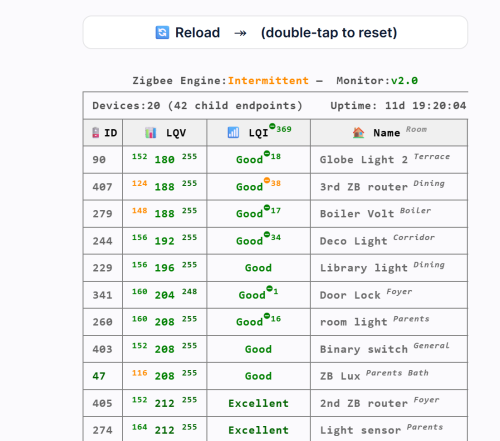
⚡ Zigbee Monitor – A Complete Health Dashboard for Your Zigbee This QuickApp gives you a real‑time, high‑precision diagnostic view of your entire ZigBee network. It tracks every device, evaluates link quality, detects ZigBee Engine freezes or crashes, highlights weak or unstable nodes, monitors battery health, and records communication drops over time. Automatic sorting, color‑coded warnings, min/max LQI history, and intelligent ZigBee Engine health scoring, it turns your HC3 into a full ZigBee analytics console—making mesh problems visible instantly instead of guessing in the dark. 📑 Table Columns 🪫 ID Device ID with battery status. Battery devices show color‑coded percentage; routers show “Serves as Router.” Ghost nodes appear as 👻. 📊 LQV (LQI value) Shows min / current / max LQI values recorded since last reset. Helps identify unstable or fluctuating devices. 📶 LQI (Quality Status) Color‑coded signal quality label: Excellent, Good, Weak, Poor, Critical. Includes drop‑severity superscripts when applicable. ❤️ Alive Displayed only when at least one device is dead. Shows “false” in red for non‑responsive nodes. 🏠 Name Room Device name with room shown in superscript. Ghost devices show their IEEE address instead. 📦 Type Indicates whether the device is Battery‑Powered (with percentage) or Serves as Router. 🔖 Vendor Manufacturer reported by the ZigBee device. 🔢 Model Device model identifier (e.g., E1743, SNZB‑02). 🧬 Family Routing family chain showing how HC3 child devices relate to each other (e.g., 123👥🡒456🡒789). Requirements HC3 with ZigBee enabled QuickApp variables: user, password (secured) User and Password The QuickApp needs credentials to access the internal ZigBee API through the HC3 proxy. Enter its username and password in the QA’s Variables tab. The QA automatically encodes these values and uses them only for read‑only Zigbee queries. Note: For security, you can create a dedicated HC3 user with limited permissions (not your main admin account) What It Shows ZigBee Engine status ID, LQV (with min/max range), LQI status, Alive (if needed), Name and Room, Type, Vendor, Model, Family. Please download and review the ZigBee Monitor User’s Guide for further details. You can also download the ZigBee & HC3 Capacity Planning Guide, which helps you build a more stable and reliable ZigBee network. -

zigbee List of Zigbee devices - users for users
K.Drozynski posted a question in Other Devices / Third-party devices
Dear users, We know that you are eager to share your thoughts regarding all Zigbee devices that you have. With so many Zigbee devices available on the market it would extremely difficult to prepare a complete list of supported Zigbee devices which would include useful remarks. For this reason we would like to encourage you to share your thoughts with other community members - let's make this a list of tested Zigbee devices created by users for users. As correctly pointed out by @petergebruers (kudos to you) "A nice list for Zigbee2MQTT already exists, complete with picture, reset procedure(s) and quirks: https://www.zigbee2mqtt.io/supported-devices/ So we can add one of those 2149 devices to our HC3, test its behaviour and report back with a link to the EXACT same device. It is important to link to the exact same devices as the one you tested because there are many lookalikes..." Regards -
Like a number of people - I am thinking of leaving the Fibaro platform given the lack of integration with so may devices like zigbee. While the UI for HC3 is somewhat simpler than that of something like HA - the practicality of HA is really hard to ignore. I was wondering therefore whether anyone here has been able to successfully integrate a remote zigbee hub with the HC3 and whether there are any specific limitations? I would also love to hear from Fibaro on when they expect to fully comply with Zigbee 3.0 rather than the haphazard beta release that has not really been improved upon since its introduction. Thanks.
-
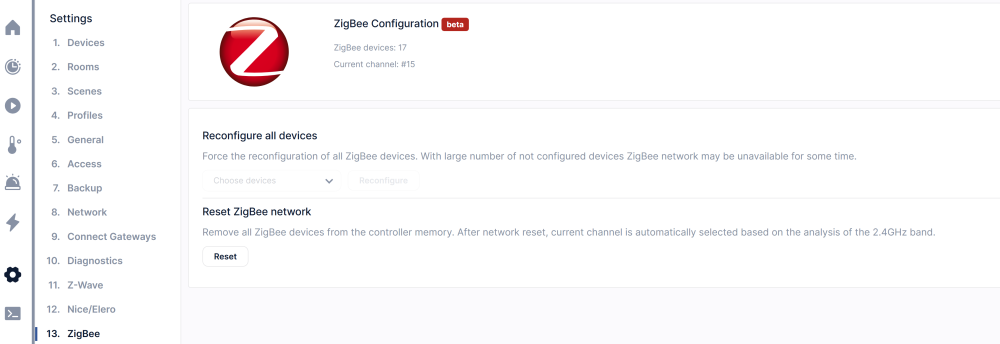
Hello everyone! If you have problems with ZigBee devices and specially meshing of ZigBee network is not working as expected then please read following articles that can enlighten you and give you possible solution: Article by Joel Crane: https://support.metageek.com/hc/en-us/articles/203845040-ZigBee-and-Wi-Fi-Coexistence Article by Nico: https://haade.fr/en/blog/interference-zigbee-wifi-2-4ghz-to-know Note that in cases where household has one router and one HC3 adjusting WiFi and ZigBee channels to avoid interference is easy, but with more devices it gets more complicated. WiFi: For example in my case is not so easy because I have WiFi router with additional 3 access points, Sonos speaker network, Philips HUE Pro bridge and two Home Center 3. Since I have Ubiquiti UniFi managed network it is quite easy to optimize WiFi deployment and network. Usually automatic optimization does the job. My WiFi router 2.4GHz uses channel 1, AP for back of the house is on channel 11, AP for garage is on channel 6 as it is AP for my barbecue house that is on the opposite side from garage. Sonos 2.4GHz WiFi network can work only on channels 1, 6 or 11 and that can be sort of a problem since speakers are deployed all around the house. In my case is set to channel 6 since garage and barbecue house AP's has lowest traffic. ZigBee: I have replaced my two old Philips HUE bridges v2 with one HUE Pro bridge. Note that my two old HUE beridges where using ZigBee channel 25 and 26. New HUE Pro is now on ZigBee channel 25. Both ZigBee channels are far away from WiFi channel 1 which is used by my router and therefore no interference at all. Both HC3 are now set to use ZigBee channel 15 which would be OK if I have only one HC3. ZigBee channel 15 is just between WiFi channels 1 and 6 and that is good, but having two devices on the same channel is NOT good. Since Fibaro is missing option for users to manually select ZigBee channel bigger systems with more than one HC3 could run into trouble. Conclusion: If you have problems with WiFi and ZigBee, please check your WiFi network and ZigBee gateways settings before you start throwing rocks on Fibaro and anyone else here. Thank you!
-

Zigbee buttons - how to control button actions
Peter Mahut posted a question in Other Devices / Third-party devices
I tried to add zigbee buttons to HC3. I can see added device, I can use in a scene , but when I press button , nothing happens. Seems like action was not detected. Any idea ? Any experience ? Thanks. -
If you encounter issues such as slow responses or disconnections with ZigBee devices, particularly after a firmware update or backup recovery, try this suggested fix: Start the "Add Zigbee Device" process and let it run for about a minute or until the hub stops it. You might need to repeat this process a few times to stabilize the communication. I personally run this process automatically every three days to maintain stability. Please note that some problems might not be related to HC3, such as issues caused by distance or faulty devices. I'm curious if this works for others, so feel free to share your experience. Thank you!
-
I see that many users have a problem with ZigBee, frequently all devices showed disconnected and don't work anymore. If "standard" actions (like disconnecting/reconnecting power, reloading latest backup) don't help, here some steps that could help to recover and no need to reinclude all devices again. 1. Reset Zigbee Network 2. Include any ZIgBee device that in use in your system to initiate ZigBee network. Wait about 2 minutes and verify that included ZigBee device is working properly. Don't worry it will work later with the original ID, no need to change any code 3. reboot the system with your latest working backup 4. At the beginning you might see that all ZigBee devices are still disconnecting. Please wait several minutes till the system will stabilize ZigBee communication (could take up to 10 minutes) Now all ZigBee devices should work properly as before. This procedure helped me to recover at least 7 times. In some cases, just one (or more, but not all of them) ZigBee device become unstable, meaning takes time to turn ON/OFF and frequently shown as disconnected. I suggest solving the problem as following: 1. Create a backup 2. Reinclude the device 3. Reload saved backup The device should work using his original ID. No need to change scenes or code. Hope it helps
-
Friends, I'm getting pretty annoyed with how long zigbee has been beta and worse, how it works, I switched the lights to HUE bridge instead and linked it as an app with HC3! But I still have some sensors on the zigbee directly to the HC3 gateway! I don't understand why HUE works absolutely flawlessly and HC3 loses connection with zigbee devices every now and then! The saddest thing is that some sensors are a meter away from the gateway and despite that they are unreachable! After restarting the gateway they go for a while and then again without communication! Same with the sockets. I don't understand that no one has been able to make any improvements to make this work, some Chinese toy handles this protocol better! Does anyone have any solution to solve this problem ? Thank you
-
Witam, mam problem z usunięciem urządzenia ZigBee (czujnik temperatury i wilgotności). Podczas dodawania go do centrali prawdopodobnie urwało zasięg, przez co nie dostarcza żadnych informacji. Możliwe więc, że konfiguracja nie przebiegła pomyślnie (chociaż widnieje jako "Urządzenie skonfigurowane"). Chciałem więc usunąć błędnie dodane urządzenie, centrala wyświetla jednak taki komunikat (bez względu czy wymuszenie usunięcia, czy wysłanie polecenia o usunięcie): Nie pomaga zmiana żadnych ustawień czujnika, ponowna próba jego dodania, ani restart centrali HC3. Jestem świadomy, że obsługa ZigBee jest w wersji Beta, mam nadzieję jednak, że znajdzie się rozwiązanie. Z góry dziękuję za pomoc!


-

HC3 integration with zigmee RTX temperature and humidity smart sensor
Lukasus81 posted a question in Home Center 3
Hi, I bought RTX temperature and humidity smart sensor with zigbee 3.0 communication protocol. I was trying to add it to HC3 as a zigbee devices. HC3 detected it but see it as an unconfigurated device. Is there any option to add it to HC3 or HC3 doesn't support it, read temperature and humidity? Thanks for respons. -
Dzień dobry. Być może coś źle robię, ale mimo usilnych starań nie udało mi się dodać żadnego urządzenia Zigbee do centrali HC3 podłączonej w trybie SLAVE. Na centrali MASTER - wszystko działa bez zarzutu. Slave - nie widzi zigbee. Może ktoś zna rozwiązanie tego problemu? Będę wdzięczny za pomoc.
-

Adding Zigbee device option has been disappeared
GTakacs posted a question in Other Devices / Third-party devices
Hi, I started to configure a new HC3 controller yesterday. The first step was to upgrade to the latest firmware (5.150.18). The first device what I tried to add was a Zigbee bulb, but when I tried to add device, the Zigbee option wasn't on the list. I did a reset Zigbee in the Zigbee admin section. After this the Zigbee device adding option got to the list and I added the bulb succesfully to the controller. The bulb operated only a few minutes, after this didn't react to any command (turn on/off etc). I went to the Zigbee admin section and the number of zigbee devices was 0!! while the bulb device was on the devices page. I tried to reset the Zigbee network again, but nothing happened. The bulb device ofcourse disappeared from the devices, but the zigbee device adding option not showing again! The controller uses Wifi connect to the network. What can I do with this issue???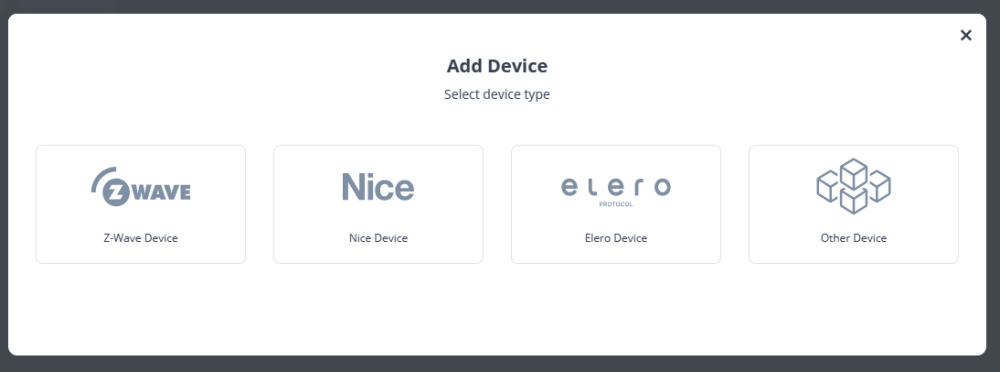
-
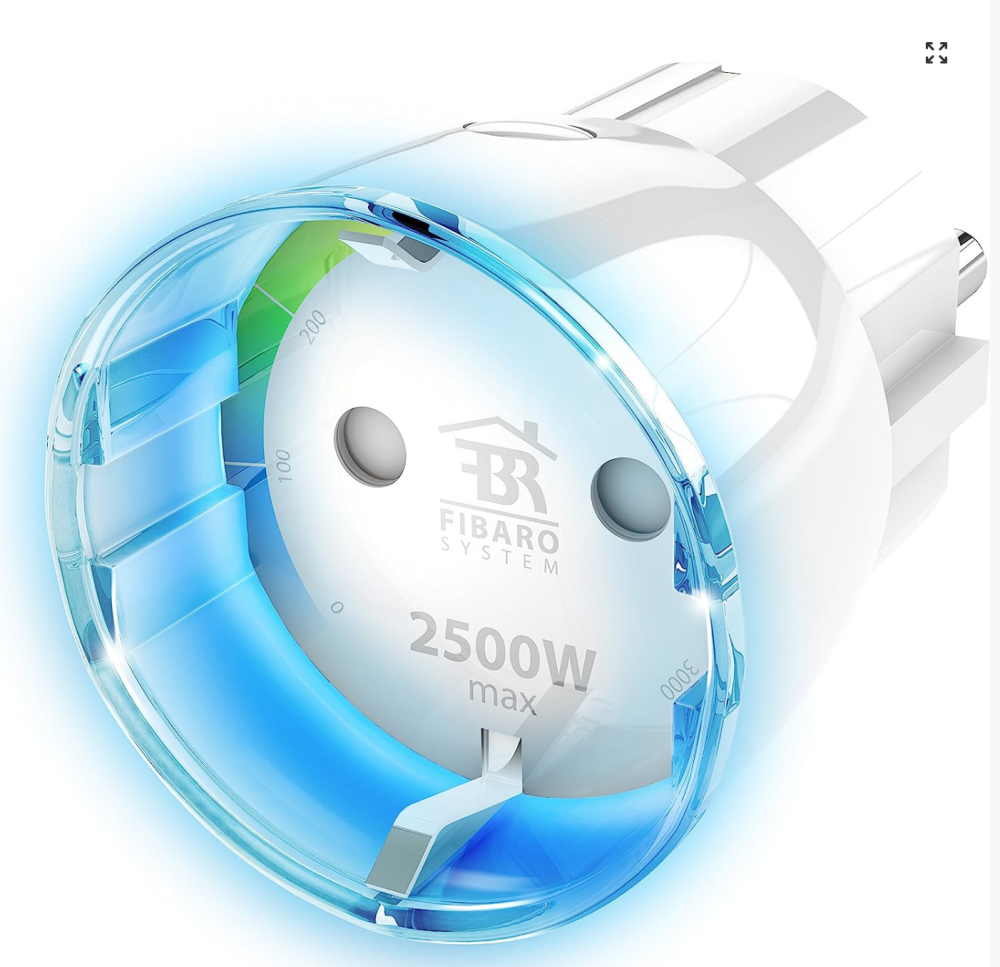
Hi to all. Is anyone has been able to use Zigbee wall switch (or any other device) that able to show online power consumption? Like Z-Wave wall plugs (Fibaro, Neo, Aeotec and others) Thank you


-
Has anyone successfully added the IKEA SYMFONISK gen2 (zigbee) remote control to Fibaro HC3? The device is added to the control panel but with an exclamation mark.
-
I have 16 Philip Hue lamps in my house being managed from HC3. Last month I changed the connection from using a hue bridge to using the new direct integration with HC3 using Zigbee protocol. I now experience that status of the lamps (on/off intensity and color) is NOT correctly displayed any longer in Yubii and/or HC3 Website. A lamp that I can see physically is turned ON appears in the UX as turned OFF. And if I try to turn it ON it says "Unit XXXX turned ON" but nothing happens in real life. And if I refresh the page the lamp still displays status OFF!! To make things really weird, I can still turn the lamps on/off them from my block scenes. I have rebootet my HC3 and also tried to disable all firewall settings just to be sure. Anyone got a clue on how to troubleshoot this? I can st
-
I'm unable to add Zigbee devices to my HC3. When I click to add a Zigbee device, the HC3 console shows Waiting for adding process to start. After 3 minutes, it updates to Timeout for adding devices expired. I'm using two different Aqara Temperature and Humidity sensors and both have the same results. Fibaro support keeps telling me to try again or reset the Aqara sensor, but I'm suspicious of the HC3 itself. The messages in the HC3 console seem to imply that the HC3 is trying to go into adding mode, but that it hangs there. Can anyone confirm this? I'd be interested to learn what the console says when all goes as it should.
-
Since Zigbee devices are cheaper and the range of available devices is much bigger many users start to use them. The problem that not all of them are supported yet and in few cases (at least for me) after purchasing they are not working (partially or fully). Although there is a list of supported ZigBee devices published by Fibaro, but the list doesn't update and in some cases, misleading. So maybe our community could help to each other, by publishing status of ZigBee devices that have been tested/verified by users. Posted link below will open and share Excel sheet of devices and their status. The file is opened for editing to everyone, so please use that authorization carefully and fill in correct data. Please include not supported devices also, to avoid unnecessary expense for others. Let's see if it works for us... https://docs.google.com/spreadsheets/d/1xNO2wlPstKksaScTWiRjueqdDeHrNkxttEy8muc_8So/edit?usp=sharing
-

HC3 5.111.48 (beta): Zigbee - Errors caused by Zigbee reset
Tomas Cech posted a question in Home Center 3
Hi all, I have HC3, plenty of Z-Wave devices, and about 5 Zigbee Aqara smart outlets. FW 5.111.48 (beta). At a cetrain point, all Zigbee devices became irresponsive. No way to remove or reconfigure them. Resetting Zigbee network (remove all devices) causes Profiles page in Setup is no longer available (Error 404). No answer from Fibaro yet. Anyone able to replicate? I suspect a firmware error. (btw., switching Zigbee channel or reconfiguring devices buttons are inactive too. It seems beta is a very early and immature beta...)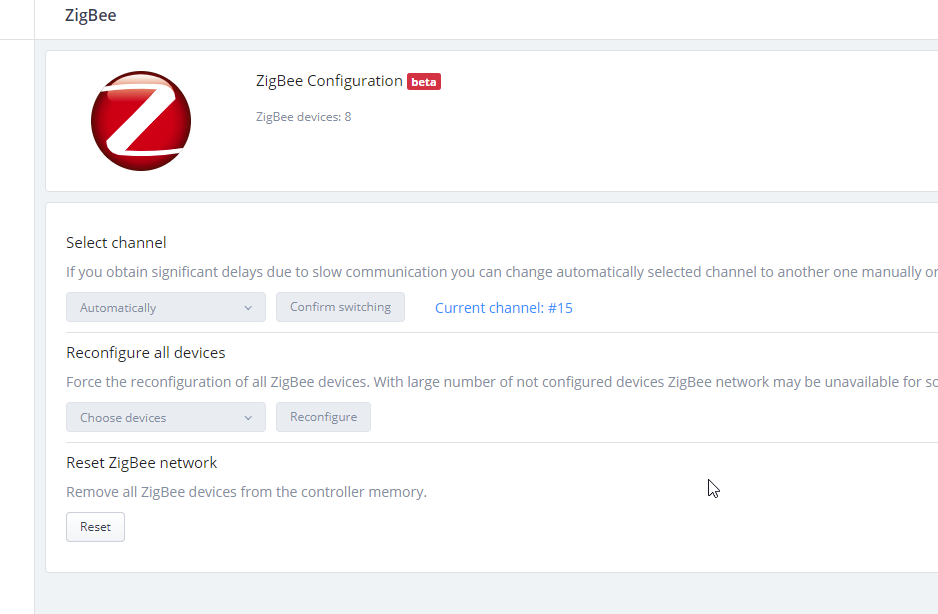
-
Hi I bought this device : Nous SZ-T04 control via MQTT | Zigbee2MQTT In the HC3, the module integration is working fine. But, when I check the temperature value or hygrométrie value the result is always 0 Do you have an idea ? Thanks in advance
-
Hi - I am trying to add my curtain controllers but am having trouble with the adding process with zigbee. Is there a reference document for adding these devices? I have tried with and without the installation code method but the page indicates the MAC address is invalid. Perhaps does anyone have screen shots of adding a zigbee device for reference? Thanks, Anth
-
Hi, is this announcement correct The Zigbee, Bluetooth LE, 433MHz, and 868MHz protocols are not fully implemented in software at this time, so it is not possible to add devices that work with these protocols. The table chips of each communication protocol are physically located in the device. Will be the HC3 officialy support those protocols in near future?
-
 Hello everyone, I just got in my new flat and decided to set-up my domotic apparatus starting from a Yubii Home hub. No issues with dimmers, door/window and smoke sensors. The problem is that my flat was pre-equipped with Somfy RTS shutters and a Danfoss Ally radiator hub (Zigbee protocol), which unfortuantely are not comatible with the Z-Wave protocol. I have been looking around to understand what could be the easiest course of action to controll all devices from my Yubii Home box. From my understanding, either a Jeedom or an Eedomus hub, along with a RFXCom module, should do the trick for both the shutters (hence the RFXCom module) and the radiator hub. As I'm not an expert however, I was hoping that someone here could either confirm the above makes sense or propose an alternative course of action. Thank you in advance for your help!
 -
Amazon, Apple, Google, Zigbee Alliance and board members (such as IKEA, Legrand, NXP Semiconductors, Resideo, Samsung SmartThings, Schneider Electric, Signify (formerly Philips Lighting), Silicon Labs, Somfy, and Wulian) form working group to develop open standard for smart home devices. The industry working group will take an open-source approach for the development and implementation of a new, unified connectivity protocol. The project intends to use contributions from market-tested smart home technologies from Amazon, Apple, Google, Zigbee Alliance, and others. The decision to leverage these technologies is expected to accelerate the development of the protocol, and deliver benefits to manufacturers and consumers faster. References: Apple Press Release ZigBee Alliance Press Release Connected Home IP
-
Hi I know the hc2 doesn't natively support zigbee but I was wondering if anybody (through an additional device ) manage to connect a zigbee device with the hc2 There is a great selection of zigbee devices including wall controllers on the market and would be great to be able to leverage them.... Thanks