Welcome to Smart Home Forum by FIBARO
Dear Guest,
as you can notice parts of Smart Home Forum by FIBARO is not available for you. You have to register in order to view all content and post in our community. Don't worry! Registration is a simple free process that requires minimal information for you to sign up. Become a part of of Smart Home Forum by FIBARO by creating an account.
As a member you can:
- Start new topics and reply to others
- Follow topics and users to get email updates
- Get your own profile page and make new friends
- Send personal messages
- ... and learn a lot about our system!
Regards,
Smart Home Forum by FIBARO Team
Search the Community
Showing results for tags 'hue light'.
Found 5 results
-
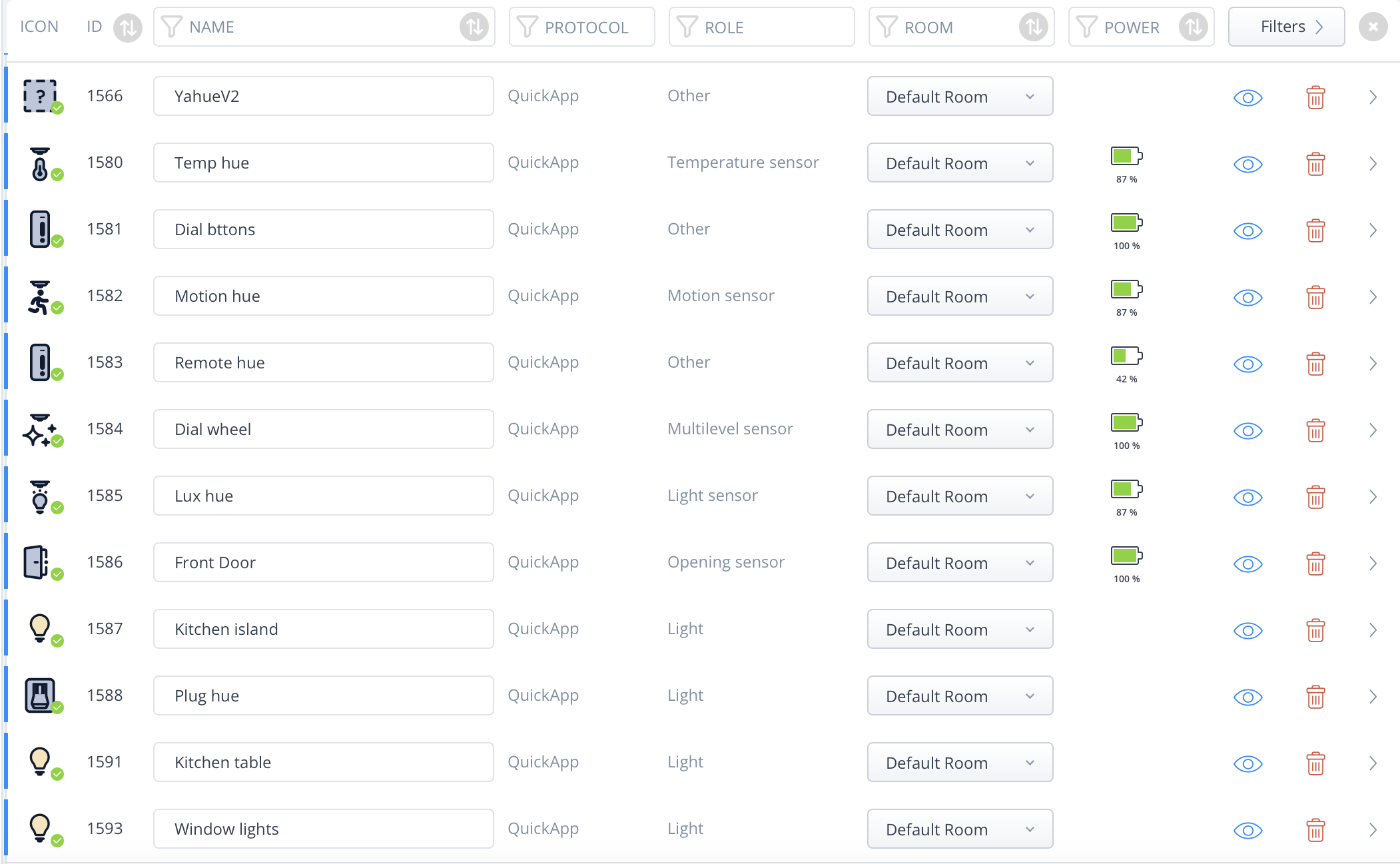
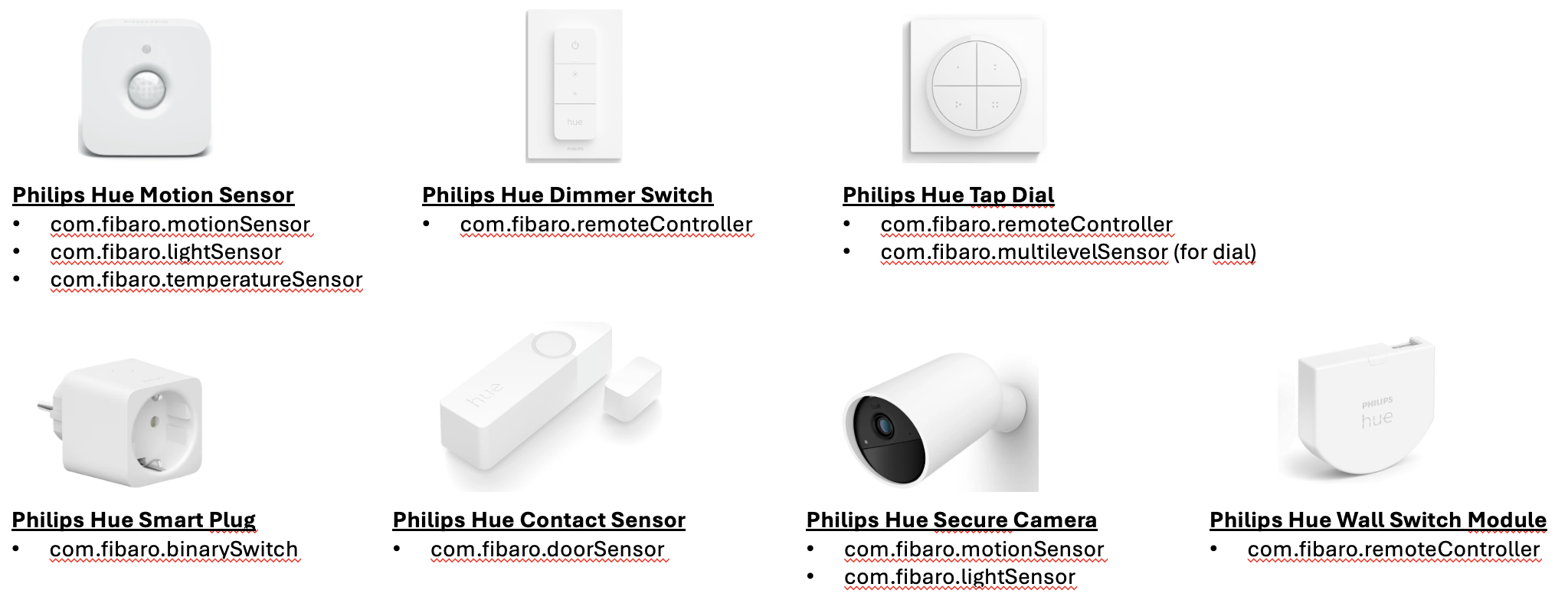
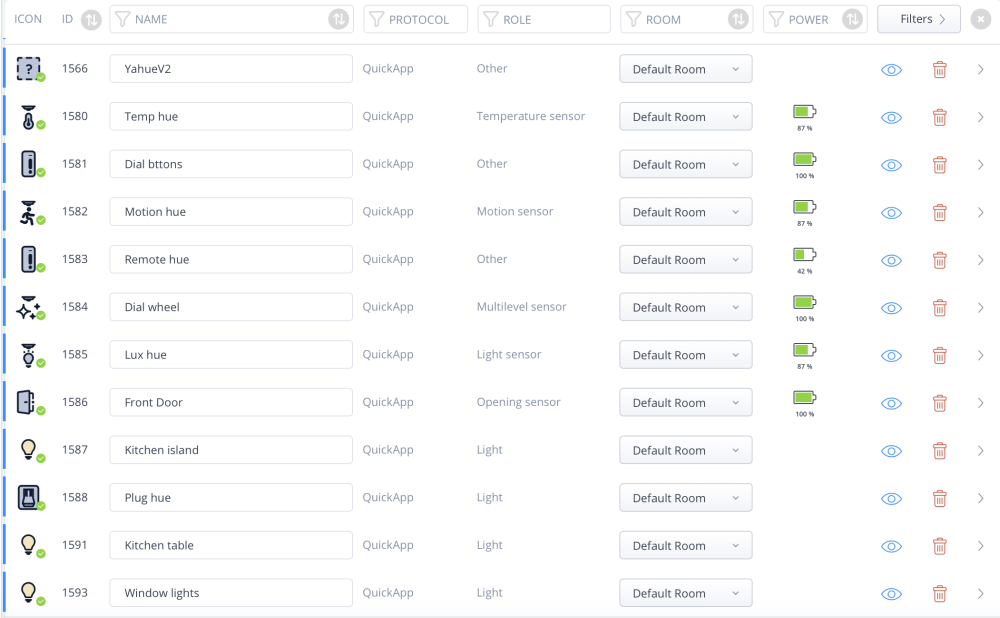
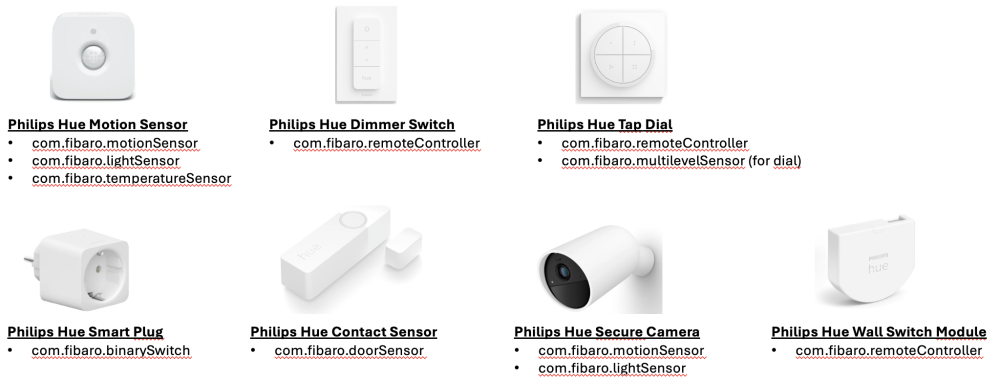
This is a new version of Yahue. We can't upgrade the old to this as some devices have changed types. Install and upgrade with QA Dist Manager Yahue — User Documentation Yahue is a Fibaro HC3 QuickApp that bridges the Philips Hue v2 API. It discovers all Hue devices and rooms on your bridge and lets you selectively expose them as native HC3 child devices — sensors, lights, switches, and room controllers — that work seamlessly with scenes, automations, and the Fibaro mobile app. Installation Prerequisites Fibaro HC3 with firmware supporting QuickApp child devices Philips Hue Bridge (v2, firmware ≥ 1.60) Installing the QuickApp The recommended way to install and keep Yahue up to date is the QA Dist Manager QuickApp. It can install Yahue directly from the GitHub releases and notify you of new versions. Manual install: Download dist/Yahue.fqa from the GitHub releases page On your HC3 go to Settings → QuickApps → Add QuickApp and upload the .fqa file Open the newly created QuickApp and set the Hue_IP QuickApp Variable to the IP address of your Hue bridge (e.g. 192.168.1.50) Save and restart the QuickApp On startup, if no application key is stored yet, the info label will show: Option A — Pair from the QuickApp panel (recommended) This is the easiest method and requires no tools. Make sure Hue_IP is set correctly and the QuickApp has been restarted Press Pair with bridge in the QuickApp panel The info label changes to "Press the button on your Hue bridge now…" Walk to your Hue bridge and press the physical link button within 30 seconds Yahue fetches the application key automatically, saves it to the Hue_User variable, and restarts itself Option B — Enter an existing key manually If you already have a Hue application key (e.g. from another app or from using the Hue developer debug tool): Open the QuickApp settings and set the Hue_User QuickApp Variable to your key Save and restart the QuickApp On startup the QuickApp connects to the bridge, discovers all devices and rooms, and populates the device selector. Selecting devices The QuickApp panel shows a multi-select list of every Hue resource that can be exposed as an HC3 child device. Each entry shows the device name and its type abbreviation in brackets. Tick the devices and rooms you want to create child devices for Press Apply selection The QuickApp restarts and creates (or removes) child devices to match your selection Child devices are persistent — they survive QuickApp restarts. You only need to use the selector when you want to add or remove devices. Device type mapping Yahue automatically picks the appropriate HC3 device type based on the Hue resource's capabilities. Sensors Hue capability HC3 type Notes Temperature service com.fibaro.temperatureSensor Reports °C Light / illuminance service com.fibaro.lightSensor Reports lux Motion service com.fibaro.motionSensor value = true when motion detected Contact report service com.fibaro.doorSensor value = true when open. Remappable — see below Button service com.fibaro.remoteController Emits centralSceneEvents (keys 1–4) Relative rotary service com.fibaro.multilevelSensor Accumulates rotation into 0–100 Motion area configuration com.fibaro.motionSensor OR-logic across all sensors in the area Lights Hue light capabilities HC3 type Notes On/off only com.fibaro.binarySwitch On + dimming com.fibaro.multilevelSwitch On + dimming + color temperature com.fibaro.colorController On + dimming + color (xy) com.fibaro.colorController Full RGB + color temperature Rooms and zones Yahue inspects each room/zone group and picks the most appropriate HC3 type based on the capabilities of the lights it contains: Group capabilities HC3 type Class Notes Any light supports color (RGB) com.fibaro.colorController RoomZoneQA Full RGB + CT + scenes No color, any light supports color temperature com.fibaro.colorController RoomZoneQA CT-only colour controller + scenes No color/CT, any light is dimmable com.fibaro.multilevelSwitch RoomZoneDimQA Dim + scenes (e.g. plain white-dim entrance lights) On/off only com.fibaro.binarySwitch RoomZoneSwitchQA On/off + scenes All three variants share the same scene dropdown and Static/Dynamic toggle (see Room / Zone controller). Configuring type overrides By default, Hue contact sensors become com.fibaro.doorSensor. If you have window sensors or garage door sensors you can remap them individually. Open the UserConfig file inside the QuickApp (or edit userconfig.lua locally before uploading). Add entries to the HUE.typeOverrides table: HUE.typeOverrides = { ["xxxxxxxx-xxxx-xxxx-xxxx-xxxxxxxxxxxx"] = "com.fibaro.windowSensor", ["yyyyyyyy-yyyy-yyyy-yyyy-yyyyyyyyyyyy"] = "com.fibaro.garageDoorSensor", } The key is the Hue device UUID — it is the part after the class prefix in the device dropdown value. For example, if the dropdown shows DoorSensor:a1b2c3d4-..., the key is a1b2c3d4-.... The UserConfig file is never overwritten by auto-update. Per-child QuickApp variables Some child device behaviours can be tuned by setting a QuickApp Variable directly on the child device. These are read once at initialisation (when the child is loaded after a restart). Variable Applies to Type Default Description dimdelay ColorLight, RoomZoneQA number (ms) 8000 Total duration of a smooth brightness ramp triggered by startLevelIncrease or startLevelDecrease. The actual ramp time is scaled proportionally to the current brightness level, so the ramp always takes at most this many milliseconds to travel the full 0–100 range. Room / Zone controller Room and zone devices give you full control over a Hue group. Yahue creates one of three variants depending on the group's capabilities (see Rooms and zones). Scene support Each Room/Zone child has a Scene dropdown and a Static/Dynamic toggle button in its panel. Scene dropdown — lists every Hue scene defined for that room/zone. Selecting a scene immediately recalls it on the Hue bridge. The selection is persisted in the QA variable lastSceneId and is restored in the dropdown on the next restart. Static/Dynamic button — toggles how scenes are recalled: Static — recalls the scene as defined (default). Dynamic — recalls the scene's dynamic palette (cycling colours on lights that support it). The choice is persisted in the QA variable sceneMode. You can also store and recall scenes programmatically: fibaro.call(deviceId, "setScene", sceneName) -- store scene name for later turnOn fibaro.call(deviceId, "turnOn") -- recalls stored scene if any fibaro.call(deviceId, "turnOn", "Relax") -- recall by name (one-off, not stored) Colour / CT changes also turn the group on For RoomZoneQA (colour or CT-only), calling setColor, setColorComponents or setColorTemperature now sends on=true together with the colour change, so the group turns on if it was off — you always see the result of the action. Brightness aggregation The group's displayed brightness (value) is computed as the average of the on-members' brightness, updated live as each member reports a new dimming level. This keeps the QA in sync with Hue scenes that set per-light brightness without emitting a group-level dimming event. Available Lua methods per device type These methods can be called from scenes, automations, and other QuickApps via fibaro.call(deviceId, "methodName", ...). All sensor types Sensors are read-only. Their value property is updated automatically from Hue SSE events. Method Description (none) No callable methods — use property triggers in scenes Battery: Devices with a battery (Hue sensors) automatically report batteryLevel and dead status. BinarySwitch — com.fibaro.binarySwitch Method Arguments Description turnOn — Turns the light on turnOff — Turns the light off DimLight — com.fibaro.multilevelSwitch Method Arguments Description turnOn — Turns on at last brightness turnOff — Turns off setValue level (0–100) Sets brightness startLevelIncrease — Smooth ramp to 100% startLevelDecrease — Smooth ramp to 0% stopLevelChange — Stops any active ramp TempLight — com.fibaro.colorController White-ambiance lights (tunable white, no colour). Method Arguments Description turnOn — Turns on turnOff — Turns off setValue level (0–100) Sets brightness setColorTemperature kelvin (2000–6500) or mirek (153–500) Sets colour temperature. HC3's standard setColorTemperature action passes Kelvin; values ≤ 1000 are treated as already-mirek for backward compatibility ColorLight — com.fibaro.colorController Full-colour lights. Method Arguments Description turnOn — Turns on turnOff — Turns off setValue level (0–100) Sets brightness setColor "RRGGBB" Sets colour from hex string, e.g. "FF0000" for red setColorComponents {red,green,blue,warmWhite} Sets colour by component (0–255 each). RGB triggers colour mode; warmWhite alone triggers colour temperature mode setColorTemperature kelvin (2000–6500) or mirek (153–500) Sets colour temperature (HC3 passes Kelvin) startLevelIncrease — Smooth ramp to 100% (duration controlled by dimdelay QA variable, default 8 s) startLevelDecrease — Smooth ramp to 0% (duration controlled by dimdelay QA variable, default 8 s) stopLevelChange — Stops any active ramp signal sig, duration_ms, colors Signalling effect (see below) setEffect effect Looping light effect (see below) setTimedEffect effect, duration_ms One-shot timed effect (see below) RoomZoneQA / RoomZoneDimQA / RoomZoneSwitchQA Controls all lights in a Hue room or zone simultaneously. The exact HC3 type depends on the group's light capabilities (see Rooms and zones). Methods below are exposed only when supported by the underlying group: Method Available on Arguments Description turnOn all (optional scene name) Turns group on, optionally recalling a named scene turnOff all — Turns entire group off setValue Color, CT, Dim level (0–100) Sets group brightness setColor Color "RRGGBB" Sets group colour from hex string. Also turns the group on setColorComponents Color {red,green,blue,warmWhite} Sets group colour by component. Also turns the group on setColorTemperature Color, CT kelvin (2000–6500) or mirek (153–500) Sets group colour temperature. Also turns the group on startLevelIncrease Color, CT, Dim — Smooth group ramp to 100% (duration controlled by dimdelay QA variable, default 8 s) startLevelDecrease Color, CT, Dim — Smooth group ramp to 0% (duration controlled by dimdelay QA variable, default 8 s) stopLevelChange Color, CT, Dim — Stops group ramp setScene all sceneName Stores a scene name to recall on next turnOn sceneChanged all event UI callback for the scene dropdown — also persists lastSceneId sceneModeToggle all — UI callback for the Static/Dynamic button signal all sig, duration_ms, colors Signalling effect on all group lights (see below) Light effects reference signal — blink / alerting effects Applies a visual signalling effect to the light or group. fibaro.call(deviceId, "signal", sig, duration_ms, colors) Parameter Type Description sig string Effect type (see table below) duration_ms number Duration 1000–65534000 ms. Default 5000 colors table Optional array of 1–2 RRGGBB hex strings sig value Colors required Description "on_off" none Blink between max brightness and off "on_off_color" 1 color Blink between off and the given color "alternating" 2 colors Alternate between two colors "stop" none Cancel any active signal immediately Examples: fibaro.call(id, "signal", "on_off", 5000) fibaro.call(id, "signal", "on_off_color", 10000, {"FF0000"}) fibaro.call(id, "signal", "alternating", 30000, {"FF0000", "0000FF"}) fibaro.call(id, "signal", "stop") setEffect — continuous looping effect Individual lights only (not supported on rooms/zones). fibaro.call(deviceId, "setEffect", effect) effect value Description "candle" Candle flicker "fire" Fire effect "prism" Prism colour cycle "sparkle" Random sparkle "opal" Opal shimmer "glisten" Glisten "underwater" Underwater wave "cosmos" Cosmos "sunbeam" Sunbeam "enchant" Enchant "stop" Cancel active effect setTimedEffect — one-shot timed effect Individual lights only (not supported on rooms/zones). fibaro.call(deviceId, "setTimedEffect", effect, duration_ms) effect value Description "sunrise" Sunrise simulation "sunset" Sunset simulation "stop" Cancel active timed effect Updating Yahue To update to the latest version: Open the QuickApp on the HC3 Set the QuickApp Variable update to yes Save The QuickApp downloads dist/Yahue.fqa from GitHub, installs all files, and restarts. Your UserConfig file is never overwritten — your type overrides and any other customisations are preserved. Troubleshooting Info label shows "Set Hue_IP variable then restart" The Hue_IP QuickApp Variable is empty or not a valid IPv4 address. Set it in the QuickApp settings and restart. Info label shows "Set Hue_User, or press 'Pair with bridge'" No application key is stored yet. Either press Pair with bridge and follow the prompt, or enter an existing key manually into the Hue_User QuickApp Variable. Pairing timed out ("Timed out — press Pair and try again") You have 30 seconds to press the physical link button on the bridge after pressing Pair with bridge. Press Pair with bridge again and try once more. Pairing shows an error message The bridge at Hue_IP was unreachable. Verify the IP address is correct and that your HC3 can reach the bridge on port 80. No devices appear in the dropdown The bridge was unreachable or returned an error. Check the HC3 log for ERROR lines from the QuickApp. Confirm the bridge IP is reachable from the HC3. A child device shows as dead The corresponding Hue device has gone offline (e.g. bulb removed or powered off). The dead property will clear automatically when the device reconnects. Changing a contact sensor to windowSensor has no effect The typeOverrides setting only applies when the child device is first created. Remove the device from the selection, apply, add the override to userconfig.lua, re-add the device, apply again. Scene dropdown is empty on a Room/Zone device Scenes are loaded at startup. If you added scenes to the Hue app after the QuickApp started, press Restart to reload them. A dimmable light shows as off when set to 1 % in the Hue app Fixed in v0.2.16+. At its lowest dim step the Hue bridge can send dimming.brightness values < 0.5 which would round to 0 and force HC3 to display the light as off. Yahue now clamps such values to 1. HC3 setColorTemperature returns an error from the bridge (mirek > 500) Fixed in v0.2.20+. HC3's standard setColorTemperature action passes a Kelvin value; Yahue now converts to Hue mirek (clamped to 153–500). Values ≤ 1000 are treated as already-mirek for backward compatibility. A room/zone child created on an older Yahue version is missing the new scene/mode UI On upgrade to v0.2.18+ Yahue compares each room/zone child's stored UI version against the current definition. If they differ, the child is recreated with the new layout (UID is preserved, but per-child QA variables such as scene, lastSceneId and sceneMode are reset). The QA restarts automatically after the recreate cycle. Examples: Turn on a room/zone at 30min past sunset, and turn it off 60min before sunrise. (zoon/room has deviceID 1128). Set 'scene' quickVar if you want the zone/room to turnOn with a specific scene. Conditions triggers: { conditions = { { isTrigger = true, operator = "==", property = "sunset", type = "date", value = 30 }, { isTrigger = true, operator = "==", property = "sunset", type = "date", value = 360 }, { isTrigger = true, operator = "==", property = "sunrise", type = "date", value = -60 } }, operator = "any" } Actions: local time = sourceTrigger.property..":"..(sourceTrigger.value or "") local zone = 1128 if time=='sunset:30' then fibaro.call(zone,"setVariable","scene","earlyScene") -- First scene 30min after sunset fibaro.call(zone,"turnOn") elseif time=='sunset:360' then fibaro.call(zone,"setVariable","scene","lateScene") -- Second scene 3hours after sunset fibaro.call(zone,"turnOn") elseif time=='sunrise:-60' then fibaro.call(zone,"turnOff") -- Turn off in the morning end Another example. A Hue tap switch (deviceID 1596) with 4 buttons controlling 3 scenes for a zone (deviceId 1587) (+ turnOff) Conditions/triggers: { conditions = { { id = 1596, isTrigger = true, operator = "anyValue", property = "centralSceneEvent", type = "device" } }, operator = "all" } Actions: local zone = 1587 if not sourceTrigger.property == 'centralSceneEvent' then return end local key = sourceTrigger.value.keyAttribute..":"..sourceTrigger.value.keyId if key == "Released:1" then fibaro.call(zone,"setVariable","scene","Red") fibaro.call(zone,"turnOn") elseif key == "Released:2" then fibaro.call(zone,"setVariable","scene","Blue") fibaro.call(zone,"turnOn") elseif key == "Released:3" then fibaro.call(zone,"setVariable","scene","Green") fibaro.call(zone,"turnOn") elseif key == "Released:4" then fibaro.call(zone,"turnOff") end
- 283 replies
-
- 8
-

-

-
- hue
- hue plugin
- (and 4 more)
-
Afternoon, I have purchased the Hue White and Colour Ambiance GU10 lights and the bridge and wanted to know what fibaro product I would need to buy? what I need the RGBW module?
-

show hue light under category lights?
Guest posted a question in Other Devices / Third-party devices
If i add hue lights with the plugin, the lights will show as virtual device. Is there a way to "move" it to the light categories? So it will show in the app in the lights? -valle- -
Has anyone been able to intergrate a hue kit like a virtual device into a hcl? I have tried to follow the instructions in this forum but not been able to control the hue hub from the virtual device button. Anyone? ?
-
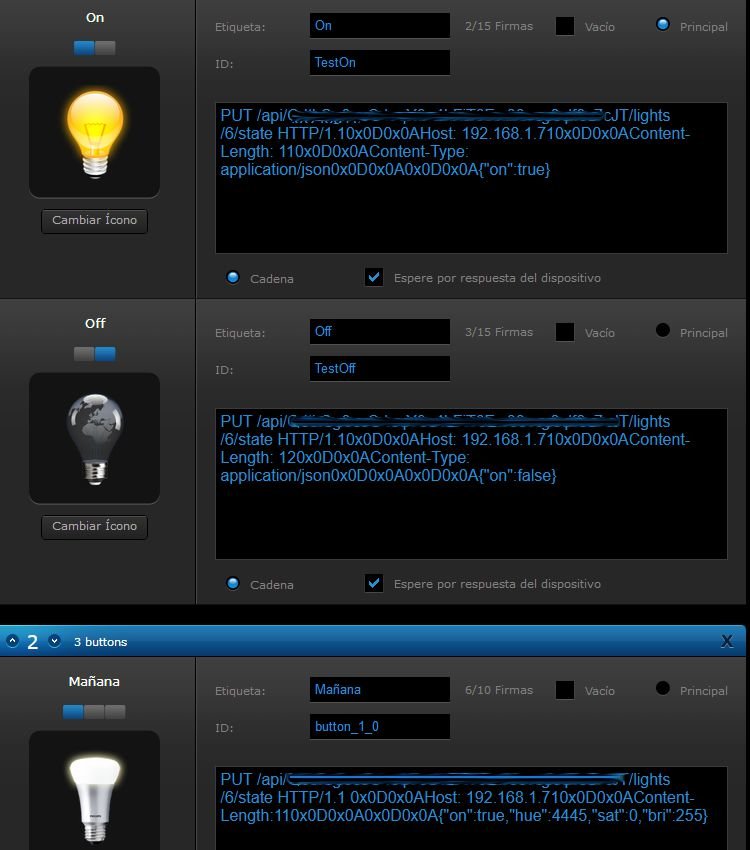
Hi every one Equipment involved: Fibaro hcl, aeotec multisensor 6 and Philips hue I want 3 diferents lights acording the moment of the day, morning, evening and night. Mi idea is a virtual device with 5 posibilities: on, off, morning, evenening and night so I can choose from. The challenge is to turn on the bulb with a particular set of brightness, hue and saturation and here is the barrier. I can use either “on”:xx “bri”: xx “sat”: xx but only one : {“on”:true, “bri”:100}, for example don’t tur on the bulb, so{“bri”:100,”sat”:200} has no efect on a light already on. Even more, {“hue”:xxx} never Works even just hue alone. Is posible to create the virtual device i’m trying to do, and how? Is there any other way to get those 3 differents lights. Image of my initial idea Thks in advance Pd. for those who take a closer look at the virual the reason for different Length value (On 110, and Off 120) is: both 110 On=ok, but light don't turn off. Both 120 On= take up to 6 seconds to turn on, anf Off=ok. Why?, no idea