Welcome to Smart Home Forum by FIBARO
Dear Guest,
as you can notice parts of Smart Home Forum by FIBARO is not available for you. You have to register in order to view all content and post in our community. Don't worry! Registration is a simple free process that requires minimal information for you to sign up. Become a part of of Smart Home Forum by FIBARO by creating an account.
As a member you can:
- Start new topics and reply to others
- Follow topics and users to get email updates
- Get your own profile page and make new friends
- Send personal messages
- ... and learn a lot about our system!
Regards,
Smart Home Forum by FIBARO Team
All Activity
- Past hour
-
Good morning. Programs Nobody Needs, episode twelve (or something around that). Long. A story behind. I would like to draw your attention to the short video attached. It shows how, using Fibaro’s “normal” interface and its ability to display SVG graphics, one can build a system for managing application settings - preferences. I have seen user applications with a large number of configurable elements more than once. Their settings were changed using standard Fibaro UI elements: buttons, text fields or drop-down lists. Such an interface, however, quickly becomes extremely long and - in the applications I have seen - remains visible all the time. This is hardly ergonomic and effectively obscures information that is important “on a daily basis”. That is why the idea of doing this without the above disadvantages started growing in my head. I will leave it to you to judge how it turned out from the user’s point of view. The fact is that a surprisingly large number of settings can fit into a relatively small part of a typical screen - far more than with the standard UI. 20260714_153801.mp4 The server and communication model. A table library I wrote a time ago came to the rescue - except that it uses SVG rather than HTML. This approach was necessary mainly to obtain pop-up windows, which made it possible to create a compact and readable interface. In general, this library can perform “miracles” compared with HTML tables. The price is a larger data payload. My previous experience with the client–server model, which had already worked well in the TableMan project, proved very useful here. The server and SVG engine was already there. Only one tiny detail remained - marrying the two together - so the work progressed quite quickly. SetMan, like TableMan, uses a client–server architecture. It collects commands from its clients and sends a dynamically generated, up-to-date image of the preferences directly back to them, without involving ANY client-side code. The server controls everything on the client, including button labels and their visibility. There is practically no communication protocol at all - it is a “fire and forget” model. The exception is completing the editing process. Client application defines an onPrefsDone function, which the server calls after the settings have been confirmed. The function receives a table containing the editing result, and it is then up to the application to use those data. The same function is used for reporting errors. In that case, the message is available in payload.result.error, while the error is simultaneously recorded in the server’s private terminal. The server itself displays basic information about its clients. It detects deleted applications and communication from clients that have lost their subscription, for example after a server restart. It also allows dead subscriptions to be removed and clients to be restarted remotely. The client. A small Client module has to be included in the user application. It contains just... 34 lines of code (sic!). That is perfectly sufficient. The Client is a complete idiot. It validates nothing and calculates nothing. Apart from the UI-handling functions for the buttons, it has only three functions in total: register, new, exec. The last one is used to send preference definitions and actions performed by the user - button presses - to the server. An application can have several different preference sets prepared and replace them dynamically. At any given moment, however, only one set, one UI field and one group of buttons are active. The preference definition is an ordinary serializable Lua table. "Construction language” is quite compact. For example, the settings shown in the video take about 100 lines, even though they include numeric ranges, single and multiple selections, switchable rows, separators and pop-up windows. There is many taht can be configured. Among other things, one can specify: type of each item, number and width of columns, keys of returned values, range, step and unit of numeric values, different increments for short and long button presses, single and multiple selections, section separators, behaviour of switchable rows, size and position of pop-ups, selected interface colours, the initial cursor position. Not everything has to be defined. There is a set of defaults which produces the appearance shown in the video. What I personally find attractive: in “inactive” state, only one MENU button remains visible. Pressing it expands the preferences view and reveals the remaining buttons. Their labels change depending on the current operation: navigation, value editing, selecting from a list or confirming changes. Once editing is complete, the entire preferences interface disappears again and the application receives the final result. Does anybody need it? Probably not. But after all, this is the “Programs Nobody Needs” series. Part of code defining example in video: { name = "Climate and energy", spec = { title = "Climate and energy", header = { { label = "Setting", width = "60%" }, { label = "Value", width = "40%", value = true } }, switchElementMode = "multi", multiValueText = "[selected]", entries = { { kind = "separator", text = "Climate" }, { kind = "range", key = "targetTemperature", cells = { "Target temperature", "" }, value = 21.5, options = { min = 16, max = 28, step = 0.5, longStep = 2, unit = " °C", decimals = 1 } }, { kind = "range", key = "nightTemperature", cells = { "Night temperature", "" }, value = 18, options = { min = 14, max = 24, step = 0.5, longStep = 2, unit = " °C", decimals = 1 } }, { kind = "inlinesingle", key = "profile", cells = { "Comfort profile", "" }, selected = 2, options = { "Eco", "Comfort", "Boost" } }, { kind = "singleselect", key = "heatingMode", cells = { "Heating mode", "" }, selected = 1, options = { { label = "Automatic schedule", value = "auto" }, { label = "Manual control", value = "manual" }, { label = "Heating off", value = "off" } } }, { kind = "multiselect", key = "heatingDays", cells = { "Active days", "" }, selected = { 1, 2, 3, 4, 5 }, options = { "Mon", "Tue", "Wed", "Thu", "Fri", "Sat", "Sun" } }, ... ...
- Today
-
Ok @jgab, many thanks for the clarification. Giovanni
-
 Sharper joined the community
 -
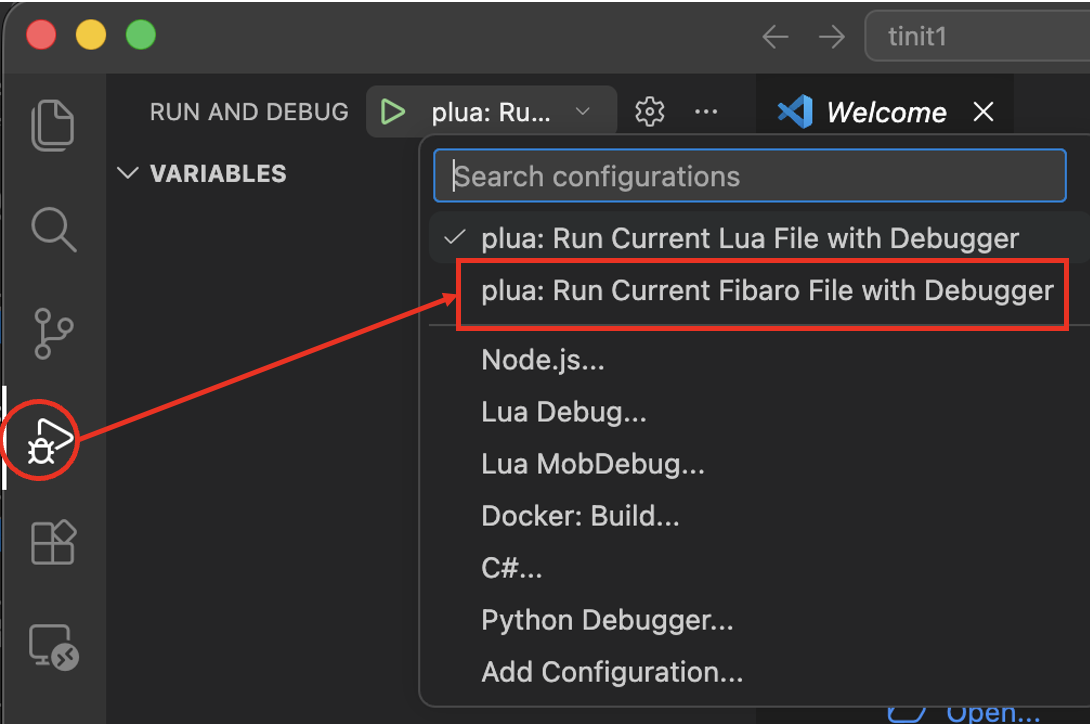
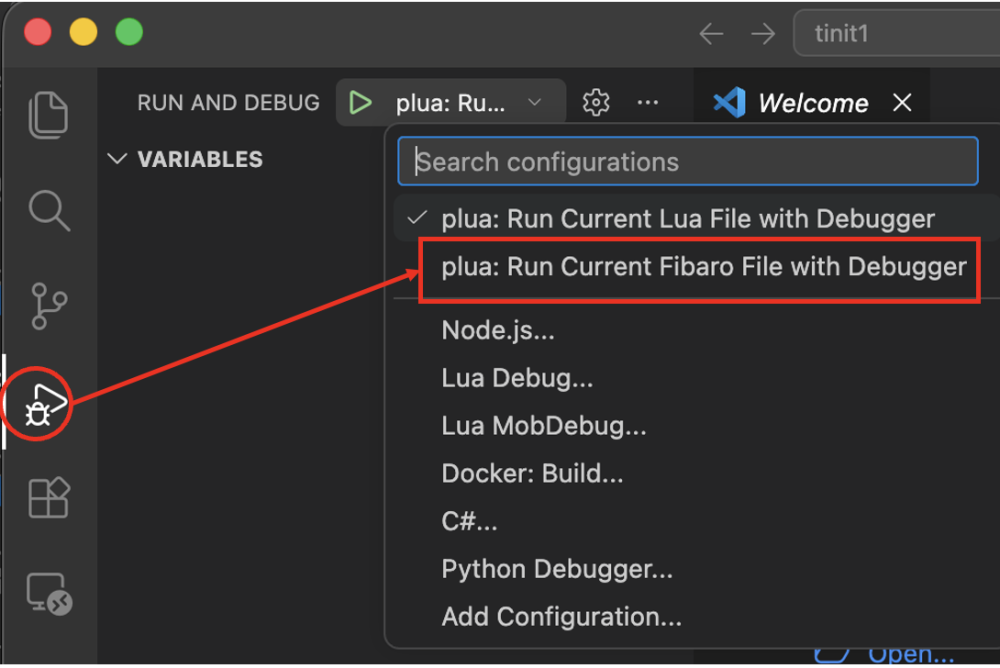
The command >plua --init will create a project setup in a new workspace for vscode. Besides choosing a QA template it will also install /.vscode/launch.json /.vscode/tasks.json The launch.json contains 2 different launch configs: -plua: Run Current Lua File with Debugger -plua: Run Current Fibaro File with Debugger The first config just runs a lua file without loading the fibaro APIs. The second expects the file to be a QA and will load the fibaro APIs and try to start QuickApp:onInit if it exists. Note that when pressing F5 or choosing "Start Debugging" in vscode, it will run the current chosen launch configuration. If that happens to be the first config, in this case, it will complain that there is no fibaro.* or api.* functions available. In vscode we select the launch config in the run and debug side panel.
-
 Ladislavmolnar joined the community
 - Yesterday
-
I had the same for a project created with "plua --init-qa", so I guess that command maybe out of date/sync. Also having a problem with downloadQA. Running "plua --fibaro -t 'downloadQA 1240:.' dummy.lua" results in"[ERROR ][PLUA]: Unknown tool: downloadQA 1240:." Edit: downloadQA issue was from VS Code setup guide again (different machine). Copy/paste from @jgab answer above resolved it.
-
I had the same for a project created with "plua --init-qa", so I guess that command maybe out of date/sync. Also having a problem with downloadQA. Running "plua --fibaro -t 'downloadQA 1240:.' dummy.lua" results in"[ERROR ][PLUA]: Unknown tool: downloadQA 1240:."
-

[ROZWIĄZANO]Brak reakcji na przycisk bistabilny dla SmartImplant
wodzislawski replied to wodzislawski's question in Smart Implant
Witam, dziękuję za reakcję. Przeinstalowałem urządzenie i zaczęło reagować na przyciski. Musiał być problem na etapie konfiguracji. -

YahueV2 (Yet another Hue app, using Hue API v2)
jgab replied to jgab's topic in Tutorials and Guides
I did iterate, but over the wrong resource🙃... fixed in v0.2.74- 280 replies
-
- 1
-

-
- hue
- hue plugin
- (and 4 more)
-
Masz włączoną ochronę lokalną co odłącza klawisze od wyjścia, wyłącz ją a klawisze będą sterowały wyjściami
-

[ROZWIĄZANO]Brak reakcji na przycisk bistabilny dla SmartImplant
m.roszak replied to wodzislawski's question in Smart Implant
Generalnie implant obsługuje klawisze mono i bistabilne do sterowania wyjściem ale dla eventów scen tylko monostabilne: Stan binary switcha powinien się zmienić dla obu typów klawiszy o ile nie jest aktywne local protection (odcięcie wejść od wyjść).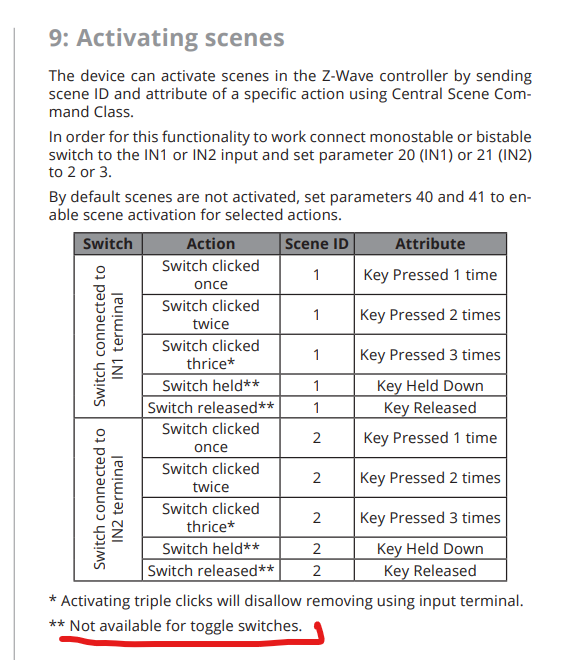
-
I looks like your are using the Classic app. The Classic app are currently being phased out and no longer works probably. Please start using the official Danalock app. You can find the app for app_store Danalock lifestyle. You will also always be able to run the calibration via click commands. You can find a guide on how to run a semi-automatic calibration with click commands . If you have the hold-back-latch feature enabled in the Danalock app you need to follow https://www.youtube.com/watch?v=uzzygexpcb8.
-
- 1
-
-
[ROZWIĄZANO]Brak reakcji na przycisk bistabilny dla SmartImplant
wodzislawski posted a question in Smart Implant
Witajcie, poddalem się. Stąd zwracam się do was o pomoc. Chciałem zbudować prosty układ. Za zwarciu masy (niebieski kabel) z żółtym - in1- powinna się wyzwalać scena. Natomiast nie ma żadnej reakcji po stronie SmartImplant kombinowałem z `wejściem 1 jako binarne i bistabilny. Nie działa. pytania: In1 ustawione jako Bistabilny: czy zwierając wspomniane przewody- powinien się zmieniać status binarny switch ? No i dlaczego temperatura wynosi grubo ponad 10 stopni od rzeczywistej ? -

YahueV2 (Yet another Hue app, using Hue API v2)
Sankotronic replied to jgab's topic in Tutorials and Guides
Hi Jan, Effects are now working as expected on single light, but still not working on grouped lights. Clicking on effect buttons does nothing. As I mentioned before, grouped lights does not support effects, so if button for effect is pressed on grouped lights QA then code must loop through lights that are members of the group and send to each individual light command for effect activation. -
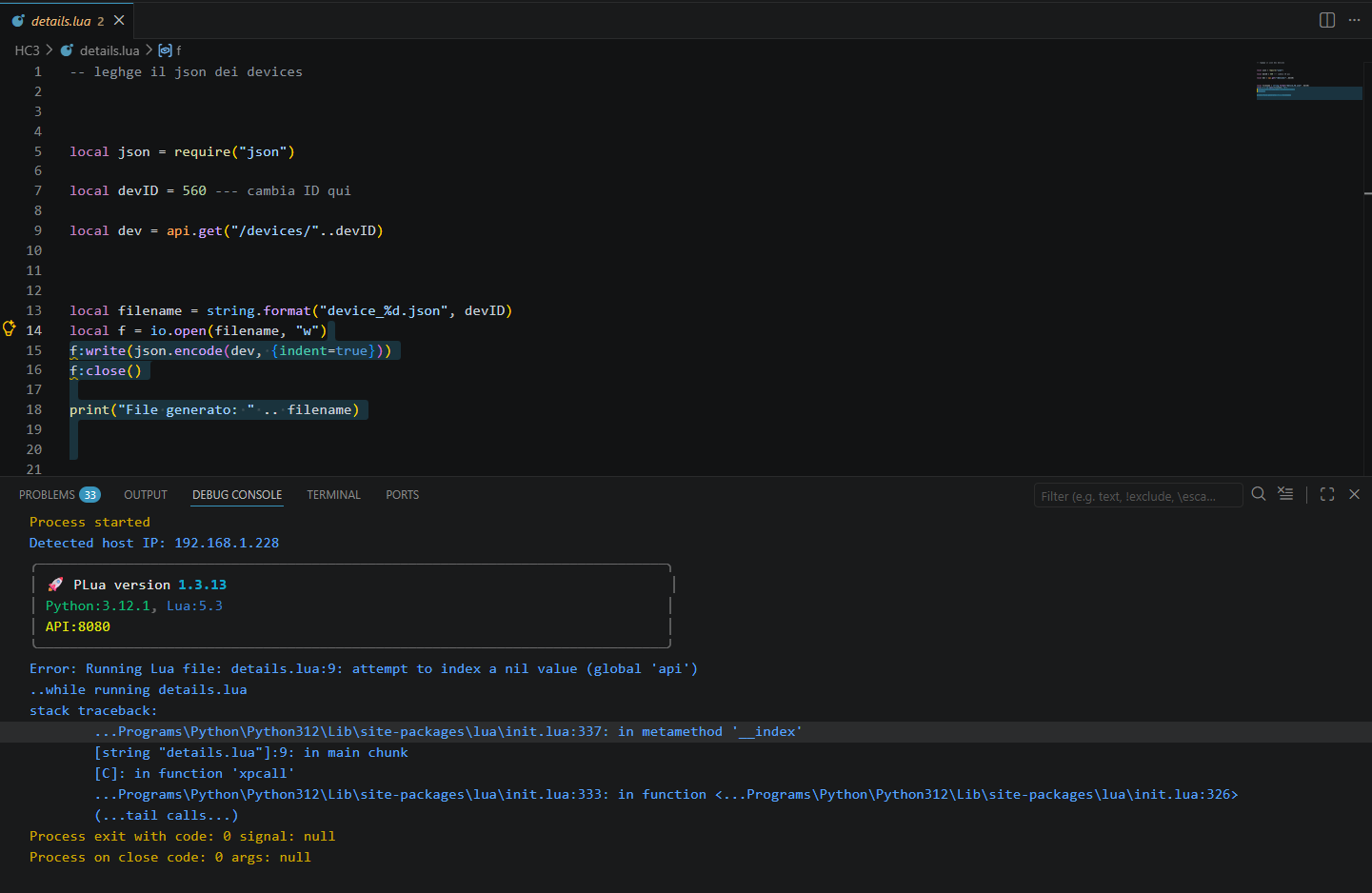
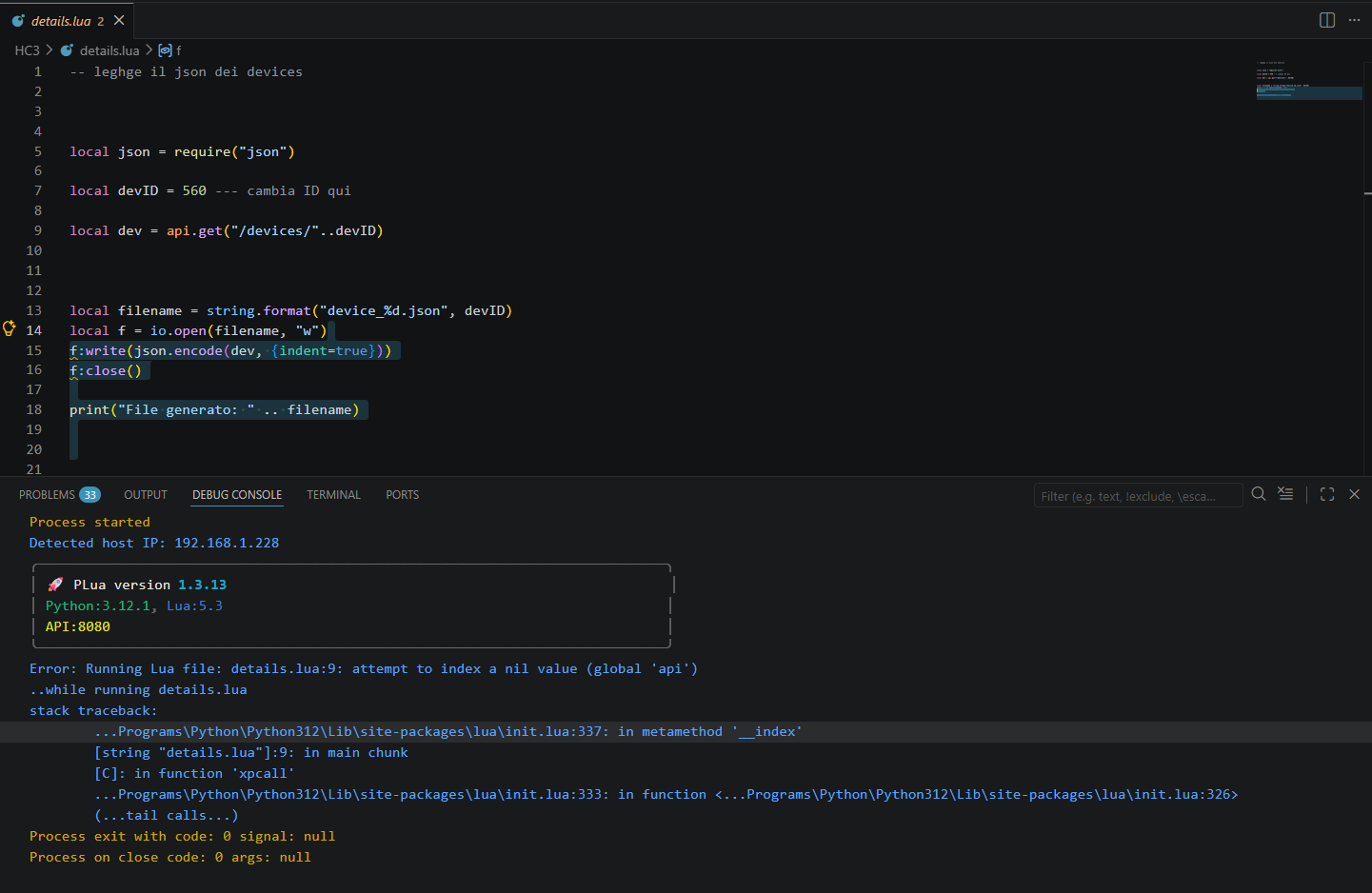
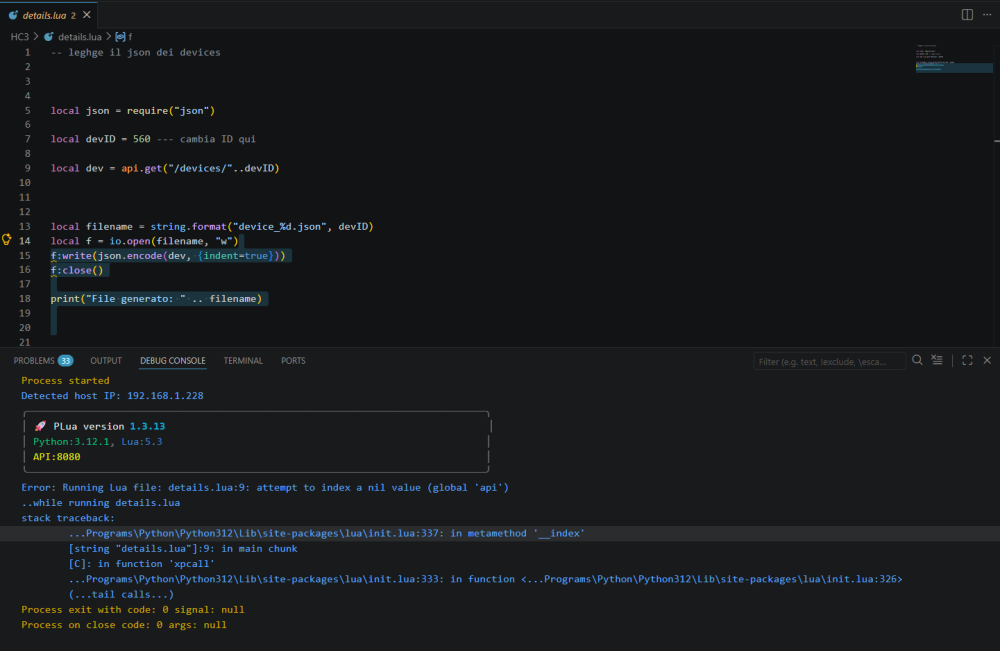
Hi @jgab, referring to my assistance requested, because of the problem attempt to index a nil value (global 'api')The problem was solved... ; just for your info.... i found the launch json as follows... { "version": "0.2.0", "configurations": [ { "name": "PLua: Current File", "type": "luaMobDebug", "request": "launch", "workingDirectory": "${workspaceFolder}", "sourceBasePath": "${workspaceFolder}", "listenPort": 8172, "stopOnEntry": false, "sourceEncoding": "UTF-8", "interpreter": "plua", "arguments": [ "${relativeFile}" ], "listenPublicly": true }, { "name": "PLua: Current File with Fibaro SDK", "type": "luaMobDebug", "request": "launch", "workingDirectory": "${workspaceFolder}", "sourceBasePath": "${workspaceFolder}", "listenPort": 8172, "stopOnEntry": false, "sourceEncoding": "UTF-8", "interpreter": "plua", "arguments": [ "--fibaro", "--run-for", "60", "${relativeFile}" ], "listenPublicly": true } ] } I donever open config files... ad I do not know when/why such modify occurred, however deleting that area, the system resumed normal working conditions... many thanks Ciao Giovanni
-
Dear Jan, great work on EventRunner7 🙏🙏🙏 , just started moving all my rules from 5 & 6 to a single instance on Eventrunner7... Looks like the nr.post() does not (yet) work in 7. rule("noderedURL='http://192.168.0.242:1880/endpoint/ER_HC3'") rule("nr.post(#echo1)") rule("nr.post_as(#echo2)") If it is not me doing something wrong, could you include when you roll out a new version? Thxs Jeroen
-
Setting the log level is slightly different: function QuickApp:onInit() LOG_LEVEL = ERROR self:debug("this debug should not be visible in console") self:error("this error should be visible in console") end
-
PLUA: attempt to index a nil value (global 'api')
jgab replied to Giovanni_Genoa's topic in Tutorials and Guides
Yes, please continue the discussion in the plua forum thread. You are probably using the wrong vscode launch task. You need to use the "Plua: Current Fibaro File" when running/debuging. That will add the --fibaro flag that loads the fibaro libraries like api.* { "name": "Plua: Current Fibaro File", "type": "luaMobDebug", "request": "launch", "workingDirectory": "${workspaceFolder}", "sourceBasePath": "${workspaceFolder}", "listenPort": 8172, "stopOnEntry": false, "sourceEncoding": "UTF-8", "interpreter": "./run.sh", "arguments": [ "--fibaro", "--run-for", "0", "${relativeFile}" ], "listenPublicly": true } - Last week
-
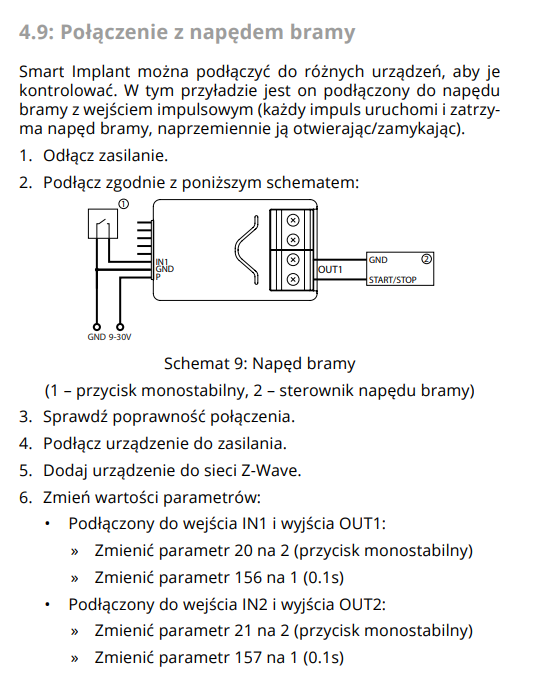
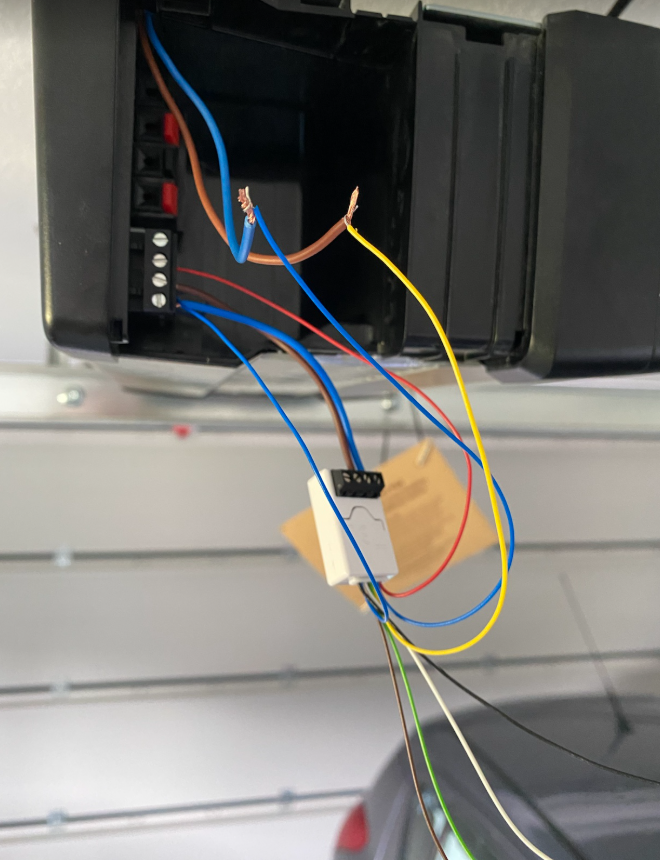
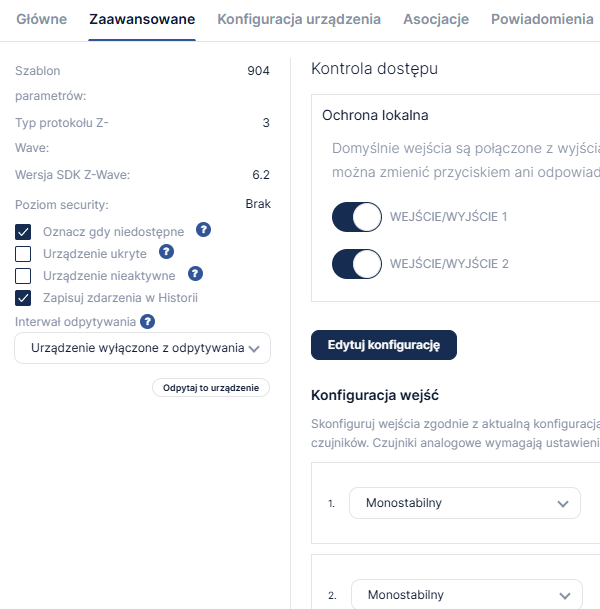
Cześć, mam problem przy podłączeniu implanta do silnika Hormann SupraMatic4. Podłączyłem wg schematu z manuala, dodałem do HC3 --> sterowanie działa ale tylko przez aplikacje. Mam przycisk dzwonkowy, który również jest wpięty w implant ale niestety on nie działa. Zdjęcie jak wygląda podłączenie - kable złączone prowizorycznie to właśnie kable do przycisku dzwonkowego. W jaki sposób podłączyć to tak aby działało? Dodatkowo jak wpiąć w ten układ kontaktron ? Ponizej wklejam dodatkowo ustawienia ze Smarta:

-
 Nysa joined the community
 -
 drzordz1 joined the community
 -
 Patrickpizza joined the community
 -

PLUA: attempt to index a nil value (global 'api')
SmartHomeEddy replied to Giovanni_Genoa's topic in Tutorials and Guides
Better place your post in the Plua tread: -

KNX/IP Quickapp and Knx callback logs
Rostor posted a question in Other Devices / Third-party devices
Hello, I have managed to use an HC3 as main controller for an already installed KNX network. I was able to create a lot of quickapp to controll HVAC, A/C, lights, allarm, sensors and so on. My problem is that every quickapp on init create a listener, every listener even if not doing actions in that quickapp create logs for every knx telegram. So I have my HC3 logs/history that is full of KNXCallback logs instead of action logs. Is there a way to disable KNXCallback ? Thanks, Renato -
 Hi @jgab the system was working fine, suddenly today I've got this error , attempt to index a nil value (global 'api'). The *.lua is a very simple one to get informations from devices, but the problem is with any file/qa/scene using API... i tested already with " plua --diagnostic", no probelm access to hc3 and no warning provided... I tried to uninstall/reinstall PLUA, but no results.... maybe you have somesuggestion, Many thanks Best regrads Giovanni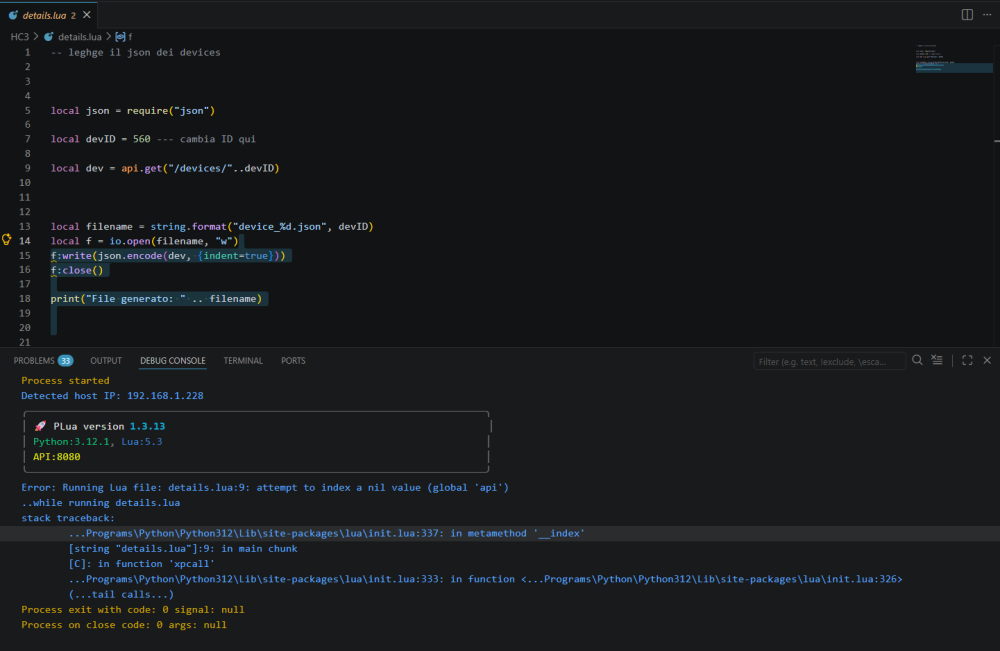
-
YahueV2 (Yet another Hue app, using Hue API v2)
jgab replied to jgab's topic in Tutorials and Guides
Ok, fixed both in v0.2.71. -
 MatiasRaz joined the community
 -

Smoke sensor FGSD -002 generate suddenly alarm
Alex replied to erik.o.rosen's question in Smoke Sensor
Yes during the night one out of 14 devices suddenly beeps about 5 times. No idea which one. (it stopped until I came close enough to listen which one it was). The might have a malfunction or do signal that something is wrong, but why not sending a message to the controller? -
 Shido joined the community
 -
 Mikhail Soushkov joined the community
 -
YahueV2 (Yet another Hue app, using Hue API v2)
Sankotronic replied to jgab's topic in Tutorials and Guides
Hi Jan, I finally had a chance to test latest version 2.70 and it does look pretty god except that effects on grouped lights does not work. Note that effects can be activated only on single lights and so in case of a grouped light Yahue must loop through individual lights of the group and send effect command. On my HUE Festavia light effects are working, but need first to turn it on and then use effect button. If effect button is pressed while light is off then nothing happens. -
I'm playing arround with MCP server and have it connected to my Hermes Agent now. I had to updated the server code with the updated sugested in the fix(mcp): echo client protocolVersion in handleInitialize (compat 2024-11-05+) PR on github to get it to work. I managed to get some devices turned off/on and it worked as expected. Next I tried to get my agent to find the device that has to highest energy consumption in the last month, and it failed with the following response I encountered an error when trying to fetch energy data for the last two weeks using mcp__hc3_smart_home__get_energy_data. The system returned a generic "HTTP 500: Internal Server Error", which means I could not retrieve the consumption metrics. The tool only supports fetching energy data based on predefined intervals (hour, day, week, month, year) but appears to be unavailable or restricted when trying to pull complex historical comparisons like a precise "last 2 weeks" analysis. Then i looked into the code behind and notice the following defenition for get_energy_data // Energy Management { name: 'get_energy_data', description: 'Get energy consumption data for devices or the entire system', inputSchema: { type: 'object', properties: { deviceId: { type: 'number', description: 'Optional: Specific device ID to get energy data for', }, interval: { type: 'string', description: 'Time interval (hour, day, week, month, year)', enum: ['hour', 'day', 'week', 'month', 'year'], }, }, }, }, And calling my HC3 API with this // Energy Management Methods private async getEnergyData(args: { deviceId?: number; interval?: string }): Promise<any> { if (args?.deviceId) { return await this.makeApiRequest(`/api/energy/${args.deviceId}`); } else { return await this.makeApiRequest('/api/energy'); } } When looked into the API Swagger there are no API responding to /api/energy/${args.deviceId} So my question is from which HC3 version is these defenitions constructed? Also looking at the energy.json, downloaded from API swagger, there is some detailed defintions for each enpoint/calls, and the one for the energy endpoint (/energy/consumption/device/{deviceId}/detail) looks like this "/energy/consumption/detail": { "get": { "tags": ["energy"], "summary": "Details of energy production/consumption", "operationId": "getConsumptionDetail", "parameters": [ { "name": "period", "in": "query", "description": "Array of time periods for which data is returned", "required": true, "style": "form", "explode": false, "schema": { "type": "array", "items": { "$ref": "#/components/schemas/DateTimeUnitDto" } } } ], I guees this would be the endpoint that comes closest to /api/energy/${args.deviceId}?
-
 Nepo joined the community
 -
I have many recommendation for Mitsubishi Electric AC, so I decided to go with it. Is it possible to integrate it into the Yubii, like Daikin?