Welcome to Smart Home Forum by FIBARO
Dear Guest,
as you can notice parts of Smart Home Forum by FIBARO is not available for you. You have to register in order to view all content and post in our community. Don't worry! Registration is a simple free process that requires minimal information for you to sign up. Become a part of of Smart Home Forum by FIBARO by creating an account.
As a member you can:
- Start new topics and reply to others
- Follow topics and users to get email updates
- Get your own profile page and make new friends
- Send personal messages
- ... and learn a lot about our system!
Regards,
Smart Home Forum by FIBARO Team
All Activity
- Today
-
Thank you very much. In my particular case this will not help - measurig points incomes "at it's will", instead of one-after-one stream. I heard about socket.gettime but not here... Basically, the need for this arose because, for a new idea of mine, I wanted to check how reliable a hub.call to another QuickApp actually is. By the way, I am attaching these two little programs, the sender and the receiver. This may be an interesting experiment for some of you, showing just how much is happening inside that black box. Before start, you need to enter the correct IDs of both programs in the sender (SENDER and RECEIVER constants), so that it can filter out the communication between them. The sender sends a call to the receiver together with its own counter value. The receiver receives it, but also maintains its own counter, which must match the value it received. In addition, the average number of events per hour is calculated over a twelve-hour rolling window. Once the window has been filled, the minimum and maximum events-per-hour values will also be updated. Number of missing hub.calls will also be shown. I also wanted to measure the sender-receiver-sender round-trip time “in real life”, but unfortunately, that cannot be done... EV_sender.fqa EV_receiver.fqa
-
Yep, this is only solution. Lua does not support natively ms.
-
Make a 100 or 1000 request with os.time and calculate the average round trip...
-
Message to @m.roszak. SVG graphics in QuickApp interface makes it possible to create UI that are more visually attractive than those built only with the standard UI elements or simple HTML. At the moment, however, SVG is displayed only as an image, so individual parts of the graphic cannot respond to clicks. This is really unfortunate. Even very limited click support would make it possible to create room plans, control panels or installation diagrams even much attractive - because of reaction on a click over the element... I am not suggesting that arbitrary JavaScript should be allowed inside SVG files. That could obviously create security concerns. However, the controller already supports calling device actions through the existing callAction endpoint, including over HTTPS, like this: https://user:password@ip_address/api/callAction?deviceID=ID&name=nazwa_funkcji Perhaps SVG could therefore be given one simple and controlled mechanism that would call such an action when clicked, using the user’s current authenticated session. For example, it could look like this: <a href="fibaro-action:call?deviceID=1611&name=turnOn"> ... </a> Such a link would not open a website. Instead, the HC3 interface would intercept it and execute the normal device action call over HTTPS. This way, the SVG would not need to contain a username, password, or any JavaScript code. Scripts, external links, and other potentially unsafe elements could remain blocked. Another possible approach could be a dedicated attribute - as an information to the interface what action should be executed. Of course, I do not know how the current interface is implemented or how much work such a change would require. From the user’s point of view, however, even this simple ability to call an existing device function would be enough. Would it be possible to consider adding this kind of limited click support for SVG? If anyone agrees with this suggestion, please add your support. Perhaps it will help strengthen our voice.
-
- 1
-

-
 piet eeken joined the community
 -
Good morning, is there a millisecond-resolution wall clock available in HC3 QuickApps? As I want to measure between-quickapp communication latency, the os.clock() is not a solution - I checked and it measures just CPU time. Or - is there a method to measure a single quickapp millisecond run time, not only CPU time of the application?
- Yesterday
-
 Feliciano joined the community
 -

YahueV2 (Yet another Hue app, using Hue API v2)
Sjakie replied to jgab's topic in Tutorials and Guides
Jan, v0.2.75 [15.07.2026] [14:10:27] [ERROR] [QUICKAPP397]: QuickApp crashed [15.07.2026] [14:10:27] [ERROR] [QUICKAPP397]: /usr/share/lua/5.3/json/decode/util.lua:35: unexpected character @ character: 1 0:1 [<] line: [15.07.2026] [14:12:01] [ERROR] [QUICKAPP397]: table: 0xaaab0044daf0 -
Najłatwiej jak pobierzesz istniejacy szablon z innego urządzenia, to generalnie plik json. Tam zmieniasz numery parametrów, dopuszczalne zakresy (oraz rozmiar), definiujesz typ (lista wyboru, slider, bitmaska) i uzupełniasz opisy. Później tylko wgranie. Polecam edytor, który waliduje strukturę jsona by uniknać drobnych błedów jak np brak przecinka - np Visual Studio Code, który jest darmowy.
-
Hej. jestescie w stanie podesłać link do instrukcji jak tworzyć szablony ? Model AMZ z-wave https://sklep.fakro.pl/markiza-zewnetrzna-na-okno-dachowe-amz-z-wave.html
-
Thank you @trob.
-
Hej W kwestii 1, najlepiej jak skontaktujesz się z Fakro. Jeśli chodzi o markizę, podasz dokładny model? Generalnie nie mieliśmy planów na to w związku z niewielką popularnością tych rozwiązań (zawsze można dodać ręcznie parametry). Jeśli pojawi się więcej osób zainteresowanych integracją to można to rozważyć. Na silniku 3.0 można też stworzyć normalnie szalblon i go "wgrać" do urządzenia.
-
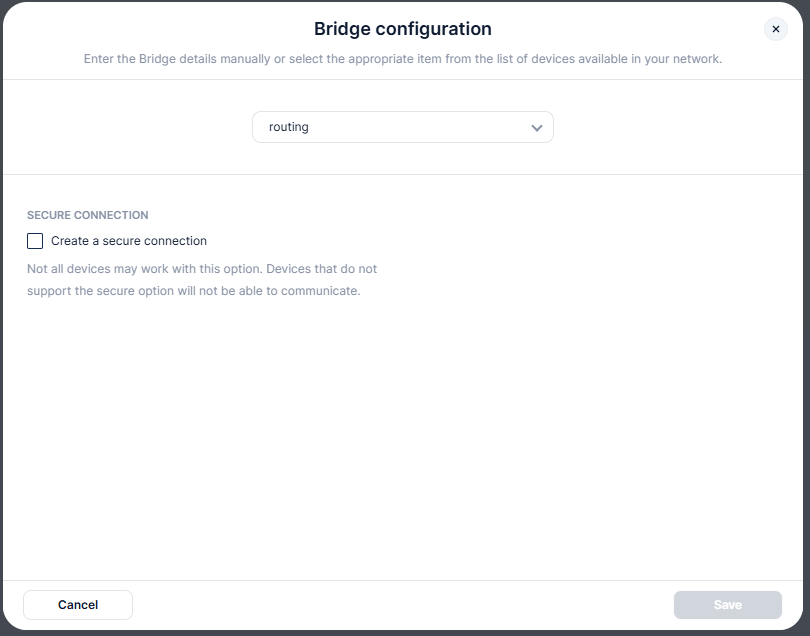
Indeed there seems to be a bug, when ip field is empty (and for routing it should be empty - we use default 224.0.23.12) you cannot select routing. PUT request you made should work, but only only after restart of knx-engine (or gateway) Correct request to enable "routing" connection would be POST ${IP}/api/devices/9/action/configure with payload {"args":[{"connectionType": "routing"}]}
-
Pamiętaj, że bez ochrony lokalnej ten kontrakton domyślnie będzie sterował wyjściem. Także koniecznie by przycisk sterujący był podłączony do wejścia co odpowiada danemu wyjściu - temu co steruje bramą (wyłączona ochrona lokalna) a kontrakton do drugiego wejścia z włączoną ochroną lokalną lub po prosty odłączonym drugim wyjściem. Poza tym, nic więcej.
-
Witajcie, mam okna Fakro z napędem i komunikacją z-wave. Wielkie podziękowania dla zapolu Fibaro, który opracował szablon dla tych okien. Mam jednakże problem z aktywacją kalibracji okna. pomimo zapisania [ wg procedury] - stanu rozkalibrowanego i skalibrowanego ( pkt 2 a potem 1 parametru) - kalibracja się nie aktywuje. Prośba o podpowiedź jak to uruchomić. druga kwestia - zintegrowane markizy Fibaro. Możecie też opracować szablon ?
-
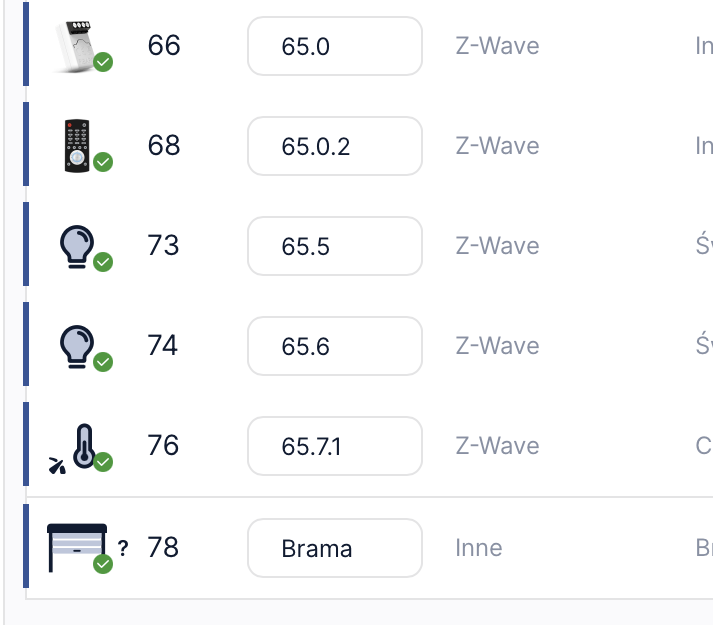
Dzięki serdeczne - wszystko działa! Nie wiem czemu nie ma tej informacji w manualu. Jezeli chodzi o kontaktron to podpinam go do zielonego kabelka i do GND silnika i w ustawieniu Wejscia 2 --> Binarny NC --> i po prawej numer czujnka z centralki ? W moim przypadku to bedzie numer 65.6 ( 65.5 to sygnal wejscia 1 - podswietla sie gdy otwieram brame). Czy są jescze jakeis specyfincze ustawienia jesli chodzi o kontaktron?
-
Your rule, simplified, looks like: rule([[ $Bezetting_Eethoek == 'Vrij' & $Bezetting_Keuken == 'Vrij' & $Verlichting_Appartement == 'Aanwezig_Aan' & schakelaar_eettafel == false => case || $Temp_Binnen_Buiten_Delta == 'Koud' >> log('Hupp1') || $Temp_Binnen_Buiten_Delta == 'Warm' >> log('Hupp2') end ]]) and will only trigger if the any variable in the condition $Bezetting_Eethoek == 'Vrij' & $Bezetting_Keuken == 'Vrij' & $Verlichting_Appartement == 'Aanwezig_Aan' & schakelaar_eettafel changes. And the action will run if the condition is true. It will not trigger on Temp_Binnen_Buiten_Delta changing from Koud to Warm or vice versa as that test is not in the condition part of the rule.
-
I had to use API with PUT method. JSON body: {"properties":{"ip":"224.0.23.12", "mac":"", "port":3671}} Now, I got it working.
-
Hello, I am unable to set-up KNX/IP Routing communication. It is grayed out.
-

YahueV2 (Yet another Hue app, using Hue API v2)
jgab replied to jgab's topic in Tutorials and Guides
The problem may have been there all the time... try v0.2.75 with a fix. -
Jan, if he GV change it does't work as trigger? Action comes if light is switched oo than he changes from warm in to Koud or vice versa rule([[$Bezetting_Eethoek == 'Vrij' & $Bezetting_Keuken == 'Vrij' & $Verlichting_Appartement == 'Aanwezig_Aan' & schakelaar_eettafel == false =>case || $Temp_Binnen_Buiten_Delta == 'Koud' >> fibaro.call(eethoek.Eethoek_Lampen,"turnOn","Kleur_Koud_5"); log.dodgerblue('38-A - Hue scene Eethoek - "scene","Kleur_Koud_5"'); wait(00:00:02); log.khaki('38-A - Eethoek_Lampen lichtsterkte >>> %s procent',eethoek.Eethoek_Lampen:value); wait(0) || $Temp_Binnen_Buiten_Delta == 'Warm' >> fibaro.call(eethoek.Eethoek_Lampen,"turnOn","Kleur_Warm_5"); log.dodgerblue('38-2A - Hue scene Eethoek - "scene","Kleur_Warm_5"'); wait(00:00:02); log.khaki('38-2A - Eethoek_Lampen lichtsterkte >>> %s procent',eethoek.Eethoek_Lampen:value); wait(0) end ]])
- Last week
-
YahueV2 (Yet another Hue app, using Hue API v2)
Sjakie replied to jgab's topic in Tutorials and Guides
Jan, V02.74 Before I did't see this error? [14.07.2026] [16:37:24] [ERROR] [QUICKAPP397]: QuickApp crashed [14.07.2026] [16:37:24] [ERROR] [QUICKAPP397]: ./include/App.lua:1085: attempt to call a nil value (method 'turnOff') turn off is the last line in app self:updateProperty("value", self.hasDim and 0 or false) self:updateProperty("state", false) self:_stampCmd() self.group:turnOff(self.transition) -
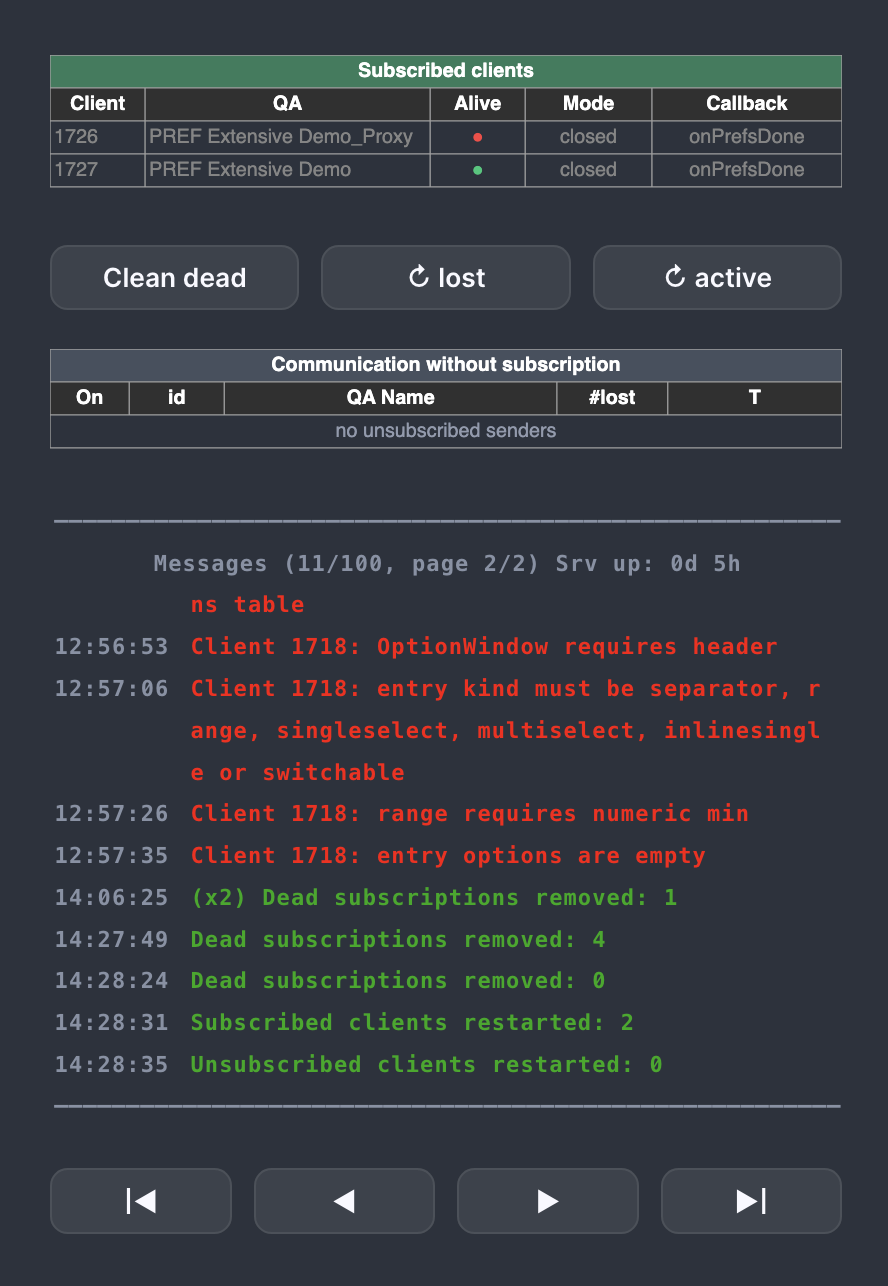
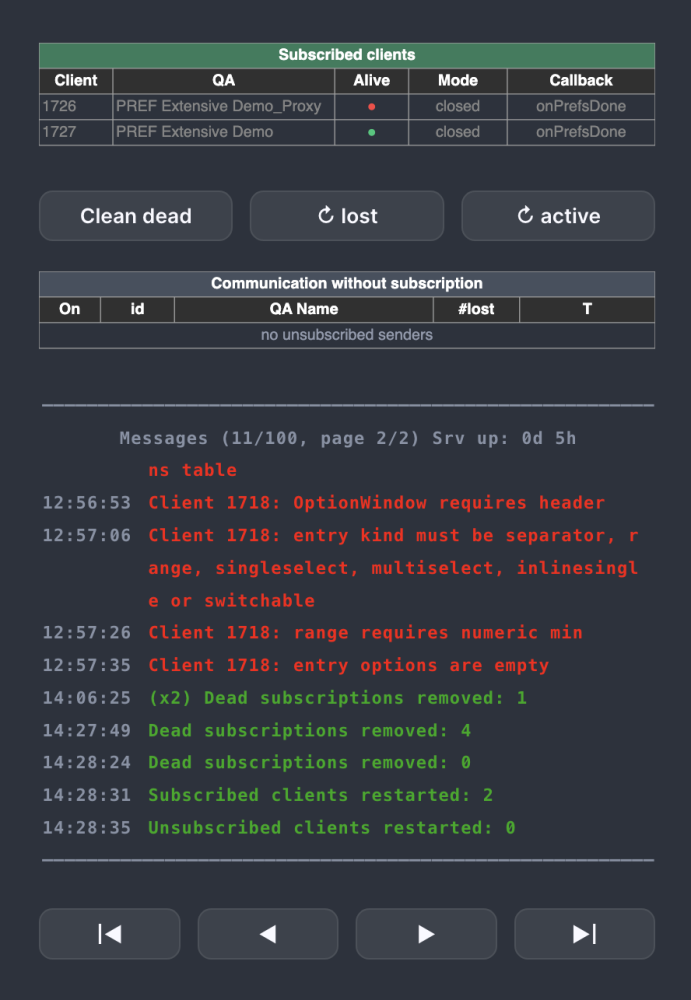
Good morning. Programs Nobody Needs, episode twelve (or something around that). Long. A story behind. I would like to draw your attention to the short video attached. It shows how, using Fibaro’s “normal” interface and its ability to display SVG graphics, one can build a system for managing application settings - preferences. I have seen user applications with a large number of configurable elements more than once. Their settings were changed using standard Fibaro UI elements: buttons, text fields or drop-down lists. Such an interface, however, quickly becomes extremely long and - in the applications I have seen - remains visible all the time. This is hardly ergonomic and effectively obscures information that is important “on a daily basis”. That is why the idea of doing this without the above disadvantages started growing in my head. I will leave it to you to judge how it turned out from the user’s point of view. The fact is that a surprisingly large number of settings can fit into a relatively small part of a typical screen - far more than with the standard UI. 20260714_153801.mp4 The server and communication model. A table library I wrote a time ago came to the rescue - except that it uses SVG rather than HTML. This approach was necessary mainly to obtain pop-up windows, which made it possible to create a compact and readable interface. In general, this library can perform “miracles” compared with HTML tables. The price is a larger data payload. My previous experience with the client–server model, which had already worked well in the TableMan project, proved very useful here. The server and SVG engine was already there. Only one tiny detail remained - marrying the two together - so the work progressed quite quickly. SetMan, like TableMan, uses a client–server architecture. It collects commands from its clients and sends a dynamically generated, up-to-date image of the preferences directly back to them, without involving ANY client-side code. The server controls everything on the client, including button labels and their visibility. There is practically no communication protocol at all - it is a “fire and forget” model. The exception is completing the editing process. Client application defines an onPrefsDone function, which the server calls after the settings have been confirmed. The function receives a table containing the editing result, and it is then up to the application to use those data. The same function is used for reporting errors. In that case, the message is available in payload.result.error, while the error is simultaneously recorded in the server’s private terminal. The server itself displays basic information about its clients. It detects deleted applications and communication from clients that have lost their subscription, for example after a server restart. It also allows dead subscriptions to be removed and clients to be restarted remotely. The client. A small Client module has to be included in the user application. It contains just... 34 lines of code (sic!). That is perfectly sufficient. The Client is a complete idiot. It validates nothing and calculates nothing. Apart from the UI-handling functions for the buttons, it has only three functions in total: register, new, exec. The last one is used to send preference definitions and actions performed by the user - button presses - to the server. An application can have several different preference sets prepared and replace them dynamically. At any given moment, however, only one set, one UI field and one group of buttons are possible. The preference definition is an ordinary serializable Lua table. "Construction language” is quite compact. For example, the settings shown in the video take about 100 lines, even though they include numeric ranges, single and multiple selections, switchable rows, separators and pop-up windows. There is many taht can be configured. Among other things, one can specify: type of each item, number and width of columns, keys of returned values, range, step and unit of numeric values, different increments for short and long button presses, single and multiple selections, section separators, behaviour of switchable rows, size and position of pop-ups, selected interface colours, the initial cursor position. Not everything has to be defined. There is a set of defaults which produces the appearance shown in the video. What I personally find attractive: in “inactive” state, only one PREFS button remains visible. Pressing it expands the preferences view and reveals the remaining buttons. Their labels change depending on the current operation: navigation, value editing, selecting from a list or confirming changes. Once editing is complete, the entire preferences interface disappears again and the application receives the final result. Does anybody need it? Probably not. But after all, this is the “Programs Nobody Needs” series. Part of code defining example in video: { name = "Climate and energy", spec = { title = "Climate and energy", header = { { label = "Setting", width = "60%" }, { label = "Value", width = "40%", value = true } }, switchElementMode = "multi", multiValueText = "[selected]", entries = { { kind = "separator", text = "Climate" }, { kind = "range", key = "targetTemperature", cells = { "Target temperature", "" }, value = 21.5, options = { min = 16, max = 28, step = 0.5, longStep = 2, unit = " °C", decimals = 1 } }, { kind = "range", key = "nightTemperature", cells = { "Night temperature", "" }, value = 18, options = { min = 14, max = 24, step = 0.5, longStep = 2, unit = " °C", decimals = 1 } }, { kind = "inlinesingle", key = "profile", cells = { "Comfort profile", "" }, selected = 2, options = { "Eco", "Comfort", "Boost" } }, { kind = "singleselect", key = "heatingMode", cells = { "Heating mode", "" }, selected = 1, options = { { label = "Automatic schedule", value = "auto" }, { label = "Manual control", value = "manual" }, { label = "Heating off", value = "off" } } }, { kind = "multiselect", key = "heatingDays", cells = { "Active days", "" }, selected = { 1, 2, 3, 4, 5 }, options = { "Mon", "Tue", "Wed", "Thu", "Fri", "Sat", "Sun" } }, ... ...
-
- 5
-
-
Ok @jgab, many thanks for the clarification. Giovanni
-
 Sharper joined the community
 -
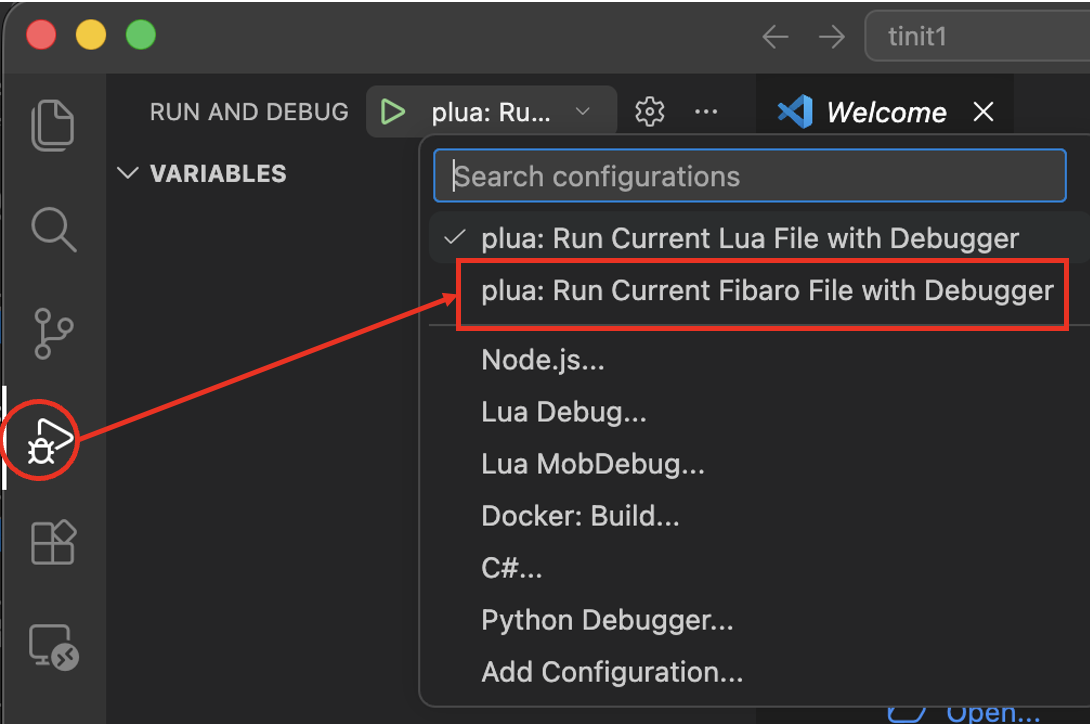
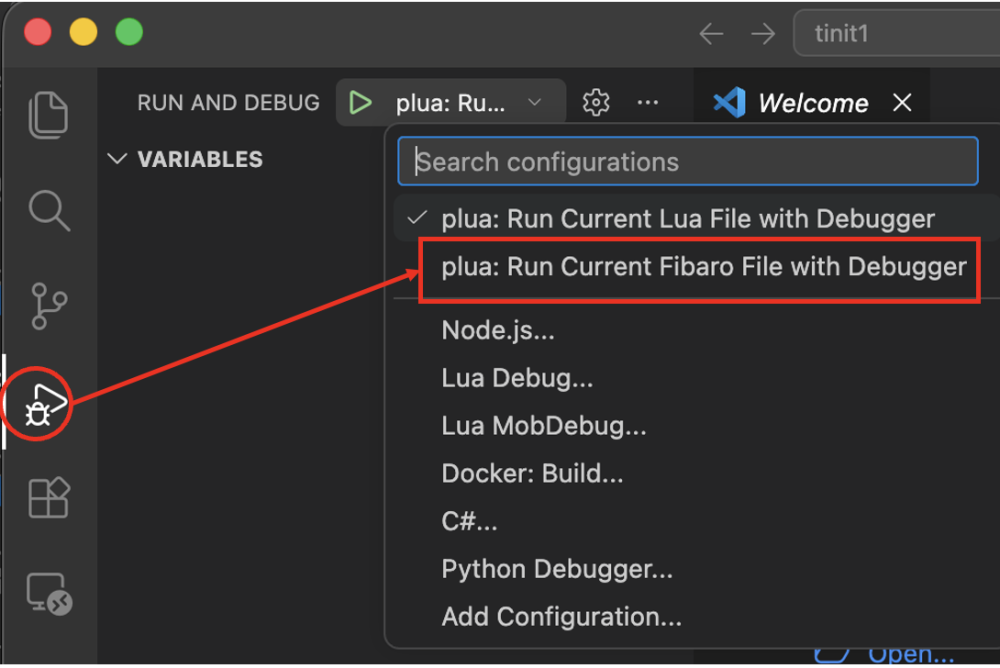
The command >plua --init will create a project setup in a new workspace for vscode. Besides choosing a QA template it will also install /.vscode/launch.json /.vscode/tasks.json The launch.json contains 2 different launch configs: -plua: Run Current Lua File with Debugger -plua: Run Current Fibaro File with Debugger The first config just runs a lua file without loading the fibaro APIs. The second expects the file to be a QA and will load the fibaro APIs and try to start QuickApp:onInit if it exists. Note that when pressing F5 or choosing "Start Debugging" in vscode, it will run the current chosen launch configuration. If that happens to be the first config, in this case, it will complain that there is no fibaro.* or api.* functions available. In vscode we select the launch config in the run and debug side panel.
-
 Ladislavmolnar joined the community
 -
I had the same for a project created with "plua --init-qa", so I guess that command maybe out of date/sync. Also having a problem with downloadQA. Running "plua --fibaro -t 'downloadQA 1240:.' dummy.lua" results in"[ERROR ][PLUA]: Unknown tool: downloadQA 1240:." Edit: downloadQA issue was from VS Code setup guide again (different machine). Copy/paste from @jgab answer above resolved it.
-
I had the same for a project created with "plua --init-qa", so I guess that command maybe out of date/sync. Also having a problem with downloadQA. Running "plua --fibaro -t 'downloadQA 1240:.' dummy.lua" results in"[ERROR ][PLUA]: Unknown tool: downloadQA 1240:."