

About This File

UHAS v1.0.4 (Universal Home Automation System) for HC2
UHAS INTRODUCTION
UHAS is a set of scenes and Virtual Devices (VD) that provide the following capabilities:
- Auto translation of all scenes, VD's, predefined global variables, and messages to 31 different languages (19 directly supported by HC2) (NOTE – not all languages are translated, and users are very welcomed to help with translations that are not yet done)
- Scheduled and repeating events based on time of day, week, month, and season including Scene FTBE which provides repeating and scheduled actions
- Advanced Notification Center (ANC) brings centralized notifications with support for most popular services like Pushover, Telegram, GroupMe, WhatsApp and Signal, Sonos TTS and LaMetric TIME smart clock notifications
-
Advanced Lighting Control (ALC) with integration for Philips HUE, Nanoleaf, LIFX and Blebox devices (will be provided in separate package)
-
Very Smart Blinds (VSB) automation
-
Presence monitoring and control with geofencing and Netatmo presence
-
Weather state and forecast with notifications and integration for Netatmo weather station and WeatherFlow and Tempest weather stations
-
Home consumption monitoring and recording
-
Appliance monitoring - with notifications
-
Safety alarms fire and flood
-
Security alarm integration ready with provided global variables
-
Irrigation control based on FIBARO devices
-
Scenes ready to use with Fibaro dimmer 2, Fibaro keyFob, Fibaro Swipe, Fibaro Button and Remotec ZRC-90 central scene activation with built in support for ANC
-
HC2 system status notifications, automatic backups and many more...
UHAS OVERVIEW
- UHAS has been developed for the Fibaro Home Centre 2 (HC2) home automation controller, as a series of modules, which are responsible for one particular action or job, and the user can interact with them as a group, or on their own.
- UHAS provides an advanced Home Automation (HA) set of features, ready to be used out of the box with minimum user effort to set up and run. Running code is provided as part of the system, doing most of the settings for the user or a systems installer.
- UHAS is primarily intended to be used by users of the Fibaro HC2 system who wish to have fully featured HA without the need to learn LUA programming and spending a lot of time with coding Virtual Devices and scenes.
- UHAS can also become a part of a mature Fibaro system installation which has developed with many modules to cover more advanced HA and more devices.
- UHAS Virtual Devices and scenes use proprietary code developed by author. This code is developed to minimise users involvement in installation and setting of the system. Most of the necessary setting is done by the UHAS components and other settings are simplified and minimised as much as possible. This was also possible because all UHAS VD's and scenes use role system that is used to find necessary components for actions to be performed.
- UHAS Virtual devices category is set automatically during translation or changing of the main icon. This means that most of the VD's should show in proper category in new mobile app as lights, blinds, gates, ambience, climate, safety, security, multimedia, remotes and other. The same goes for scenes, when scenes save their settings after first manual run then also category is set.
UHAS PREREQUISITES
-
Fibaro Home Center 2 (HC2) with firmware version 4.120 or higher (recommended but not necessary expanded RAM memory to at least 2Gb)
-
Configured and installed z-wave devices – I.e., light switches, motion sensors, lux detectors etc.
INSTALLATION AND UPGRADE
- NEW USERS - Please download provided UHAS v1.0.3 Installation package and UHAS Installation and User Manual v1.0.3 EN and then UHAS v1.0.4 update package and install.
-
EXISTING USERS - if your UHAS is:
- Not yet started with installation then please download full package UHAS v1.0.3 Installation package and install.
- Still on v1.0 or V1.0.1 then please first download UHAS v1.02. upgrade package and install. Lastly download and install UHAS v1.03. upgrade package
- Installed v1.0.2 then please download UHAS v1.03. upgrade package and install.
- Installed v1.0.3 then please download UHAS v1.04. update package and install.
ADDITIONAL NOTE - In UHAS Installation and User Manual v1.0.3 EN instructions for ALC scene upgrade say:
UPGRADE INSTRUCTIONS – This upgrade is recommended. To upgrade and keep your ALC Scene settings please copy new code from ALC Scene v1.3.3.lua from line:
-- NEW v1.3.3 - copy code from here to the end of scene code to keep your settings above this line
to the end of code.
The mentioned line I forget to add to the code before making upgrade package, therefore please copy new code from line:
-- THE CODE BELOW DOES NOT REQUIRE MODIFICATION BY THE USER to the end of code. Thanks goes to @MiZ for pointing that out 🙏
IMPORTANT NOTE
UHAS uses its own unique global code variables. This means that UHAS will NOT influence the current system scenes, scripts, or virtual devices in any way, even if any of Sankotronic’s earlier UHAS beta versions and standalone scenes or VD's (Virtual Devices) are being used. There is no need for any changes to be made to the existing code before the installation of UHAS. The UHAS global variables are created and controlled automatically by the system so that you do not need to maintain them manually.
UHAS INSTALLATION PACKAGE CONTENT (29.1Mb)
- 92 Virtual Devices
- 53 scenes
- Icon sets for all the above VD's and scenes
THANK YOU! ❤️
I want to BIG thank to @clowg for helping me with translations and writing manual these last days speeding up publishing UHAS.
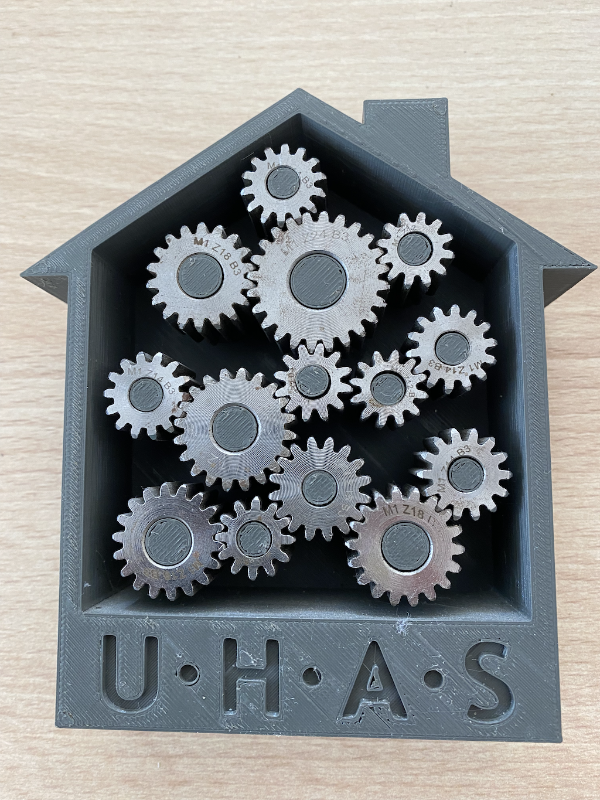
BIG thank to @gucio1234 and his son Cyprian for making logo for UHAS and 3D printed with real gears! I just love it ❤️
I also want to thank many of you who helped during testing of UHAS beta versions and with translations! @clowg, @speedoxx007 ,@Bodyart, @jimicr, @gucio1234, @jompa68, @Sjekke, @robw, @rbhun, @lennypenny, @FunkFib, @MarcoT, @Orgli, @MarcoTorino71 and many others. Your help is greatly appreciated. Apologies to all other not mentioned nice people who contributed in making UHAS.
I also want to thank gurus of this forum @petergebruers, @jgab, @cag014, @SmartHomeEddy and others for help with coding in LUA.
And of course a BIG thank to Fibaro for providing Home Center 2 and Home Center 3 for developing purposes!
BIG THANKS! also to all UHAS users for their donations! Your support is greatly appreciated! 🙏
TERMS AND CONDITIONS
Permission to use, copy, modify and distribute this software and its documentation for educational, research, personal use and non-profit purposes, without fee and without a signed licensing agreement is hereby granted, provided that the copyright notice, with "Terms and conditions" and "Disclaimer" appear in all copies, modifications and distributions. It is strictly forbidden to sell, rent, lease and/or lend this software for profit without prior consent from the Author.
DISCLAIMER
This software is provided by copyright owner "as is" and any express or implied warranties, including, but not limited to, the implied warranties of merchantability and fitness for a particular purpose are disclaimed. In no event shall the author and distributor be liable for any direct, indirect, incidental, special, exemplary, or consequential damages (including, but not limited to, procurement of substitute goods or services; loss of use, data, or profits; or business interruption) however caused and on any theory of liability, whether in contract, strict liability, or tort (including negligence or otherwise) arising in any way out of the use of this software, even if advised of the possibility of such damage.
Fibar Group S.A. and their employees are not responsible for support of the UHAS. Please contact the author Sankotronic, on the Fibaro Forum, for any questions or support required.
Edited by Sankotronic
Added new update
What's New in Version 1.0.4 See changelog
Released
Changes & corrections done for UHAS update 1.0.4
- "TTS Translation scene" - v1.4.3 added translation for Fan humidity control.
- "System Status VD" - v1.5.2 corrected setting up interactive push message in main loop. Was missing adding Remote reboot scene ID.
- "Watchdog VD" - v1.5.4 corrected update list button code for opening global variable UHASSystemCtrl and main loop code for new version and startup delay from 10 to 20 minutes
- "ANC Message Queue VD" - v1.2.1 Buttons ANC msg DELETE and ANC msg DELETE ALL - corrected code to update properly queue_tot in global variable UHASAncQueue that holds number of saved messages. Main loop only updated VD version.
- "Netatmo Weather Station scene" - v3.0.2 corrected Netatmo server domain name "api.nentamo.com" since "api.netatmo.net" will be depreciated
- "Netatmo Public Station scene" - v1.3.1 corrected Netatmo server domain name "api.nentamo.com" since "api.netatmo.net" will be depreciated
- "HUE2 Preview scene" - v1.0.3 changed code for sending commands to HUE bridge so that HUE2 Group VD can send effect to each bulb that is member of controlled group
- "HUE2 Preview VD" - v1.0.5 Main loop corrected updating state of the installed HUE2 VDs including plugs and effects.
- "HUE2 Group VD" - v1.0.3 Main loop modified code to properly update state of the lights when effect is running and added user setting for effect names. Process button v1.0.2 calling HUE2 scene function modified so that number of running instances can be check to wait or send command immediately. Added processing of effects for which buttons are added to the VD
- "HUE2 Color VD" - v1.0.3 Process button calling HUE2 scene function modified so that number of running instances can be check to wait or send command immediately. Added processing of effects for which buttons are added to the VD
- "HUE2 White VD" - v1.0.2 Process button calling HUE2 scene function modified so that number of running instances can be check to wait or send command immediately
- "HUE2 Dimmable VD" - v1.0.2 Process button calling HUE2 scene function modified so that number of running instances can be check to wait or send command immediately
- "HUE2 Plug VD" - v1.0.2 Process button calling HUE2 scene function modified so that number of running instances can be check to wait or send command immediately
- "Christmas Indoor scene" - v1.0.5 added delays between turning lights on/off to avoid high demand on HC2 and Philips HUE bridge and make sure that all lights will be executed properly. Delay time is in milliseconds and can be adjusted by users.
- "Christmas Outdoor scene" - v1.0.5 added delays between turning lights on/off to avoid high demand on HC2 and Philips HUE bridge and make sure that all lights will be executed properly. Delay time is in milliseconds and can be adjusted by users.
- "Netatmo Camera scene" - v1.7.1 Corrected Netatmo server domain name "api.nentamo.com" since "api.netatmo.net" will be depreciated
- "Netatmo Camera finder scene" - v2.3.1 Corrected Netatmo server domain name "api.nentamo.com" since "api.netatmo.net" will be depreciated
- "Netatmo Air Quality Station scene" - v1.6.1 Corrected Netatmo server domain name "api.nentamo.com" since "api.netatmo.net" will be depreciated
- "Sonos API Setup VD" - v1.1.2 Corrected main loop code part to check and update zone players
- "Sonos API Player VD" - v1.5.2 Corrected main loop code part to check and update zone players
- "Pool Control VD" - v1.3.2 Main loop and open pool button code corrected for pump auto program and checking of sensors.
How to install UHAS update 1.0.4
- Existing users - if not installed UHAS v1.0.3 then first install upgrade 1.0.3 and then download and install upgrade v1.0.4
- New users - First download and install installation package v1.0.3 and then upgrade to v1.0.4






Recommended Comments
Join the conversation
You can post now and register later. If you have an account, sign in now to post with your account.