Jump to content

Welcome to Smart Home Forum by FIBARO

Dear Guest,


as you can notice parts of Smart Home Forum by FIBARO is not available for you. You have to register in order to view all content and post in our community. Don't worry! Registration is a simple free process that requires minimal information for you to sign up. Become a part of of Smart Home Forum by FIBARO by creating an account.


As a member you can:

  •     Start new topics and reply to others
  •     Follow topics and users to get email updates
  •     Get your own profile page and make new friends
  •     Send personal messages
  •     ... and learn a lot about our system!


Regards,

Smart Home Forum by FIBARO Team


1 Screenshot

About This File

WeatherAPI weather provider QA standalone v1.0

INTRODUCTION

WeatherAPI weather provider QA brings current weather state and forecast provided by Weather API to your home automation. Can be selected as default weather provider on HC3, HC3L and Yubii Home.


PREREQUISITES

  • Fibaro HC3, HC3Lite or Yubii Home with firmware 5.160 or greater
  • User account on WeatherAPI with free subscription


FEATURES 

  • QA can be set as default weather provider to update HC weather condition, temperature, humidity and wind.
  • Current weather and weather forecast measurements and are shown on child devices added, while current weather and forecast condition is shown by icon and description on main QA.
  • The QA checks measurement units setup on user's Fibaro controller and adjusts values accordingly.
  • QA has built in multi-language support with 32 languages included (see APPENDIX 1 for the list). QA can use HC selected language or user can select any other available language.


DOWNLOAD PACKAGE CONTENT 

  • WeatherAPI weather provider QA  v1.0
  • WeatherAPI weather provider QA  User manual v1.0
  • Icon set


INSTALL & UPGRADE 

MPORTANT NOTE - Due to upload file type restrictions imposed by Fibaro for Quick Apps, after downloading file with FQA extension, change this extension to ZIP and then unzip package. In this ZIP package you will find PDF User manual, WeatherAPI weather provider QA v1.0 Standalone.fqax and folder with icons. Please follow User manual for installation & upgrade. I hope that Fibaro will remove this limitation in near future since there is no such limitation on Fibaro Marketplace and even here for Virtual Devices.

NOTE - I know that some users will not like that this QA is encrypted. Since license is now changed to donationware, I can send original code or even unencrypted QA, but only to users that will donate or at least write a review and vote. Thank you for understanding!


TERMS AND CONDITIONS 

Permission to use, copy and distribute this software and its documentation for educational, research, personal use and non-profit purposes, without fee and without a signed licensing agreement is hereby granted, provided that the copyright notice, with "Terms and conditions" and "Disclaimer" appear in all copies, modifications and distributions. It is strictly forbidden to sell, rent, lease and/or lend this software for profit without prior consent from the Author.


DISCLAIMER

This software is provided by copyright owner "as is" and any express or implied warranties, including, but not limited to, the implied warranties of merchantability and fitness for a particular purpose are disclaimed. In no event shall the author and distributor be liable for any direct, indirect, incidental, special, exemplary, or consequential damages (including, but not limited to, procurement of substitute goods or services; loss of use, data, or profits; or business interruption) however caused and on any theory of liability, whether in contract, strict liability, or tort (including negligence or otherwise) arising in any way out of the use of this software, even if advised of the possibility of such damage. 

Fibaro a Nice company and their employees are not responsible for support of this QA. Please contact the author Sankotronic, on the Fibaro Forum, for any questions or support required. 


VERSION HISTORY 

  • 1.0 - first public release as donationware.


LOOK & FEEL  
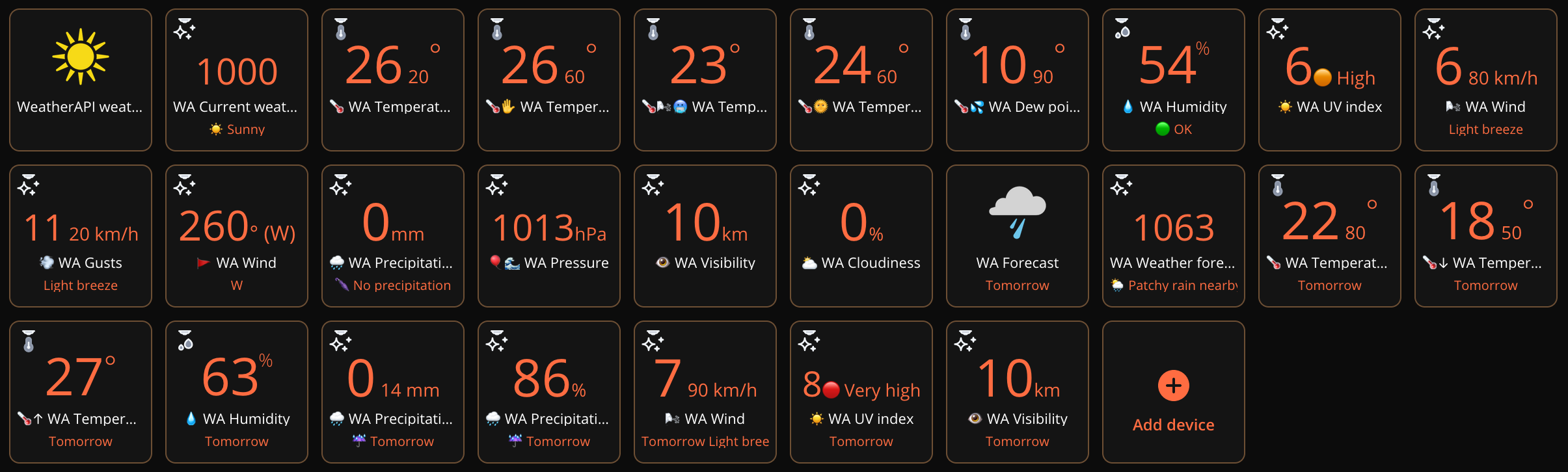
 

WAPIQAv1.0onGUI.thumb.png.e10fe96472594209f7ad0cb0f589a1a8.png


Enjoy coding and your new WeatherAPI weather provider QA! :-)

Sankotronic


User Feedback

Recommended Comments

Christb

Posted (edited)

Dear @Sankotronic,


I have installed your QA WeatherAPI and found the following:

- The PC view is perfect as log messages are visible as below:

image.thumb.png.2a4ba7cd35f3b51d755e6fb32dacbb62.png

image.thumb.png.19a62ae79577c04c1022463f38da661e.png

image.png.8fa2ae7b58f52d6cdc164dd0ac5f1e31.png

- As you can see I had to change some translations in French for the following reasons:

1) It was difficult to understand the purpose of some child (forecast or today values) when using the mobile applications because with the old Mobile application, the log is replaced by "last refresh time" not very usefull... and with the new YUBÏÏ application it was even worse as the labels view allows only few characters (no line feed) and the log message is replaced by the room name (Météo).


2) the modules seem not to be sorted as per the PC view and in different maners in the 2 mobile applications🥶 

Examples below:

image.thumb.jpeg.f6532dbc960848bc06453121cfaf30d9.jpegimage.thumb.jpeg.ce97751f4a4246194d7704a6162f32cc.jpeg


- As after installation, the box "Use new view in mobile application" was ticked , the parent module was not visible (WeatherAPI weather provider QA v1.0)

To prevent this, you may add in onInit() these 2 lines:

  self:updateProperty("useUiView",false) --2 lines to force old QA view in mobile application
  self:updateProperty("hasUIView",false) --2 lines to force old QA view in mobile application


On Old mobile application: the child "WA Weather Forecast" is still not visible (all other OK) - no idea why

On New Mobile Application all children are visible but the icon of the parent module is not accepted (595 WeatherA...


Last question:  what is the meaning of the weather code 1000 as shown below (forecast for tomorow is 1003):

image.png.bc04666321d87efef02a09f06d195144.png I have found the csv fle explaining  code/values/icon


Edited by Christb
  • Thanks 1
Sankotronic

Posted

Hi @Christb,


Thank you for valuable feedback.


For translations I really need help. I use some of the translations from my previous work, but not all are done properly as I mentioned in User manual provided.


I know that mobile apps do not show some of the information that can be seen on web UI. Also, older mobile app do not show main QA and forecast child device even if that QA is not selected as default weather provider.


This things will have to wait since I leave tomorrow for my work. Will continue when I'm back in about five weeks.

Christb

Posted

On 7/7/2024 at 10:22 PM, Sankotronic said:

For translations I really need help. I use some of the translations from my previous work, but not all are done properly as I mentioned in User manual provided.

Dear @Sankotronic,

I will be happy to help you for any French translations of your QA labels or messages. I am runing 2 HC2 and 1 HC3 so I can test PC application results and as well as the 3 Fibaro mobile applications.

  • Thanks 1
Christb

Posted

Dear @Sankotronic,


WeatherAPI is no more working today as debug console is showing:

[21.07.2024] [14:50:01] [DEBUG] [QA_WAP_WPST_595]: WeatherAPI weather provider standalone version 1.0 (c) 2024 Sankotronic

[21.07.2024] [14:50:01] [DEBUG] [QA_WAP_WPST_595]: User selected language: 🇫🇷 Français

[21.07.2024] [14:50:01] [DEBUG] [QA_WAP_WPST_595]: Use the new views in mobile application is set to false

[21.07.2024] [14:50:01] [DEBUG] [QA_WAP_WPST_595]: Child auto naming set to false

[21.07.2024] [14:50:01] [DEBUG] [QA_WAP_WPST_595]: Weather provider will refresh every 5 min

[21.07.2024] [14:50:01] [DEBUG] [QA_WAP_WPST_595]: HC3 HC3-00006080 units are metric wind speed unit is km/h

[21.07.2024] [14:50:02] [DEBUG] [QA_WAP_WPST_595]: WeatherAPI condition code: 1240 condition: ERROR

[21.07.2024] [14:50:02] [DEBUG] [QA_WAP_WPST_595]: WeatherAPI forecast condition code: 1003 forecast condition: n/a

[21.07.2024] [14:50:02] [ERROR] [QUICKAPP595]: QuickApp crashed


I have no clue of what is causing this crash.

I have changed the access password of my HC3 but your QA does not seem to need to know this password.

Sankotronic

Posted

Hi @Christb,


thank you for reporting. It seems that condition code 1240 is missing. Will check when I get back home in about two weeks. 

Christb

Posted

On 7/21/2024 at 2:55 PM, Christb said:

WeatherAPI is no more working today as debug console is showing:

Dea @Sankotronic,

Weather API back to work, in fact Waether API change mu APIcode from pro to free and entering in variable the new API key all back to normal.

Sorry for any inconveniance caused.

may be the error message is not enough clear to understand the the API key is invalid.

WeatherAPI condition code: 1240 condition: ERROR


Christb

Posted

Dear @Sankotronic,

Weather API I have installed working fine since my last post. Just a little remark: the icon of the parent QA is not always displayed correctly.

I have YR Weather also installed and some times they both show the same icon and sometimes not as below (I guess when sun is shining):

image.png.3d99303b69676c335129612c53e86685.pngthe tomorow forecast child is alwais displaying the correct iconimage.png.20ba9c920020a67626da2997a9cc3ae2.png.

Any idea why?


Sankotronic

Posted

Hi @Christb,


I'm aware of that bug. There is an unexpected character left in the code for that weather code and that is why icon is not displayed correctly.

Will publish corrected version, but in few weeks since today I7m leaving home for my work.


Thanks for reporting! 👍

  • Like 1

Join the conversation

You can post now and register later. If you have an account, sign in now to post with your account.

Guest
Add a comment...

×   Pasted as rich text.   Paste as plain text instead

  Only 75 emoji are allowed.

×   Your link has been automatically embedded.   Display as a link instead

×   Your previous content has been restored.   Clear editor

×   You cannot paste images directly. Upload or insert images from URL.

×
×
  • Create New...