Welcome to Smart Home Forum by FIBARO
Dear Guest,
as you can notice parts of Smart Home Forum by FIBARO is not available for you. You have to register in order to view all content and post in our community. Don't worry! Registration is a simple free process that requires minimal information for you to sign up. Become a part of of Smart Home Forum by FIBARO by creating an account.
As a member you can:
- Start new topics and reply to others
- Follow topics and users to get email updates
- Get your own profile page and make new friends
- Send personal messages
- ... and learn a lot about our system!
Regards,
Smart Home Forum by FIBARO Team
Search the Community
Showing results for tags 'solaredge'.
Found 2 results
-
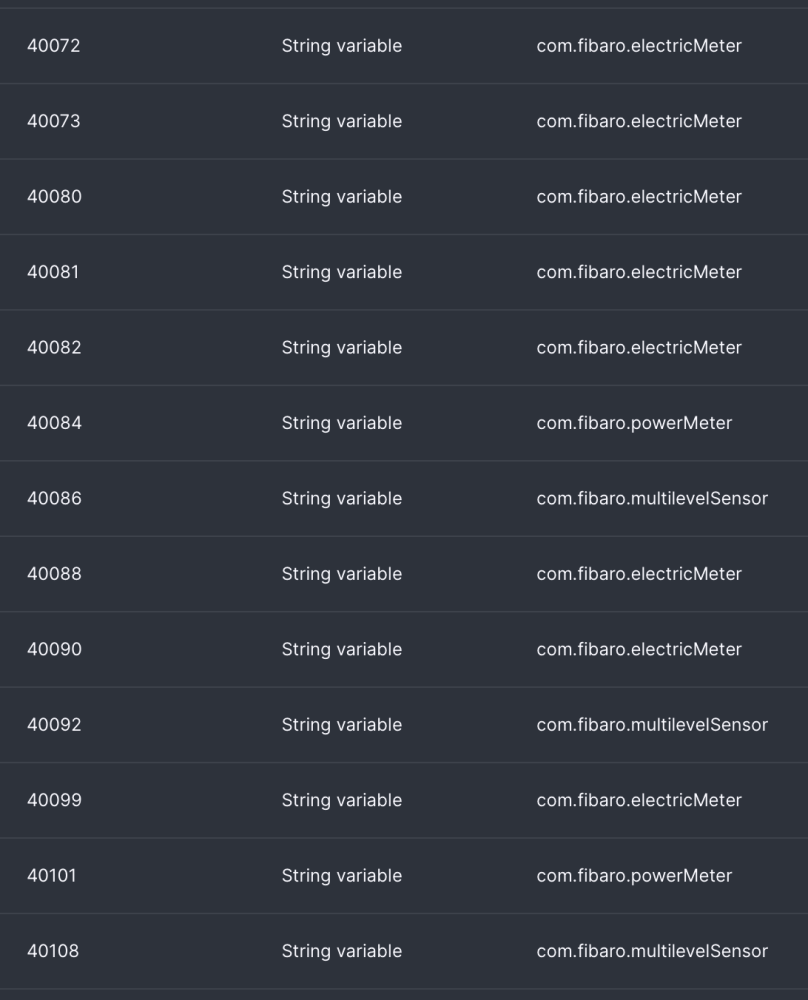
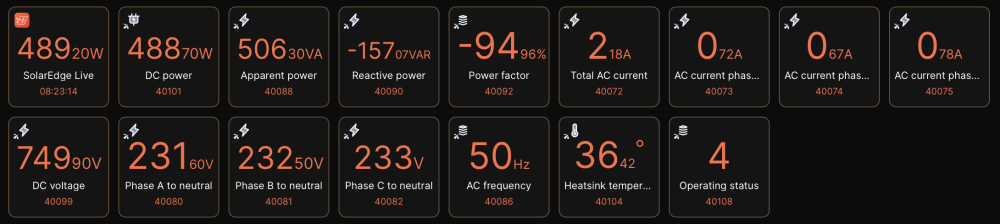
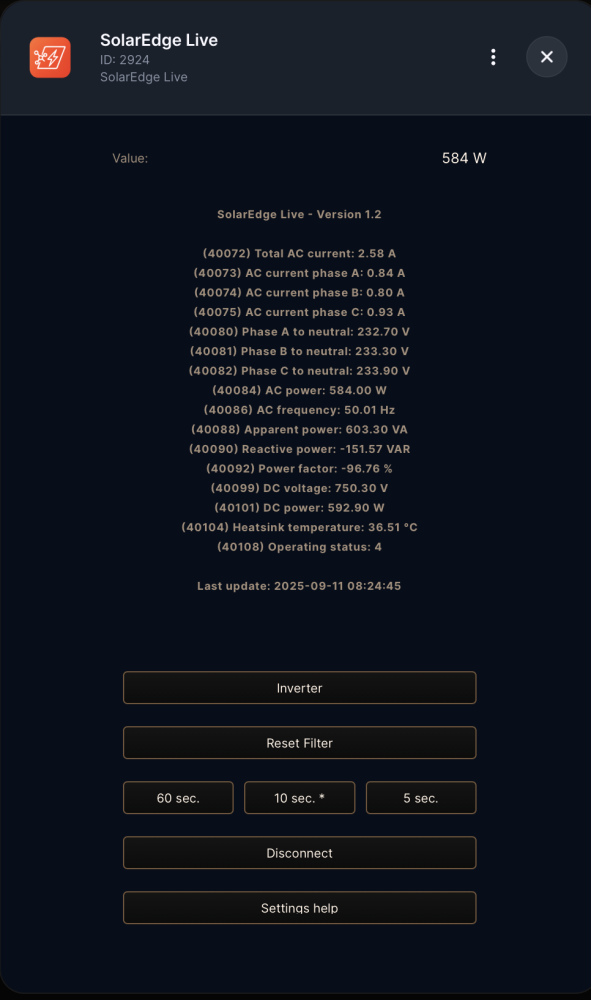
This is the next version 1.2 of the SolarEdge Live (Modbus) QuickApp. The SolarEdge Live (Modbus) QuickApp represents an advanced integration that provides instant, real-time access to local inverter data without the limitations of cloud-based API’s. This QuickApp uses the Modbus of your SolarEdge Inverter to get the real-time information about your SolarEdge setup. The QuickApp reads the SolarEdge SunSpec Modbus registers and shows the with QuickApp variables requested register values in child devices and labels. The QuickApp runs at an interval setup in the QuickApp variables. A special button is available to adjust the speed up the interval. Example QuickApp Variables with register addresses and devicetypes: Enabling Modbus on SolarEdge Inverters: To enable Modbus communication on a SolarEdge inverter, follow these general steps: Access the inverter’s configuration menu, either via its control panel or through the manufacturer’s configuration app. Navigate to the communication settings. Enable Modbus support, selecting TCP/IP for network connections. Adjust Modbus parameters as needed, such as device ID and communication port. Save your changes and restart the inverter if required. After activation, the inverter is ready to communicate with external systems or monitoring solutions using the Modbus protocol. Always consult your inverter’s user manual for detailed instructions specific to your model. Important documentation for the right register addresses (use the base 1 address): https://knowledge-center.solaredge.com/sites/kc/files/sunspec-implementation-technical-note.pdf Disclaimer: Use this QuickApp at your own risk. You are responsible for ensuring that the information provided via this QuickApp do not contain errors. SolarEdge is a registered trademark being the property of SolarEdge. SolarEdge reserves all rights to the registered trademarks. Information which is published on SolarEdge’s websites belongs to SolarEdge or is used with the permission of the rights holder. Making of copies, presentations, distribution, display or any other transfer of the information on the website to the public is, except for strictly private use, prohibited unless done with the consent of SolarEdge. Published material on dedicated SolarEdge press websites, intended for public use, is exempt from the consent requirement. Changes version 1.2 (2nd September 2025) Changed the main device type to com.fibaro.powerMeter, so it can contain the AC Power value. Added QuickApp variable for the main device register, mainRegister (default = 40084 AC Power). Added default don't 'Save events to History' (saveLogs = false) to the setup of every child device. Disabled the warnings for READ, WRITE and Invalid response. Users can't prevent those errors and to display them as warnings only clutters the logging. Changed the text of the interval speed buttons to the content of the quickapp variables intervalChildsS, intervalChildsM and intervalChildsF. Found a few old SolarEdge Modbus QuickApp names in the code and changed them also to SolarEdge Live. Optimised the register mapping. Changed the default interval timing to 60, 10 and 5 seconds. Of course, you can use your own settings. Removed the expiration date. Changes version 1.1 (9th August 2025) Renamed the QuickApp from SolarEdge Modbus to SolarEdge Live. SolarEdge Live represents the QuickApp in a better way. Of course the Modbus is still used as protocol. Added button for 'Inverter' with support for SunSpec model type 101 (single phase), 102 (split phase) or 103 (three phase). Added QuickApp variable inverterType for the model type of your Inverter (101 (single phase), 102 (split phase) or 103 (three phase), default type 101 (single phase). Also see the value of register 40070.) Added optimisation with re-use of the already connected Modbus socket. Improved memory usage with more variables as local variable. Changed the maximum retries to a maximum consecutive time no response. Changed the interval to three speeds, Slow, Medium and Fast. With QuickApp variables the speeds setting can be made for the interval and child updates. Added an indicator (*) to most of the buttons to show what selection is active. Added 'Disconnect' (or 're-connect') button to manually disconnect the QuickApp and Modbus. Added extra check for the amount of addresses (including the extra scale factor addresses) not to exceed 125 (Modbus spec: max 125 registers per request). Added extra check for the addresses being in the 40001-49999 range. Changed the register table to indexed, so the addresses (and scale factors) can be selected directly and fast from the table. Removed a double warning for CONNECT issue. Added in case of a device type 'com.fibaro.energyMeter' the property 'storeEnergyData = false' is added to the setup of that child device. By default the energyMeter won't save energy to the energy database. Added in case of a device type 'com.fibaro.powerMeter' the property 'includeInEnergyPanel = false' is added to the setup of that child device. By default the powerMeter won't be used for instantaneous power in Energy Panel calculations. Added the current time to the log text of the main device. Added the register address to the log text of all the child devices. The log text was empty. This will help to get more acquainted with the register addresses. Placed the register address in front of the label text to make it more readable. Improved the message of the retry warnings, show seconds to maxResponseTime. Improved some register description text. Rounded all the values to two decimal places. Changes version 1.0 (27th July 2025) Initial version with child devices to configure in QuickApp variables. Variables (mandatory and created automatically): host = Modbus TCP IP address of your target device (default 192.168.1.145) port = Modbus TCP port (default 1502) unitId = Modbus slave/unit address (default 1) inverterType = Type of your Inverter (101, 102 or 103, default type 101. Also see the value of register 40070.) intervalS = How fast the Modbus will refresh the data (Slow default 60 seconds) intervalM = How fast the Modbus will refresh the data (Medium default 10 seconds) intervalF = How fast the Modbus will refresh the data (default 5 seconds) intervalChildsS = How fast the Childs will update (Slow default 60 seconds) intervalChildsM = How fast the Childs will update (Medium default 10 seconds) intervalChildsF = How fast the Childs will update (default 5 seconds) maxResponseTime = Maximum time in seconds for response of the Modbus to disconnect (default = 60) debugLevel = Number (1=some, 2=few, 3=all) (default 1) Also with the QuickApp variables child devices can be created. Insert a QuickApp variabel with the address as 'variable' and the deviceType as 'value'. By default the values from the childs will show in the labels (except Scalefactor values). You can use all kinds of devicesTypes, for example: com.fibaro.energyMeter (Wh) (by default no storage to energy database) com.fibaro.powerMeter (Watt) (by default not used for instantaneous power in Energy Panel calculations) com.fibaro.electricMeter (Volt and Ampere) com.fibaro.multilevelSensor (Number values) com.fibaro.temperatureSensor (Temperature) Download the QuickApp here: SolarEdge_Live-12.fqax or from the Fibaro Marketplace: https://marketplace.fibaro.com/items/solaredge-modbus How to install: Open the Configuration Interface Go to Settings > Devices Click + Choose Other Device Choose Upload File Choose file from your computer with .fqax (This download contains several example register addresses, but you can choose you own register addresses to create your child devices)

-
In the next version of SolarEdge Monitor the functions of SolarEdge Extra will be integrated. This QuickApp gets extra information from your SolarEdge managed Solar Panels to give you the most insight of your SolarEdge installation. Site Details: Site details, such as name, location, status, etc. Site Overview: Site overview data. Inventory: Inventory of SolarEdge equipment in the site, including inverters/SMIs, batteries, meters, gateways and sensors. Inverter Technical Data: Return specific inverter data for a given timeframe. Site Power: Site power measurements in 15 minutes resolution. Site Energy: Site energy measurements in 15 minutes resolution. Site Environmental Benefits: All environmental benefits based on site energy production: CO2 emissions saved, equivalent trees planted, and light bulbs powered for a day. Use of the monitoring server API is subject to a query limit of 300 requests for a specific account token and a parallel query limit of 300 requests for each specific site ID from the same source IP. The monitoring server API allows up to 3 concurrent API calls from the same source IP. Any additional concurrent calls will return HTTP 429 error – too many requests. See API documentation on https://www.solaredge.com/sites/default/files/se_monitoring_api.pdf Site Details: id – the siteID name – the site name account id – the account this site belongs to status – the site status (see Site Status on page 53) peak power – site peak power currency - e.g. EUR installationDate – site installation date (format: yyyy-MM-DD hh:mm:ss ) ptoDate – permission to operate date notes type – site type location: country state city address secondary address zip time zone alertQuantity - number of open alerts in this site * alertSeverity – the highest alert severity in this site * publicSettings: isPublic - if this site is public (true or false) public name - name * Alert information is only available when using an API_KEY generated by an account. API_KEY generated at the site level does not return this information. Inventory: Inverter name – the inverter name e.g. Inverter 1 manufacturer – manufacturer name (SolarEdge) model name e.g. SE16K Firmware version e.g. 2.52.311 communicationMethod – the communication interface used to connect to server. e.g.: Ethernet or WIFI. serialNumber – the equipment serial number e.g.: 7F123456-00 connectedOptimizers – number of optimizers connected to the inverter Meters name – the inverter name e.g. “FeedInMeter” Manufacturer – e.g. “WattNode” Model – meter model number SN – serial number (if applicable) Type – metertype, e.g. “Production” Firmware Version (if applicable) Connected To – Name of SolarEdge device the meter is connected to connectedSolaredgeDeviceSN – serial number of the inverter/gateway the meter is connected to form – physical for a HW meter or virtual if calculated by arithmetic between other meters Sensors (Irradiance/wind/temperature sensors) connectedSolaredgeDeviceSN – the S/N of the device it is connected to e.g. 12345678-00 Id – e.g. “SensorDirectIrradiance” connectedTo – name of the device it is connected to e.g. “Gateway 1” Category – e.g.IRRADIANCE Type – e.g. “Plane of array irradiance” Gateways name – the inverter name e.g. Inverter 1 serialNumber – the equipment serialnumber e.g. 7F123456-00 Firmwareversion Batteries Name SerialNumber Manufacturer - the battery manufacturer name Model - the battery model name Nameplate capacity - the nameplate capacity of the battery as provided by the manufacturer Firmwareversion ConnectedTo – Name of SolarEdge device the battery is connected to connectedSolaredgeDeviceSN – serial number of the inverter/gateway the battery is connected to Interver Technical data: timestamp AC current (divided per phase) AC voltage (divided per phase) AC frequency (divided per phase) QRef (divided per phase) CosPhi (divided per phase) TotalActivePower apparentPower - Supported starting communication board version 2.474 activePower - Supported starting communication board version 2.474 reactivePower DC voltage groundFaultResistance powerLimit % Lifetime energy - Supported starting communication board version 2.474 totalEnergy temperature - Celsius inverterMode SLEEPING – night mode STARTING – pre-production MPPT – production THROTTLED – Forced power reduction SHUTTING_DOWN – Shutdown procedure FAULT – error mode STANDBY – maintenance LOCKED_STDBY – standby mode lock LOCKED_FIRE_FIGHTERS – firefighters lock mode LOCKED_FORCE_SHUTDOWN – forced shutdown from server LOCKED_COMM_TIMEOUT – communication timeout LOCKED_INV_TRIP – inverter self-lock trip LOCKED_INV_ARC_DETECTED – inverter self-lock on arc detection LOCKED_DG – inverter lock due to DG mode enable LOCKED_PHASE_BALANCER – inverter lock due to phase imbalance (1ph, Australia only) LOCKED_PRE_COMMISSIONING – inverter lock due to pre-commissioning LOCKED_INTERNAL – inverter lock due to an undisclosed internal reason operationMode 0 – On-grid 1 – Operating in off-grid mode using PV or battery 2 - Operating in off-grid mode with generator (e.g. diesel) is present apparentPower - VA (divided per phase) activePower - VA (divided per phase) reactivePower - VAR (divided per phase) cosPhi (divided per phase) vL1ToN - 1ph only vL2ToN - 1ph only vL1To2 - 3ph only vL2To3 - 3ph only vL3To1 - 3ph only Environmental Benefits: CO2 - quantity of CO2 emissions that would have been generated by an equivalent fossil fuel system SO2 - quantity of SO2 emissions that would have been generated by an equivalent fossil fuel system NOX - quantity of NOX emissions that would have been generated by an equivalent fossil fuel system treesPlanted - equivalent planting of new trees for reducing CO2 levels lightBulbs - number of light bulbs that could have been powered by the site for a day Site Power Detailed: timeUnit - the time unit (QUARTER_OF_AN_HOUR) unit - the measurement units (e.g. Watt) type - i.e. Production, Consumption, SelfConsumption, FeedIn (export) or Purchased (import) date - date and time value - power in Watt at that time of the day Site Energy Detailed: timeUnit - the time unit (QUARTER_OF_AN_HOUR) unit - the measurement units (e.g. Wh) type - i.e. Production, Consumption, SelfConsumption, FeedIn (export) or Purchased (import) date - date and time value - power in Wh at that time of the day Overview: id currentPower lastDayData energy lastDayData revenue lastMonthData energy lastMonthData revenue lastYearData energy lastYearData revenue lifeTimeData energy lifeTimeData revenue lastUpdateTime Changes version 0.1 (25th June 2023) - First (development) version Variables (mandatory and created automatically): - siteID = Site ID of your SolarEdge Inverter (see your Inverter Site Details) - apiKey = API key of your SolarEdge Inverter (contact your installer if you don't have one) - serialNumber = Short serialNumer of your SolarEdge Inverter (see your Inverter Inventory Details) - language = Preferred language (default = English (en)) - debugLevel = Number (1=some, 2=few, 3=all, 4=simulation mode) (default = 1)