
Welcome to Smart Home Forum by FIBARO
Dear Guest,
as you can notice parts of Smart Home Forum by FIBARO is not available for you. You have to register in order to view all content and post in our community. Don't worry! Registration is a simple free process that requires minimal information for you to sign up. Become a part of of Smart Home Forum by FIBARO by creating an account.
As a member you can:
- Start new topics and reply to others
- Follow topics and users to get email updates
- Get your own profile page and make new friends
- Send personal messages
- ... and learn a lot about our system!
Regards,
Smart Home Forum by FIBARO Team
Search the Community
Showing results for tags 'window sensor'.
Found 6 results
-
Hello, Does anyone know any rechargeable battery that is compatible with Door/Window Sensor?
- 2 replies
-
- 1
-

-
- battery
- window sensor
- (and 1 more)
-
 Folks, We have a strange situation in our main bedroom. The setup was 3 x TBK home double switch 230V 1 main light and 2 at the bed. 1 Fibaro roller shutter 230V and 2 vision security window sensors. 1 Fibaro multisensor, eurotronic radiator thermostat and 1 everspring moving sensor (outside very close) Distance to the HC-2 app. 5 meters, one wall, one floor. Everything worked fine untill the TBK home double switch for the main light disapeared from the system . Suddenly I lost as well communication with some other units in the room. The right window sensor, the everspring moving sensor and the thermostat. We replaced the TBK with a normal switch (since it was not the first time that we had problems with it) and replaced all the batteries in the units that did't communicate anymore. After a reconfiguration of the mesh network and with some exculding and including we had most of the units back online. Only strange thing is that the right window sensor is visible in the system but not when I want to select it in a scene as you can see in the screenshots. I am logged in as "superuser" rebooted the system and have no clue anymore what to do. Sorry for the long post but I want to inform you as good as possible. Anybody a suggestion?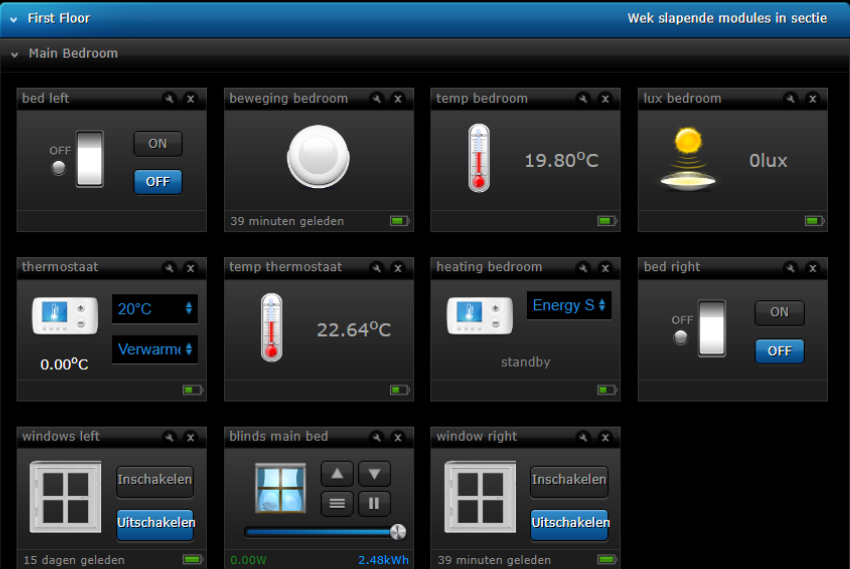

-
Hi, I have a problem when linking my heat controller to window sensor. What I want to achieve is that despite of schedules, when the window in the room gets opened, the heat controller should close the valve. When the window is open again, it should return to the normal operating mode. Both the heater and window sensor are linked to the same room. Both up to date regarding software version. I can see a read only parameter 'Opened window detected' but it never gets set. Can you help me and point me out what has to be set to make it work like 'smart home' should? Regards PeCe
-
Hello I bought a window sensor and added to my homekit home. The battery is going down very quickly. It is the second time now that lasts less than a month. any thoughts?
-
I am using the Heating Panel and it works well. I have also installed the Fibaro window sensors, also working well. Adjusts temperature in individual rooms perfect. I would like to combine the 2 so that the heating in the room is switched of if the window is open. Checke a lot can´t find a way to do tat, come in ti h´the heating panel programming and introduce new code. Any ideas? Unit Home Center 2. version 4.170
-
 Hello everybody, I have installed the temperature sensors to my already working system. I added the DS18B20 to the window and door sensors. So all the door and window sensors are configured and used in the HCL system Question is now, which reconfiguration is needed to get the sensors visible as active devices? Soft reconfigure device? I would prefer this one, so I do not loose all the scenes and VDs using the window sensor Reconfigure device? The brute force way, removing and adding the z-wave device? I hope this is not needed thanks for advice kuno


