
Welcome to Smart Home Forum by FIBARO
Dear Guest,
as you can notice parts of Smart Home Forum by FIBARO is not available for you. You have to register in order to view all content and post in our community. Don't worry! Registration is a simple free process that requires minimal information for you to sign up. Become a part of of Smart Home Forum by FIBARO by creating an account.
As a member you can:
- Start new topics and reply to others
- Follow topics and users to get email updates
- Get your own profile page and make new friends
- Send personal messages
- ... and learn a lot about our system!
Regards,
Smart Home Forum by FIBARO Team
All Activity
- Past hour
-
The API is live again, but Buienradar changed all the json data. So I changed all code to the changes Buienradar made to the json data. See the first post for the new quickapp file. You can install the new .fqa file or overwrite the code if you know what you are doing.
- Today
-
 Is it Possible to get a copy of your QA? Thanks
 -
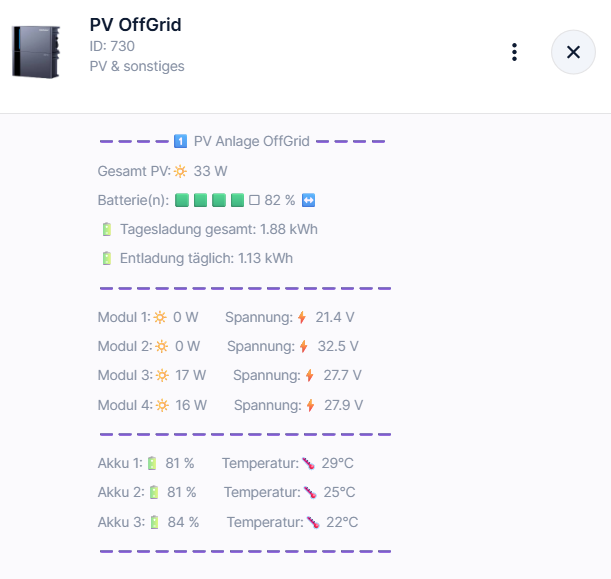
Hello. Does anyone here also use Fibaro HC3 and an Indevolt PV system? I'd be interested to know. Since I have three devices in my household and control various other devices with it, I've "built" a QuickApp that displays my systems on the HC3, including current values from the PV panels, battery levels with temperature and power output. This allows me to control a second, smaller QuickApp with a "switch" that allows devices to be switched on or off depending on the battery level.
- Yesterday
-
 Is there any smart way to group all door/window opening sensors under the "ustawienia alarmowe"? Or does each sensor have to be configured individually? Unfortunately, using a device group is not possible as a condition for a scene, and in any case, the sensors are not grouped there in the way I would need. Is there perhaps another way to include all door/window sensors in the alarm configuration without having to add and configure each sensor separately? Or is manual configuration of every sensor currently the only option?
 -
Hi cag! I uploaded version 22 and since then the geolocation is not working properly. When I arrive home or any place, I first get a notification about arriving home, then leaving, and finally arriving home again, but sometimes, when I arrive home, I get a notification about arriving home and then leaving home. It's annoying because I use geolocation to arm and disarm the alarm system, and even if we're at home, the alarm is armed because of it. Do you have any idea what the problem could be? Thanks! [2026-06-14] [16:09:15] [TRACE] [AOQ5784]: jM{265}T $geoAction[enter] ➯ skip setGlobal{&Noncsi} if not {$geoLocation(Feri papa)=HC3-00003966 and $geoUser(Attila)=Noncsi}[2026-06-14] [16:09:15] [TRACE] [AOQ5784]: jM{260}A $geoAction[enter] ➯ skip sendPush{GPS} if not {$geoLocation(Feri papa)=HC3-00003966}[2026-06-14] [16:09:16] [TRACE] [AOQ5784]: jM{257}T $geoAction[enter] ➯ sendPush(Noncsi,Attila) 'GPS','Attila arrived Feri papa') if{$geoLocation(Feri papa)<>HC3-00003966}[2026-06-14] [16:09:16] [TRACE] [AOQ5784]: jM{266}A $geoAction[enter] ➯ skip setGlobal{&Noncsi} if not {$geoLocation(Feri papa)=HC3-00003966 and $geoUser(Attila)=Noncsi}[2026-06-14] [16:09:16] [TRACE] [AOQ5784]: jM{264}A $geoAction[enter] ➯ skip setGlobal{&Attila} if not {$geoLocation(Feri papa)=HC3-00003966 and $geoUser=Attila}[2026-06-14] [16:09:16] [TRACE] [AOQ5784]: jM{263}T $geoAction[enter] ➯ skip setGlobal{&Attila} if not {$geoLocation(Feri papa)=HC3-00003966 and $geoUser=Attila}[2026-06-14] [16:09:16] [TRACE] [AOQ5784]: jM{258}T $geoAction[enter] ➯ skip sendPush{GPS} if not {$geoLocation(Feri papa)=HC3-00003966}[2026-06-14] [16:09:16] [TRACE] [AOQ5784]: jM{259}A $geoAction[enter] ➯ sendPush(Noncsi,Attila) 'GPS','Attila leaves Feri papa') if{$geoLocation(Feri papa)<>HC3-00003966}[2026-06-14] [16:09:16] [TRACE] [AOQ5784]: jM{62}A $geoAction[enter] ➯ skip turnOff{leaveHome} if not {leaveHome(false)=true}[2026-06-14] [16:09:16] [TRACE] [AOQ5784]: jM{62}A $geoAction[enter] ↪ skip turnOff{everybodyLeaveHome} if not {everybodyLeaveHome(false)=true}[2026-06-14] [16:09:17] [TRACE] [AOQ5784]: jM{265}A $geoAction[enter] ➯ skip setGlobal{&Noncsi} if not {$geoLocation(Feri papa)=HC3-00003966 and $geoUser(Attila)=Noncsi}[2026-06-14] [16:09:17] [TRACE] [AOQ5784]: jM{257}A $geoAction[enter] ➯ sendPush(Noncsi,Attila) 'GPS','Attila arrived Feri papa') if{$geoLocation(Feri papa)<>HC3-00003966}[2026-06-14] [16:09:17] [TRACE] [AOQ5784]: jM{263}A $geoAction[enter] ➯ skip setGlobal{&Attila} if not {$geoLocation(Feri papa)=HC3-00003966 and $geoUser=Attila}[2026-06-14] [16:09:17] [TRACE] [AOQ5784]: jM{258}A $geoAction[enter] ➯ skip sendPush{GPS} if not {$geoLocation(Feri papa)=HC3-00003966} 152
-
 User19 joined the community
 -
Thank you very much. I knew that it's possible!
-
 PawelA joined the community
 -
api.post("/plugins/updateView", { deviceId = <id>, componentName = <elm>, propertyName = <prop>, newValue = <value> }) So, you must know the component name.
-
Good morning, as we know access to other quickapp function is easy: fibaro.call(id, name, parameters). I would like to ask the following: is it possible to access (write to) other's quickapp UI field similar way? Alter other quickapp UI field remotely?
- Last week
-
 doorbird joined the community
 -

Do slave gateways work under z-wave engine 3.0 now?
balageneral replied to balageneral's topic in Update 5.210
Thanks for the update. This info slipped my mind as 3.0 upgrade was not really an option till now. Very good news, anyhow. -
It was a bug after I moved around the source files. v0.1.44 fixes it. I don't know. I usually have rules that initializes GVs to start values if they don't have values. It's up to your own logic. ER has no memory of what has been set.
-
Jan, is there a possibility after restoring a backup to renew all values of the Global Variables? So TOD and other values are as they should be?
-
Jan, if I want to update v0.1,43 it wil update but show updated v0.1.41!
-
Yes true: log HC3 -> [12.06.2026] [20:42:00] [DEBUG] [QUICKAPP769]: =========== Load time: 0.618s ============ log PC -> [12.06.2026][20:44:01][DEBUG ][EVENTRUNNER75555]: =========== Load time: 1.097s ============ It is just an information for you; as you said I was also thinking that the PC will be faster... but 0.4s is nothing.
-

Does the fibaro home center 3 supports mdns or ssdp discovery.
lux replied to prabu's topic in Home Automation
https://find.fibaro.com/ or code like: func autoDiscoverFibaro() { for { if adFibaroOn.Load() == 0 { select { case <-adFibaroTrig: case <-time.After(10 * time.Second): } continue } adFibaroLastRunUnix.Store(time.Now().Unix()) adFibaroLastFound.Store(0) adFibaroLastBlocked.Store(0) hostsBySerial := make(map[string]*fibaroHost) for _, port := range []int{44444, 9999} { found := discoverFibaroOnPort(port) for ip, serial := range found { if serial == "" { continue } if _, ok := hostsBySerial[serial]; ok { continue } hostsBySerial[serial] = &fibaroHost{IP: ip, Serial: serial} } } adFibaroLastFound.Store(int32(len(hostsBySerial))) if len(hostsBySerial) > 0 { ensureFibaroServices(hostsBySerial) } select { case <-adFibaroTrig: case <-time.After(2 * time.Minute): } } } -
 Hello everyone, As I bought recently an automated mower, I did some research about integrating it into Fibaro/Yubii. As the Mova (Dreame) does not officially publish the API I did some testing, based on the information found on different communities I was managed to prepare a QuickApp to actually control it. It is based partially on REST API but also utylise MQTT to handle the events. If someone is actually using one of Viax mowers it should be working with any variant. For now its mostly for testing purposes and supports only one device added to Mova app - API for the vaccums are basically the same so its possible that it will even handle those. Excercise I did is mostly for testing for now, if someone has any Mova mower feel free to use it - at some point, after some tweaks and comments I will drop it also on the marketplace for everyone to find. Viax_Mowers.fqax Steps to use: 1. Import 2. Fill email address and password for Mova account in variables 3. Done If any issues will occur there is also another variable to enable logging (debug) to the console. Regards, Michał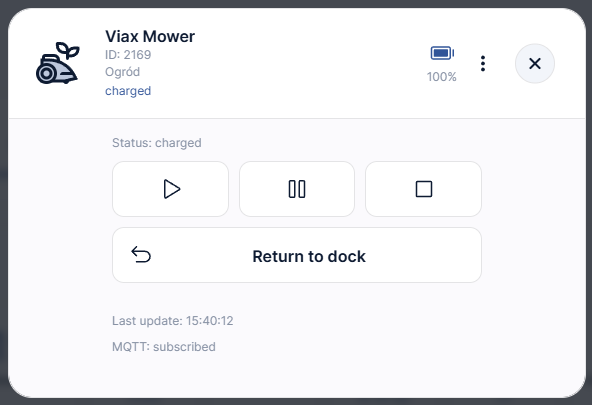
-
- 2
-

-

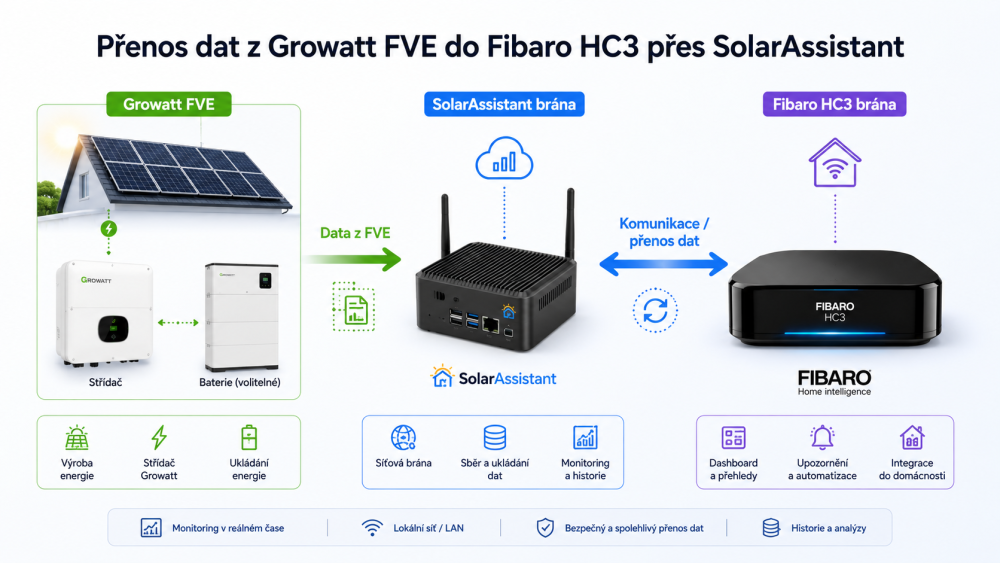
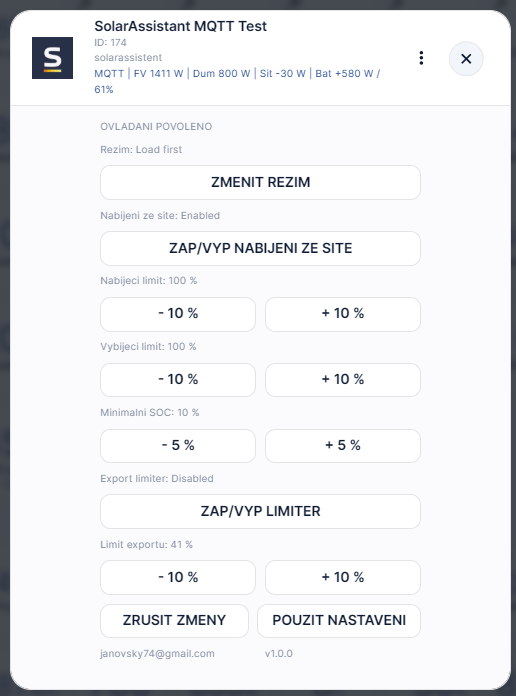
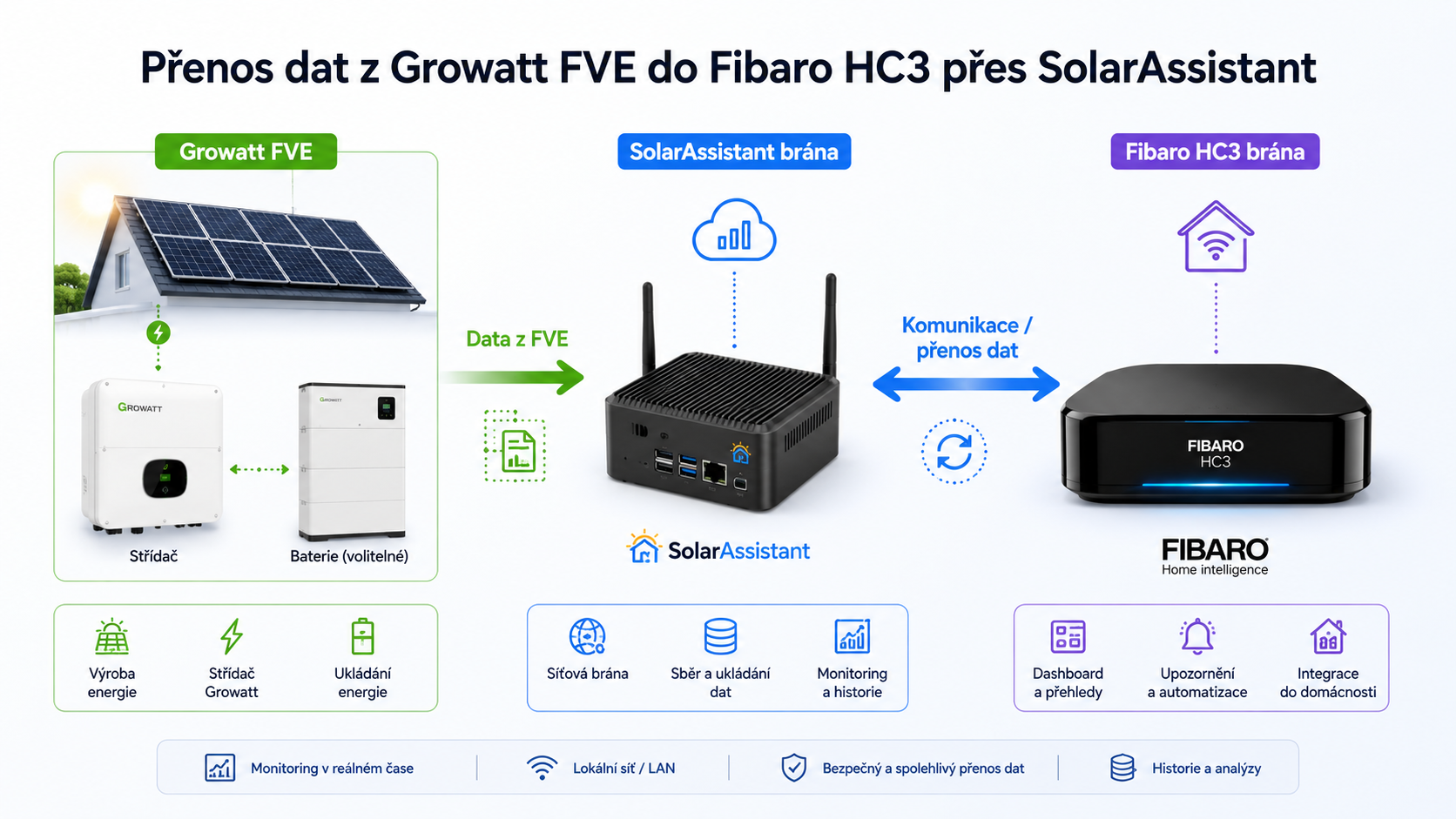
I have a QA for connecting Fibaro and Solar Asisstant + Growatt.
petro_cz replied to petro_cz's topic in Home Automation
I have a new version that installs subfolders automatically and is fully functional. I need to test it on more devices, so if you're interested, please let me know.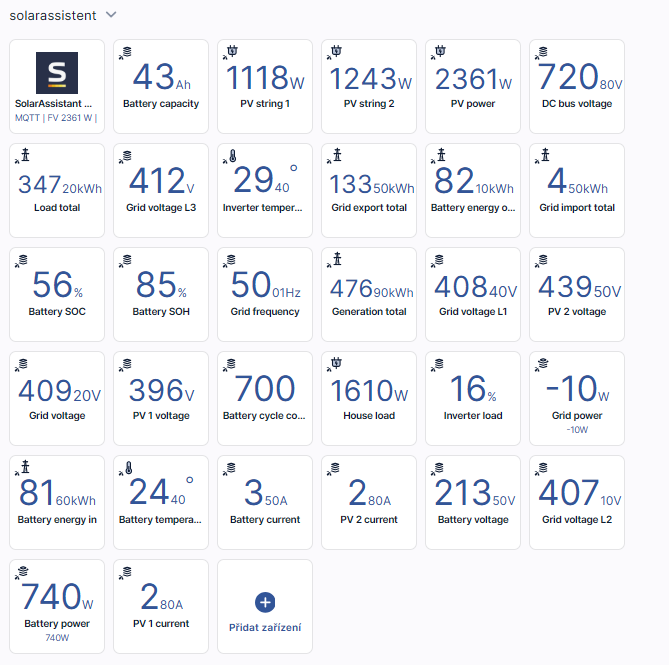
-
Yep, its additional condition on any other trigger - like device's one mentioned by @jakub.jezek
-

HC3 Z-Wave Engine 3 migration issue with ID Lock 150
Jonas bergkvist replied to Jonas bergkvist's topic in Update 5.210
Update: I finally managed to get it working. I was able to successfully include and use the lock again, but only with S0 security. The key difference this time was that I physically moved the HC3 controller much closer to the lock during inclusion. This had never been necessary before, as the lock had worked perfectly at its original location for a long time prior to the Z-Wave Engine 3 migration. Based on my experience, it seems that the ID Lock 150 Z-Wave module requires an extremely fast response during the security negotiation process. If there is even a small delay, the security handshake may fail. In my case, this appears to have been the root cause of the problem. One thing I noticed is that when the security handshake fails, the lock immediately flashes three quick red blinks right after the inclusion process. This turned out to be a very useful indicator that the inclusion had not completed successfully. I was not able to get it working with S2 security again. Unfortunately, I had discarded the original packaging for the Z-Wave module, and the DSK code was printed on that box, so I no longer have access to it. I would also strongly recommend not using Network Wide Inclusion (NWI) when including the ID Lock 150. NWI introduces additional routing and latency during the inclusion process, and it seems that the ID Lock 150 is particularly sensitive to this. This can easily cause the security exchange to fail. One additional observation: when creating PIN codes in HC3, the Label field appears to be sensitive to spaces and special characters. In my testing, PIN codes could stop working if the label contained such characters. If you experience problems adding PIN codes, try leaving the label field empty or use only simple alphanumeric characters without spaces or special symbols. So, for anyone experiencing similar issues after migrating to Z-Wave Engine 3, my recommendation would be: Move the HC3 physically close to the lock during inclusion. Disable Network Wide Inclusion (NWI). Use S0 security if S2 inclusion is not possible. Watch for the lock flashing three quick red blinks, as this may indicate that the security handshake has failed. When creating PIN codes, avoid spaces and special characters in the label field. Be patient during the inclusion process and ensure the lock remains awake and responsive. Hopefully this information helps others who run into the same issue in the future. -
 Henrik S Jensen joined the community
 -
 Emil123 joined the community
 -
 Jab Charif joined the community
 -
 Jose Silva joined the community
 -
 @kapitan47, I would say device state, for example Motion if Breached or Safe, and Time Range if its between certain times.
 -
@m.roszak Could you gave us an explanation on why that really useful integration cannot work on HC3 please? Thanks Raffaele
-

Probleme mit FGS224 (Glimmlampen in den Schaltern)
PitCock replied to m99999's question in Scenes and Interface
Hallo, herzlich willkommen. Gleich zu aller erst, hier solltest du in Englisch oder Polnisch schreiben, siehe Forumsregeln. Nun zu deinem Problem, ich vermute, dass bekommst du nur in den Griff, wenn du in den einzelnen Schaltern noch einen Null klemmen kannst und die Glimmlampe darüber angeschlossen wird. Der vollständigkeitshalber sei erwähnt, 230Volt ist lebensgefährlich! -
Hola Daniel, como estás? Estoy incursionando y vi este posteo. Yo tengo que resolver con la versión de Aidoo Z-Wave (pero bandas de frecuencia US, ya que es la banda aceptada acá en región LATAM, y Argentina más precisamente). Tengo unidades de interior de HVAC Mitsubishi Heavy, entiendo que también existiría la compatibilidad. Te surgido además una integración similar? Gracias de antemano!
-
Thank you wery much. I guess im gonna use another scene for disabling. So what is the proper way to use the time range?
-
Have you checked if there is not other scene (copy of this one) which actually does that? @tinman suggestion should solve it, in general trigger on motion and chekcing lux condition is most typical usage of our motion sensor in scenes - I did test it 5 minutes ago and seems to be working as it should. If the lux is outside the condition window (last reported) then this just need to work.
-
yes, time range cannot be treated as a trigger. So, exact time 2am should trigger the scene, and in action delay block you can disable the scene "Ustawienia alarmowe" after 3h30m.





.thumb.png.08822fad1b9ae014a6c6b279e3448558.png)