Welcome to Smart Home Forum by FIBARO
Dear Guest,
as you can notice parts of Smart Home Forum by FIBARO is not available for you. You have to register in order to view all content and post in our community. Don't worry! Registration is a simple free process that requires minimal information for you to sign up. Become a part of of Smart Home Forum by FIBARO by creating an account.
As a member you can:
- Start new topics and reply to others
- Follow topics and users to get email updates
- Get your own profile page and make new friends
- Send personal messages
- ... and learn a lot about our system!
Regards,
Smart Home Forum by FIBARO Team
Search the Community
Showing results for tags 'energy panel'.
Found 8 results
-
In Europe starting from june this year 2025, the European energy exchanges (including EPEX Spot for The Netherlands) will switch to quarterly prices instead of hourly prices. Can the energy panel handle quarterly prices? (And if not, are there plans do adapt to the quarterly energy prices?)
-
Version 1.1
49 downloads
Enphase Envoy Monitor QA standalone v1.1 INTRODUCTION Enphase Envoy Monitor QA brings seamless integration of the Enphase Envoy Metering EU with Fibaro Home Center. PREREQUISITES Fibaro HC3, HC3Lite or Yubii Home with firmware 5.161 or greater Enphase Envoy Metering EU gateway with firmware D7.6.177 or greater User account on https://enlighten.enphaseenergy.com/login/login.json FEATURES The QA retrieves production, consumption and net-balance from Enphase Envoy gateway and show on child devices. The QA also retrieves production data from all Enphase micro-inverters found in the system and can show on separately added inverter child devices. Today production, today consumption and instantaneous production and consumption child devices can be selected in Fibaro Home Center energy panel settings. After setting up Envoy gateway IP address and user name and password QA will immediately get all other necessary data like gateway serial number, session number and access token. Time of access token generation is stored and used to refresh after period of 180 days. NOTE – for now, generated token lifetime is 1 year according to the Enphase information. This version of Enphase Envoy Monitor QA provides calculated values for today’s exported energy and today’s imported energy shown on child devices. It also provides child devices for calculated values of grid dependence and production capacity QA has built in multi-language support with 32 languages included (see APPENDIX 1 for the list). QA can use HC selected language or user can select any other available language. NOT SUPPORTED BY THIS VERSION Q-relays Battery packs DOWNLOAD PACKAGE CONTENT Enphase Envoy Monitor QA v1.1 Enphase Envoy Monitor QA User manual v1.1 Icon set INSTALLATION IMPORTANT NOTE - Due to upload file type restrictions imposed by Fibaro for Quick Apps, after downloading file with FQA extension, change this extension to ZIP and then unzip package. In this ZIP package you will find PDF User manual, Enphase Envoy Monitor QA v1.1 Standalone.fqax and folder with icons. Please follow User manual for installation & upgrade. I hope that Fibaro will remove this limitation in near future since there is no such limitation on Fibaro Marketplace and even here for Virtual Devices. NOTE - I know that some users will not like that this QA is encrypted. Since license is now changed to donation-ware, I can send original code or even unencrypted QA, but only to users that will donate. For more information please check provided user manual, Thank you for understanding! TERMS AND CONDITIONS Permission to use, copy and distribute this software and its documentation for educational, research, personal use and non-profit purposes, without fee and without a signed licensing agreement is hereby granted, provided that the copyright notice, with "Terms and conditions" and "Disclaimer" appear in all copies, modifications and distributions. It is strictly forbidden to sell, rent, lease and/or lend this software for profit without prior consent from the Author. DISCLAIMER This software is provided by copyright owner "as is" and any express or implied warranties, including, but not limited to, the implied warranties of merchantability and fitness for a particular purpose are disclaimed. In no event shall the author and distributor be liable for any direct, indirect, incidental, special, exemplary, or consequential damages (including, but not limited to, procurement of substitute goods or services; loss of use, data, or profits; or business interruption) however caused and on any theory of liability, whether in contract, strict liability, or tort (including negligence or otherwise) arising in any way out of the use of this software, even if advised of the possibility of such damage. Fibaro a Nice company and their employees are not responsible for support of this QA. Please contact the author Sankotronic, on the Fibaro Forum, for any questions or support required. VERSION HISTORY 1.1 - first public release as donation-ware. LOOK & FEEL ENPHASE ENVOY MONITOR QA CHILD DEVICES AND ENLIGHTEN APP COMPARISON What you get with this integration is best explained with the next few pictures: Enlighten status screen with appropriate QA child devices: Enlighten live status screen with appropriate QA child devices: Enlighten Total Energy screen with appropriate QA child devices: Here are provided icons: - Envoy main icon - Envoy updating icon (shown during communication with Envoy gateway) - Envoy exporting icon (shown when production is higher than consumption and energy is exported to the grid) - Envoy production/importing icon (shown when production is lower than consumption and part of the consumption power is importing from the grid) - Envoy importing icon (show when there is no production and all consumption power is importing from the grid) - Envoy error icon (only shown if there is a communication problem with the Envoy gateway) - Envoy production icon (all child devices related to the production get this icon) - Envoy consumption icon (all child devices related to the consumption get this icon) - Envoy net-ballance icon (all child devices related to the net-balance [import/export from the grid] get this icon) - Envoy voltmeter icon for child device showing system voltage - Envoy amp meter icon (for child devices showing consumption, production and net-ballance current) - Envoy inverter icon (for all child devices related to micro-inverters) NOTE - This QA code is not fork or modified version of any existing similar QA. There are several Enphase Envoy QA available on the french forum ( @lazer,@TitiXsi ) and Fibaro marketplace (JJSM, Twan van Eijk, ReneNL), but none of them were used to build this QA. Enjoy coding and your new Enphase Envoy Monitor QA! Sankotronic- 1 review
-
- 4
-

-
- sankotronic
- hc3
- (and 5 more)
-
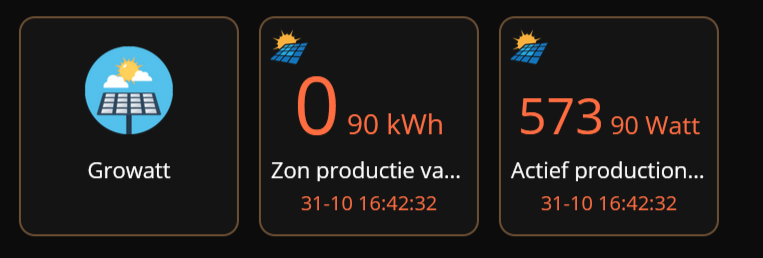
Hi, I currently have my hc3 setup with the quickapp p1 meter for house energy metering and made my own quickapp for metering the solarpanels. I used most of the code from the p1 quickapp to make sure it would work simply because I am not a coding wizard sadly :). I started running my quickapp and it worked like a charm, except for the energy panel aspect. I was producing megawatt houres of energy... The consumption also was acting up wierd at the same time. The child app resposible for reading the kwh data from the Growatt inverter is setup as an energyMeter like this: {name="Zon productie vandaag", className="ProductionToday", type="com.fibaro.energyMeter"} some more code of this child: class 'ProductionToday'(QuickAppChild) function ProductionToday:__init(device) QuickAppChild.__init(self, device) self:updateProperty("rateType", "production") end function ProductionToday:updateValue(devicedata) self:updateProperty("value", tonumber(devicedata.epvtotal)) --tonumber(devicedata.epvtotal) self:updateProperty("unit", "kWh") self:updateProperty("log", devicedata.update_timestamp) end When I noticed it starting to register megawatts I removed the line of code responsible for saving the data. self:updateProperty("storeEnergyData", true) While coding this quickapp I came across multiple "special" ways of fibaro to register certain types of data. My question now is, how does fibaro read this kwh data and process it?

-

Use stored energy data in Energy Panel selectbox not working?
Joep posted a question in Home Center 3
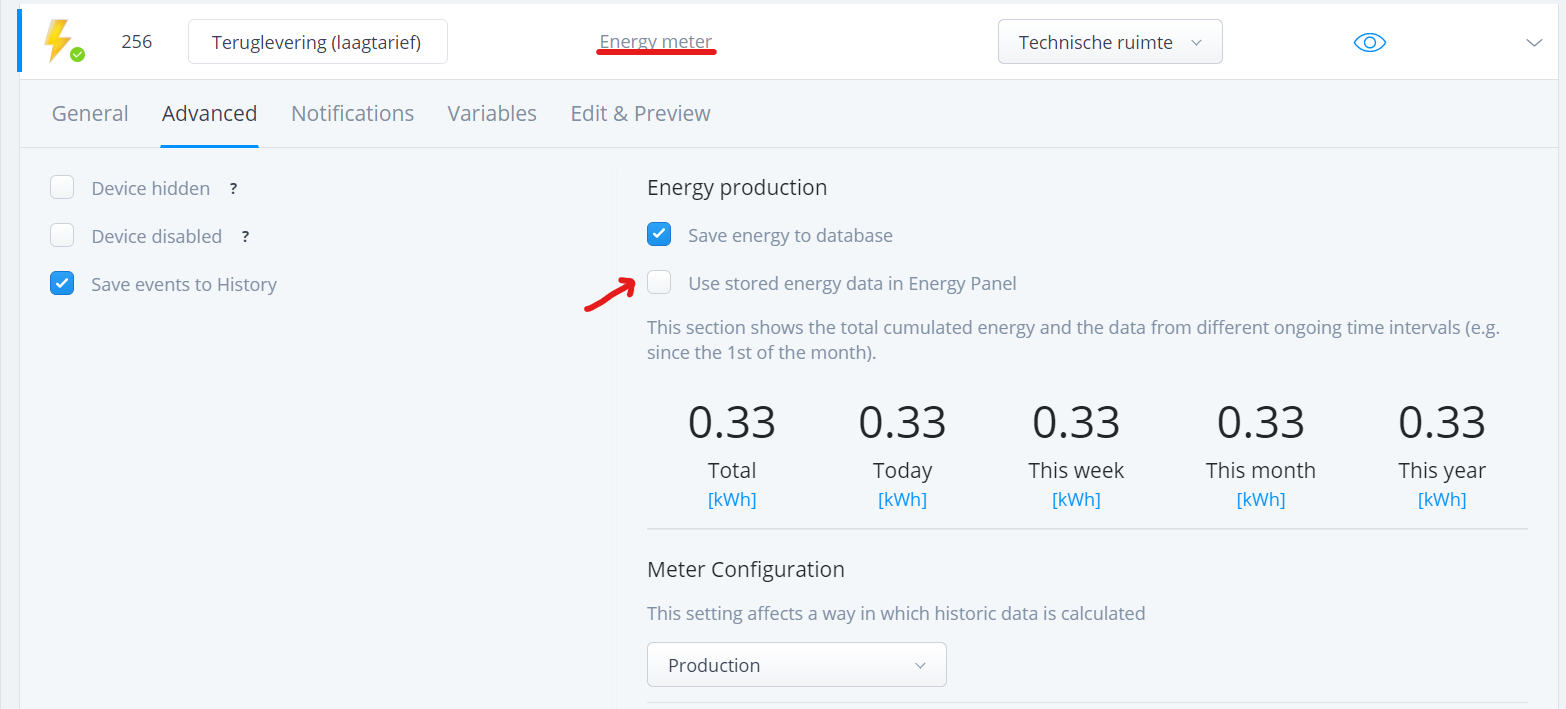
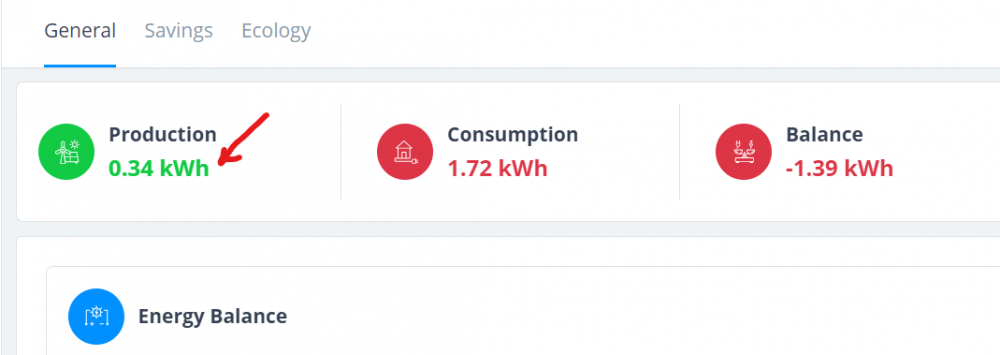
I'm working on a P1 meter readout for our smartmeter to feed the new Energy Panel. The QA has several child devices and two devices that return energy to the net. I gave this device the production meter configuration. I don't want to save this production data to the Energy Panel, because this is not real production, it's overhead energy that go's back to the grid. So I deselected the option Use stored energy data in Energy Panel: But the Energy Panel still displays the energy produced by this child device as production: The Energy Panel works this way right? 1. Production = Solar Panel energy 2. Consumption = Devices 3. Smart Meter consumption readout set as main devices = Smart Meter consumption - Devices = rest. 4. In the end of the day, when Energy Panel production - consumption is a positive number, this number must represent the Smart Meter return to grid value. The Energy Panel reporting the production (read overhead at p1) while the selectbox is unselected is a bug right?. Or am I thinking wrong? @m.roszak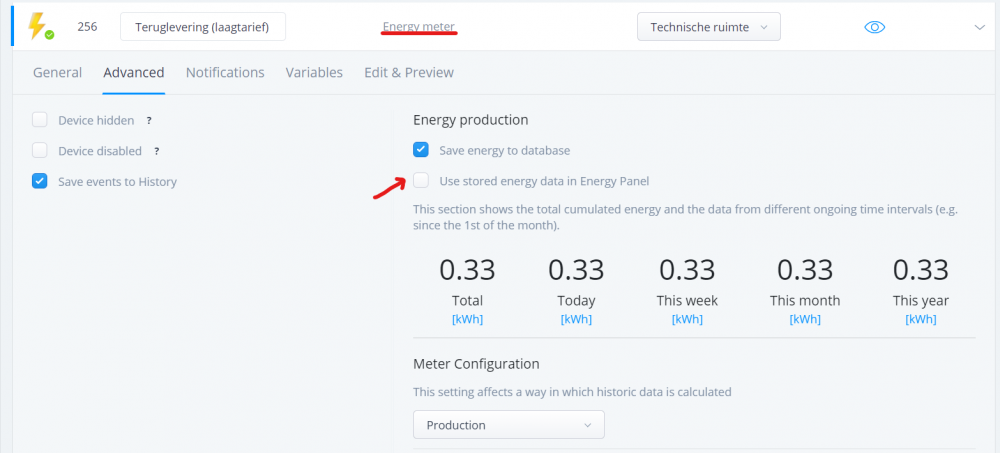
-
Hi, recently bought an HC3 (still moving from HC2 with slave HCLite ?. But at the energy panel I found "Production". Maybe for solar power or fuel cell. So I ask me if there is a device that gives you total consumption right from the house power meter? No one has a wallplug with the cookingplate ? Best regards Gerhard
-
Hi, In the current energy panel you can chose between Hour, Daily, Weekly, Monthly, Yearly and Live. All the entries except Live are static, i.e. you have to update them manually. The Live entry covers around 5 seconds which mostly just gives a straight line and thus not give very much of information. I would suggest that you can enable automatic update on all the entries and configure the update time. For example I would like to have the daily view and updated automatically every 5 minute. I assume this function does not exist in the today web-interface to Fibraro Home Center at least I have not been able to discover it but would very much like it to be implemented. Kindly regards, Bernhard Stockman
-
Hi, I had to restore a backup on my HC2 and now I have a large "gap" in my Energy and Temperature panel. (backup was from 20 days ago). Which is, off course, to be expected. But now I was wondering if it is possible to just delete all historical data so I can start with a clean slate. I've searched, but I can't find anything (maybe I haven't searched good enough ) Thx
-

Energy panel Zeros reported zero values or no reported values?
Guest posted a question in Home Center 2
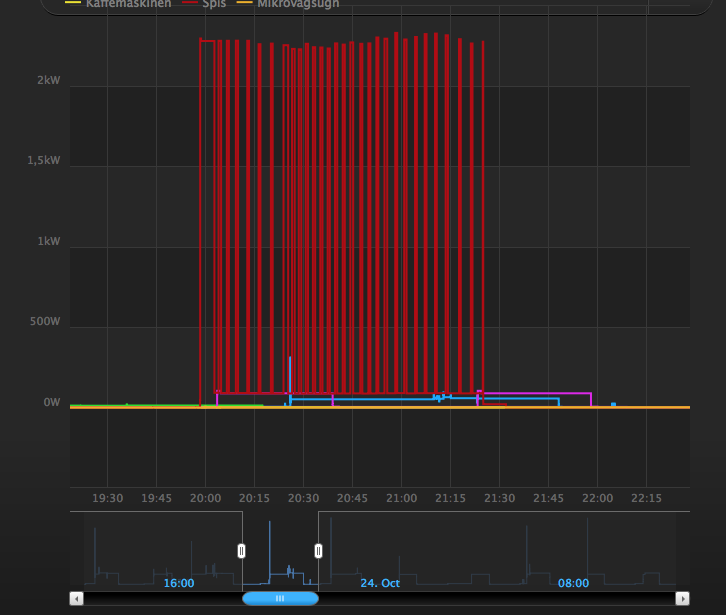
Hi, I need a clarification related to the energy panel. In the attached image there are a number of spikes in energy measurement readings, and in between each spike, there is a return to a much lower energy consumption level. Now, I need to make sure that I am interpreting this correctly. I assume in my current thinking that values are cached/stored by the HC software when they come in. When asked by the panel, the value returned from the system is the last known value reported buy the device (or last known relative to the time points of interest). So, if my device observes a change in power consumption that is larger than the threshold set internally in the device for power reports, then it is sent to the HC. And, if I then ask 15 minutes later I will get this value back, if values observed in the device in-between this time is smaller than the threshold, so that no additional reports are sent to the HC. I just need to make sure that this is the case, so that what I am observing in the image are true drops in REPORTED small values, not the effects of reports coming in very seldom and than substituted for a calculated average or something from a interpolation of the time series where there are no actual data due to a high threshold in the device. Hope it is somehow clear what I mean here..