About This File
⚡ Zigbee Monitor – A Complete Health Dashboard for Your Zigbee
This QuickApp gives you a real‑time, high‑precision diagnostic view of your entire ZigBee network.
It tracks every device, evaluates link quality, detects ZigBee Engine freezes or crashes, highlights weak or unstable nodes, monitors battery health, and records communication drops over time.
Automatic sorting, color‑coded warnings, min/max LQI history, and intelligent ZigBee Engine health scoring, it turns your HC3 into a full ZigBee analytics console—making mesh problems visible instantly instead of guessing in the dark.
📑 Table Columns
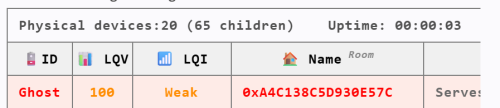
🪫 ID Device ID with battery status. Battery devices show color‑coded percentage; routers show “Serves as Router.” Ghost nodes appear as 👻.
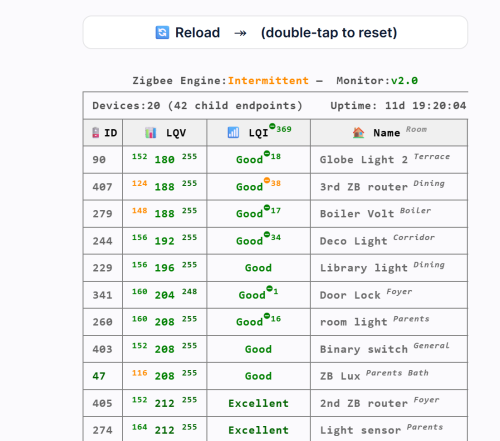
📊 LQV (LQI value) Shows min / current / max LQI values recorded since last reset. Helps identify unstable or fluctuating devices.
📶 LQI (Quality Status) Color‑coded signal quality label: Excellent, Good, Weak, Poor, Critical. Includes drop‑severity superscripts when applicable.
❤️ Alive Displayed only when at least one device is dead. Shows “false” in red for non‑responsive nodes.
🏠 Name Room Device name with room shown in superscript. Ghost devices show their IEEE address instead.
📦 Type Indicates whether the device is Battery‑Powered (with percentage) or Serves as Router.
🔖 Vendor Manufacturer reported by the ZigBee device.
🔢 Model Device model identifier (e.g., E1743, SNZB‑02).
🧬 Family Routing family chain showing how HC3 child devices relate to each other (e.g., 123👥🡒456🡒789).
Requirements
-
HC3 with ZigBee enabled
-
QuickApp variables: user, password (secured)
User and Password
The QuickApp needs credentials to access the internal ZigBee API through the HC3 proxy.
Enter its username and password in the QA’s Variables tab.
The QA automatically encodes these values and uses them only for read‑only Zigbee queries.
Note: For security, you can create a dedicated HC3 user with limited permissions (not your main admin account)
What It Shows
ZigBee Engine status
ID, LQV (with min/max range), LQI status, Alive (if needed), Name and Room, Type, Vendor, Model, Family.
Please download and review the ZigBee Monitor User’s Guide for further details.
You can also download the ZigBee & HC3 Capacity Planning Guide, which helps you build a more stable and reliable ZigBee network.
Edited by cag014
What's New in Version 1.5 See changelog
Released
A new version of the Zigbee Monitor QuickApp is bringing a much clearer and more powerful view of your Zigbee mesh.
This update focuses on stability diagnostics, better visibility, and smarter detection of network issues.
-
ZigBee Engine Health Detects mesh freeze, ZigBee engine crash, instability, and drop‑based risk levels.
-
Drop Tracking & Severity Per‑device drop counters, global drop count, and color‑coded severity indicators.
-
Improved LQI Analysis Min/Max LQI history, clearer color coding, and enhanced quality labels.
-
Smarter Table Layout New icons, cleaner formatting, and automatic sorting by weakest LQI first.
-
Battery Display Upgrade Color‑coded battery levels and clearer router/battery device distinction.
-
Double‑Tap Reset Enhanced Resets LQI history, drop counters, uptime, and thresholds.
-
Background Polling More reliable alive/dead detection and smoother table refresh cycles.
| Feature | Old Version | New Version |
|---|---|---|
| ZigBee Engine | ❌ Not available | ✅ Full engine: Stable / Unstable / At Risk / Freeze / Unresponsive |
| Drop Tracking | ❌ No drop counters | ✅ Per‑device drop count + global drop count |
| Drop Severity | ❌ Not available | ✅ Color‑coded severity based on uptime & mesh size |
| LQI Warning | Basic labels | Enhanced labels + drop indicators + better colors |
| Min/Max LQI History | Limited | Full history with superscripts (min/current/max) |
| Sorting | No sorting | Sorted by weakest LQI first |
| Battery Display | Simple | Color‑coded + clearer router/battery distinction |
| Table Layout | Plain Text | Icons, cleaner formatting, improved readability |
| Header Info | Minimal | Version, uptime, physical devices, children count |
| Double‑Tap Reset | Resets LQI only | Resets LQI, drops, uptime, thresholds |
| Polling Loops | Single Loop | Independent Zigbee poll + table refresh |
| Row Coloring | Limited | Highlight Weak/Poor + Ghost devices |
| Room Display | Separate column | Integrated into Name with formatting |
📥 Installation Instructions
For New Users
If you are installing the QA for the first time:
-
Download
LQI.v1.5.fqa -
Open your HC3 → Settings → Devices → Add Device → Upload File
-
Upload the
LQI.v1.5.fqafile -
The QA will appear automatically and start building the tableThis is the full package and includes all required code and configuration.
For Existing Users (Updating from an earlier version)
If you already have the QA installed:
-
Download
LQI.v1.5.txt -
Open your existing QA on the HC3
-
Replace the current main code with the content of the
.txtfile (copy & paste) -
Save the QA
-
The table will refresh automatically on the next update cycle
This method keeps your existing QA instance, variables, and settings intact.