
Welcome to Smart Home Forum by FIBARO
Dear Guest,
as you can notice parts of Smart Home Forum by FIBARO is not available for you. You have to register in order to view all content and post in our community. Don't worry! Registration is a simple free process that requires minimal information for you to sign up. Become a part of of Smart Home Forum by FIBARO by creating an account.
As a member you can:
- Start new topics and reply to others
- Follow topics and users to get email updates
- Get your own profile page and make new friends
- Send personal messages
- ... and learn a lot about our system!
Regards,
Smart Home Forum by FIBARO Team



Quick Apps
The category contains Quick Apps submitted by users.
Downloading and submission terms have to be accepted.
Quick Apps have to be described properly, screen shots are optional.
Support topics are created automatically here Quick Apps
Report topics and files that are no longer supported by authors.
All the files submitted have to be approved by administrators.
32 files
-

Panasonic comfort Cloud
By mike79
Panasonic comfort Cloud app
What it does:
Control you Panasonic comfort cloud compatible heat pump devices.
just like the android or apple app, but from you home center 3
Comfort Cloud
installation:
Upload the quick app to the hc3.
Go to the variable panel and change the email and password.
Wait a coble off second then press on button.
Variable settings:
for setting start temperature in the aircon modes.
WARNING!!
Do not set it to a number that larger or smaller than you Panasonic is capable of.
so do not set cooling start temp to 5 degrees when minimum is 15
or heat to 65 degrees when max is 30, you get the point.
Extra fun stuff:
Since there is a thermometer in the inside & outside unit,
i added two global variables that you can use in other apps
GlobalVariable('inside heatpump temperature') GlobalVariable('Outside heatpump') Added a function for retrieving energy and more for.
it can be viewed via the debug buttons.
located in Oninit and use function QuickApp:getHis()
Plan is to make a app that just shows energy data and more.
Troubleshoot:
it is crucial that app retrieve token before app runs.
i have very fast internet
so could be that with slow internet that timers have to be adjusted up.
located in Oninit
important that they execute in that order!
fibaro.setTimeout(1500, function() QuickApp:turn1()() end) --token first fibaro.setTimeout(3000, function() QuickApp:turn2() end) --when we got token we can run the rest. fibaro.setTimeout(604800000, function() QuickApp:onInit() end) --token restart every month
Full Code on my Github page:
Code
Last words:
Damn this was hard to make when never haven writing Lua before.
Enjoy!
75 downloads
- panasonic
- remote control
- (and 2 more)
-
Synology Switch
By mike79
Synology Switch
Here is my Quick app for turning off synology nas with the hc3, and using wol (wake on lan for waking it up again)
First you have to enable wol on your synology nas
What it does:
It uses code user agents for optaining the servers sid for logging into the server and power down.
Synology api
Setup:
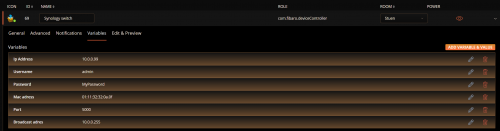
After installing the quickapp, put in your varibles in the varibles window for your nas server in the varible window ,except mac adress, then save.
In this first version you have to put you mac adress as hex int the code window, then save.
that will be fixed in next version.
See screen shot what text to search for and replace for putting in your mac address.
Last words:
test and enjoy.
Changelog:
1.0.0 version is for DSM 6.x
1.0.1 version is for DSM 7.x
158 downloads
(0 reviews)0 comments
Updated
-

QA-Marantz.fqa
By mike79
Marantz Remote
I have adapted the French Denon remote app from french forum to Marantz.
French Forum
Added bunch of stuff from the attached protocoll.
Added Eco mode On/Off
Added 11 more Surround sound modes
Added 10 Sources
Upload and edit ip varible to get it working.
The rest of the varibles should not be changed.
You can customize the sources buttons names in the edit panel.
If you wanna check code before downloading, you can also visit my repo for this
Github HC3_Quickapp_Marantz
191 downloads
(0 reviews)0 comments
Updated
-
Onkyo 2021-06-23.fqa
By JeroenL
About This File
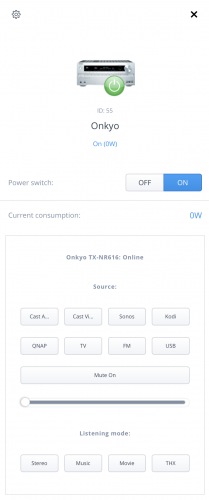
Onkyo QuickApp
INTRODUCTION
Onkyo has a range of network connected Audio/Video receivers that can be controlled via a network UTP connection. This QuickApp provides basic control of the A/V receiver.
Tested on an Onkyo TX-NR616.
QuickApp should be easy to adapt to other models if required.
This is my first QuickApp, any suggestion to make it better highly appreciated.
PREREQUISITES
Tested on Fibaro Home Center HC3L and Yubii Home with firmware 5.071.52
An Onkyo AV Receiver
FEATURES
Basic On/Off Volume Control Mute On/Off toggle switch 8 Input selectors, label can be customised using variables 4 Listening Modes On/off line status indicator
INSTALLATION
Please check provided User Manual.
Upload file in the device section.
AVAILABLE DOWNLOAD
Onkyo 2021-06-23.fqa Icons - found on the forum and slightly adapted
TERMS AND CONDITIONS
Permission to use, copy, modify and distribute this software and its documentation for educational, research, personal use and non-profit purposes, without fee and without a signed licensing agreement is hereby granted, provided that the copyright notice, with "Terms and conditions" and "Disclaimer" appear in all copies, modifications and distributions. It is strictly forbidden to sell, rent, lease and/or lend this software for profit without prior consent from the Author.
DISCLAIMER
This software is provided by copyright owner "as is" and any express or implied warranties, including, but not limited to, the implied warranties of merchantability and fitness for a particular purpose are disclaimed. In no event shall the author and distributor be liable for any direct, indirect, incidental, special, exemplary, or consequential damages (including, but not limited to, procurement of substitute goods or services; loss of use, data, or profits; or business interruption) however caused and on any theory of liability, whether in contract, strict liability, or tort (including negligence or otherwise) arising in any way out of the use of this software, even if advised of the possibility of such damage.
Fibar Group S.A. and their employees are not responsible for support of the ABC VD.
VERSION HISTORY
1.0.2 - First public release113 downloads
-
Sonos API Player QA standalone
By Sankotronic
Sonos API Player standalone
INTRODUCTION
Sonos is the ultimate wireless home sound system that brings brilliant sound to all parts of house, room by room. Sonos API Player QA enables Fibaro Home Center 3 to control Sonos Wi-Fi multi-room speakers and show their status using node-sonos-http-api as mediator between Sonos and Fibaro.
PREREQUISITES
Fibaro Home Center 3, HC3L or Yubii Home with firmware 5.070 or greater
Node.js capable device such as Raspberry PI with installed jishi node-sonos-http-api
One or more Sonos Wi-Fi multi-room speaker
FEATURES
Support for My Sonos stations and playlists. User can easily get list of My Sonos stations and playlist to QA and start playing from QA or other QA and scene code Support for grouping actions join and leave Support for Spotify, Apple Music and Amazon music Support for text to speech TTS for Google, VoiceRSS and AWS Poly Support for playing clips for e.g. doorbell or alarm functions Supports all standard audio commands PLAY, PAUSE, STOP, PREVIOUS, NEXT, MUTE/UNMUTE, SHUFFLE, REPEAT and CROSSFADE Support for all other functions available by jishi node-sonos-http-api User can restart QA device Debug mode with different levels
Multi language support with 25 languages included (see APPENDIX 1 for the list). QA can use HC3 selected language or user can select any other available language. QA will be automatically translated to the selected language
User can also setup icons to show current status of the player or leave HC3 default icon
INSTALLATION
Please check provided User Manual
UPGRADE
To upgrade from version 1.0 to 1.1 please download this file: Sonos API Player QA v1.1 update.zip Unzip it and copy/paste code for each file as named main, common and app
After saving QA please change settings of QA variables TTSlanguage and/or TTSvoice as necessary.
AVAILABLE DOWNLOAD
Sonos API Player QA v1.1 User manual EN v1.1
TERMS AND CONDITIONS
Permission to use, copy, modify and distribute this software and its documentation for educational, research, personal use and non-profit purposes, without fee and without a signed licensing agreement is hereby granted, provided that the copyright notice, with "Terms and conditions" and "Disclaimer" appear in all copies, modifications and distributions. It is strictly forbidden to sell, rent, lease and/or lend this software for profit without prior consent from the Author.
DISCLAIMER
This software is provided by copyright owner "as is" and any express or implied warranties, including, but not limited to, the implied warranties of merchantability and fitness for a particular purpose are disclaimed. In no event shall the author and distributor be liable for any direct, indirect, incidental, special, exemplary, or consequential damages (including, but not limited to, procurement of substitute goods or services; loss of use, data, or profits; or business interruption) however caused and on any theory of liability, whether in contract, strict liability, or tort (including negligence or otherwise) arising in any way out of the use of this software, even if advised of the possibility of such damage.
Fibar Group S.A. and their employees are not responsible for support of the ABC VD. Please contact the author Sankotronic, on the Fibaro Forum, for any questions or support required.
VERSION HISTORY
1.1.0 - corrected say and sayall commands language handling error, added Korean language for QA and changed TTS language handling to enable usage of all available languages by selected TTS service. 1.0.0 - First public release
Look and feel:
Enjoy coding and your new Sonos API Player QA!
Sankotronic
804 downloads
-
ChildrenOfHue
By jgab
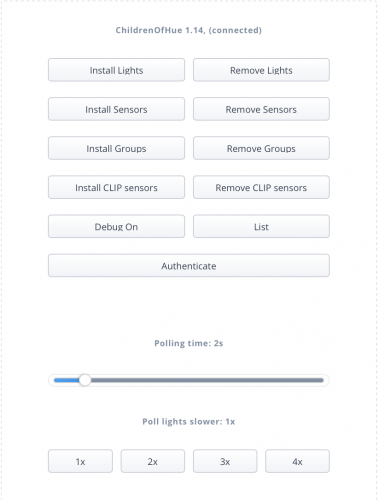
It's a "simple" QA that relies on the QuickAppChildren to realise the Hue devices.
This means that the user interfaces are limited to what are supported by the child app classes.
Supported Hue device classes:
ZLLSwitch.
Hue switch with 4 buttons. Creates centralSceneEvents similar to a Fibaro keyFob (com.fibaro.remoteController)
The interpretation is
keyId = hueKeyValue // 1000
keyAttribute = ({"Pressed","HeldDown","Released","Released"})[hueKeyValue % 1000 +1]
It also supports setValue('value',value) to simulate a key press.
ZLLTemperature.
Hue temperature sensor. Behaves like a standard fibaro.com.temperatureSensor.
ZLLLightLevel.
Hue light sensor. Behaves like a standard fibaro.com.lightSensor.
The device quickAppVariables 'daylight' and 'dark' is updated with resp. Hue attribute.
ZLLPresence
Hue presence sensor. Behaves like a standard fibaro.com.motionSensor.
Extended color light
Hue RGB light. Behaves like a fibaro.com.philipsHueLight.
supports:
fibaro.call(<id>,"turnOn")
fibaro.call(<id>,"turnOff")
fibaro.call(<id>,"toggle")
fibaro.call(<id>,"setValue",value) -- dim value 0..100
If the value is a table the value is sent directly to the Hue light as a Hue property table.
Ex. fibaro.call(<id>,"setValue",{effect='colorloop',bri=50})
fibaro.call(<id>,"setValue",{startup={customsettings={xy={0.73500005089041,0.26499994910959}}}})
fibaro.call(<id>,"setColor",red, green,blue). -- color 0..255
fibaro.call(<id>,"changeBrightness") -- brightness 0..255
fibaro.call(<id>,"changeHue") -- 0..65535
fibaro.call(<id>,"changeSaturation") -- 0..255
fibaro.call(<id>,"startLevelIncrease")
fibaro.call(<id>,"startLevelDecrease")
fibaro.call(<id>,"stopLevelChange")
fibaro.call(<id>,"toggleDim",<boolean>) -- Toggle dim direction. true with 'stop'
The device quickAppVariable 'state' is updated with the Hue state
Dimmable light
Hue dimmable white light. Behaves like a fibaro.com.multilevelSwitch.
supports:
fibaro.call(<id>,"turnOn")
fibaro.call(<id>,"turnOff")
fibaro.call(<id>,"toggle")
fibaro.call(<id>,"setValue",value) --- dim value 0..100
If the value is a table the value is sent directly to the Hue light as a Hue property table.
fibaro.call(<id>,"changeBrightness") -- brightness 0..255
fibaro.call(<id>,"startLevelIncrease")
fibaro.call(<id>,"startLevelDecrease")
fibaro.call(<id>,"stopLevelChange")
fibaro.call(<id>,"toggleDim",<boolean>) -- Toggle dim direction. true with 'stop'
The device quickAppVariable 'state' is updated with the Hue state
Color temperature light
Mapped as a Dimmable light
Color light
Hue color light. Behaves like a fibaro.com.colorController.
supports:
fibaro.call(<id>,"turnOn")
fibaro.call(<id>,"turnOff")
fibaro.call(<id>,"toggle")
fibaro.call(<id>,"setValue",value) --- dim value 0..100
If the value is a table the value is sent directly to the Hue light as a Hue property table.
fibaro.call(<id>,"setColor",red, green,blue). -- color 0..255
fibaro.call(<id>,"changeBrightness") -- brightness 0..255
fibaro.call(<id>,"startLevelIncrease")
fibaro.call(<id>,"startLevelDecrease")
fibaro.call(<id>,"stopLevelChange")
The device quickAppVariable 'state' is updated with the Hue state
fibaro.call(<id>,"toggleDim",<boolean>) -- Toggle dim direction. true with 'stop'
Room
Hue light group.
Behaves like a fibaro.com.multilevelSwitch.
fibaro.call(<id>,"turnOn")
fibaro.call(<id>,"turnOff")
fibaro.call(<id>,"toggle")
fibaro.call(<id>,"setValue",value) --- dim value 0..100
If the value is a table the value is sent directly to the Hue group as a Hue property table.
fibaro.call(<id>,"changeBrightness") -- brightness 0..255
fibaro.call(<id>,"startLevelIncrease")
fibaro.call(<id>,"startLevelDecrease")
fibaro.call(<id>,"stopLevelChange")
fibaro.call(<id>,"setScene",<Hue scene ID or scene name>)
fibaro.call(<id>,"toggleDim",<boolean>) -- Toggle dim direction. true with 'stop'
Hue CLIPS devices
CLIPPresence => com.fibaro.motionSensor class='ZLLPresence'
CLIPTemperature. => com.fibaro.temperatureSensor class='ZLLTemperature'
CLIPPressure => com.fibaro.binarySwitch class='BinarySwitch'
CLIPHumidity => com.fibaro.humiditySensor. class='Humidity'
CLIPOpenClose. => com.fibaro.binarySensor. class='BinarySensor'
The startLevelIncrease, startLevelDecrease, and stopLevelChange makes it possible to bind a remote controller that support centralSceneEvent to dim when a button is held down and stop dimming when the button is released.
The lights store their Hue values in a quickAppVariable 'state'.
This can be retrieved like below and ex. used to set default startup values for Hue lights...
local function getVar(id,name) local vars = api.get("/devices/"..id).properties.quickAppVariables or {} for _,v in ipairs(vars) do if v.name==name then return v.value end end end function QuickApp:main() state = getVar(1435,"state") -- retrieve current color fibaro.call(1435,{startup={customsettings={xy=state.xy}}) -- set as default startup end
312 downloads
-
RFID Programmer (extension should be .fqa not lua)
By BusterB1959
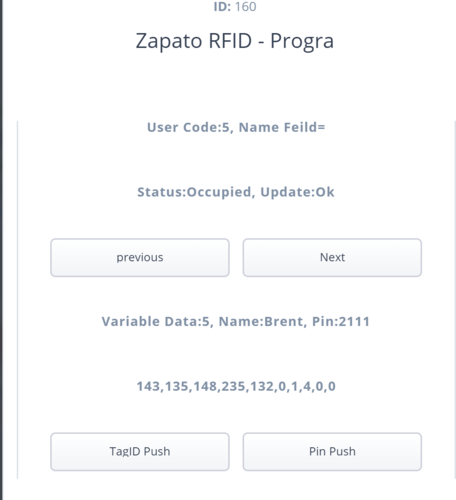
This is a small QuickApp that will allow you to programme the Zipato RFID reader whist Fibaro sort out HC3 to do this.
Put you details in the Variables section and then click TagID Push or Pin Push
145 downloads
(0 reviews)0 comments
Submitted
-
Download Statistics
-
New reviews
-
 By Bornheim · PostedI integrated two HUE bridges in my HC3. It works perfect (and much better and more powerful then the app integrated in HC3). In particular, also sensors, temperature measures etc. are available and can be used in Scenes. However, in both cases after installing and entering the IP adress of my HUEs I had to restart the HC3 to get the authentification running. So I assume to install one has to (i) upload / install the QuickApp, (ii) enter the IP address of the HUE in the local LAN, (iii) rest
 -

-

-

-
 By Sankotronic · PostedVery useful solution to help with gradually moving from HC2 to HC3. I have tested few of the QA and used them to test some of my new solutions on HC3 keeping HC2 still having main controll of our house. Thank you @cag014 for yet another excellent solution!
 -

-

-

-
 By SmartHomeEddy · PostedGreat QuickApp and excellent configuration manual. QuickApp works smooth. Thanks!
 -

-
-
Highest Rated Submitters
No ratings this week.
No ratings this month.
No ratings this year.
-
1

-
2

-
3

-
4
-
5

-