

About This File
🧠 What AOQ (All-in-One QuickApp) Offers
- Multi-System Control: Seamlessly manages HC3, HC2, and HCL controllers using master/slave architecture.
- Unified Automation: Replaces scattered Lua and Block scenes with one centralized QA.
- Device Intelligence: Auto-detects Z-Wave, ZigBee, Nice, QA devices, and scenes.
- Alarm Zone Management: Identifies breached zones/sensors and triggers actions.
- Custom Events & Profiles: Supports dynamic profiles and custom rule-based automation.
🛠️ Core Configuration: Job Management - jM{} Hash Table
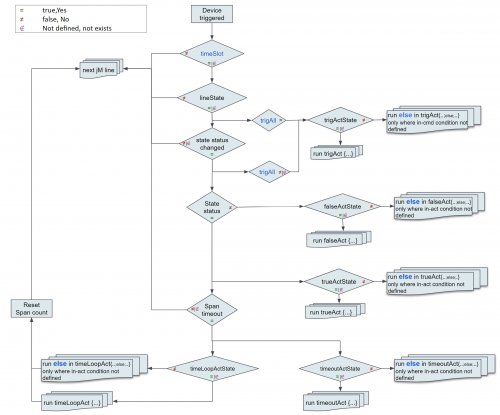
Each line in jM{} includes:
| Field |
Description |
|
|---|---|---|
| Time Span |
Duration in minutes for monitoring or action. |
|
| IDs List |
Devices/scenes/variables/keywords (e.g., `"137,630" |
|
| Criteria & Rules |
Optional conditions like |
|
| Action Tables |
Optional commands: |
🔄 Device Aliasing with jS2n{}
Avoid hardcoding device IDs:
jS2n = {mSensor=200, boiler=137, dryer=630, light=230, timeScene="_17"}
Use aliases in jM{}:
jM={
{15,"`mSensor`",{state="value=true", trueAct={"`light`", "turnOn"},falseAct={"`light`", "turnOff"}}}
}
🔍 Monitor Option
Detects inactivity or failure to report:
{8, "`timeScene` and _545", {timeSlot="10:00~22:00"}} -- scenes must be active every 8 min between 10am to 22pm
{10, "`boiler`and 145", {property="power"}} -- must report power every 10 min
{30, "`boiler`", {state="power>100"}} -- alert if power >100 for 30 min
⚙️ Control Option
Example: Turn on light when motion sensor is breached, turn off after 3 min when motion sensor back to safe:
jM={"`mSensor`",{state="value=true",trueAct={"`lightSw`","turnOn"},falseAct={"`lightSw`","turnOff", "180"}}}
To restrict to nighttime:
jM={"`mSensor`",{state="value=true",timeslot="18:00~07:00", trueAct={"`lightSw`","turnOn"},falseAct={"`lightSw`","turnOff", "180"}}}
Example: Turn on light when motion sensor is breached, turn off after 3 min (regardless of when motion sensor back to safe)
jM={"`mSensor`",{state="value=true", trueAct={{"`lightSw`","turnOn"},{"`lightSw`","turnOff", "180"}}}}
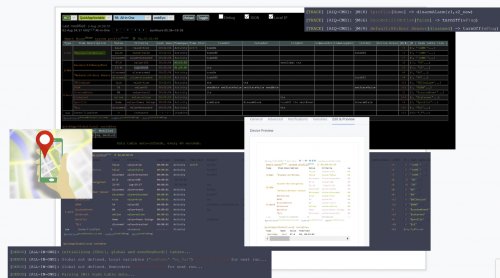
🧪 Debug & Table View
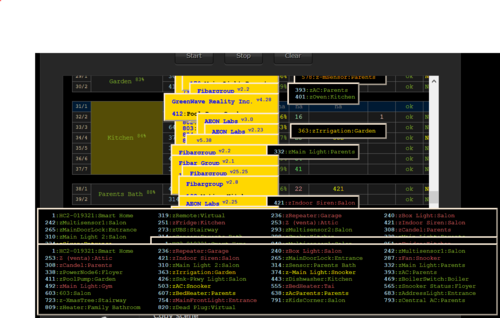
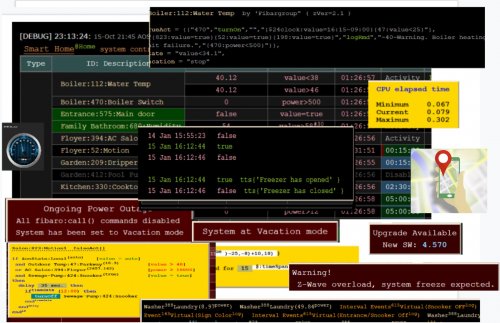
- Debugger Output: Shows executed commands with color-coded status.

- Table Header: Displays system info, sunrise/sunset, home/vacation mode, system traffic.
-
Columns:
- Device type, ID, name, battery status
- Criteria evaluation
- Alerts and elapsed time
- Action tables and active rules
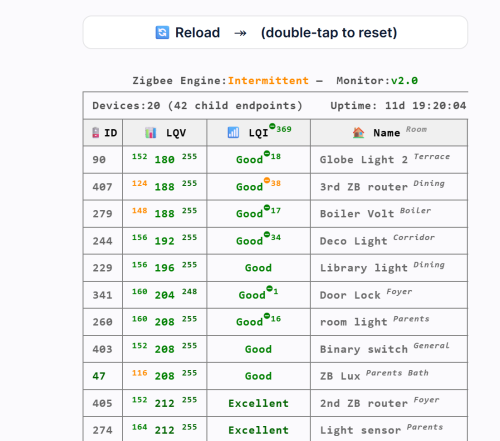
📊 Top Active Monitor (New) AOQ now includes an enhanced Top Active Devices monitor designed to identify devices that may destabilize HC3 performance.
It analyzes lifetime activity, current load per hour, and burst behavior to detect devices generating excessive or abnormal traffic.
The table highlights devices that may cause delays, radio congestion, disconnects, or even controller restarts.
A Peak/h column appears only when abnormal bursts are detected, helping users quickly locate problematic devices without cluttering the interface.
📘 Want to Go Deeper?
You can find the full documentation and guides on the Smart Home Forum by FIBARO, including:
- AOQ Advanced User’s Guide
- AOQ Quick Guide
- AOQ HC-WebEye Viewer
Edited by cag014
Updated
What's New in Version 22.0 See changelog
Released
What's New
🔧 Hotfix
- When a device in the jM line lacks a defined property or state, AOQ may crash.
- Resolved fibaro.alert() issues affecting push and email notifications, caused by changes in recent Fibaro platform versions.
- Using ‘true’ or ‘false’ as the parameter value causes AOQ to misinterpret the input as an error and abort execution.
✨ New Features
-
Data table
- Cosmetic enhancements
- Popup menu now includes sliders to reduce menu size, addressing the previously bulky and inconvenient layout.
-
Execution Efficiency Improvement
- Replaced setInterval() with setTimeout() to improve execution efficiency by an estimated 10–20% and to reduce the likelihood of system restarts caused by accumulated interval callbacks.
- Several functions have been optimized with the assistance of AI (Copilot) to improve performance.
-
Enhanced Expression Calculation Accuracy
-
Updated expression evaluation logic to apply multiplication and division before addition and subtraction, removing the need for extra parentheses.
- As a result, expressions such as 2 + 2 * 2 now correctly evaluate to 6 instead of the previous result of 8.
-
Updated expression evaluation logic to apply multiplication and division before addition and subtraction, removing the need for extra parentheses.
-
Theme-Based Background
- Background now adapts to light/dark theme for version 181 and above.
🐞 Bug Fixes
- Various minor fixes and performance improvements.
📥 Update Instructions
You’re welcome to download the new AOQ Advanced User’s Guide-AI-v1 created with AI (Copilot). Your thoughts and feedback would be truly appreciated.
- The Geofence Guide is now included in the Advanced User Guide.
For New Users:
-
Download
AOQ-v22.0.fqaand add it as a QA device.
For Existing Users:
-
Download
AOQ-main-v22.0.txtand replace your current main file in Quick App
⚠️ Reminder: Always back up your previous QA configuration before updating







Recommended Comments
Join the conversation
You can post now and register later. If you have an account, sign in now to post with your account.