Welcome to Smart Home Forum by FIBARO
Dear Guest,
as you can notice parts of Smart Home Forum by FIBARO is not available for you. You have to register in order to view all content and post in our community. Don't worry! Registration is a simple free process that requires minimal information for you to sign up. Become a part of of Smart Home Forum by FIBARO by creating an account.
As a member you can:
- Start new topics and reply to others
- Follow topics and users to get email updates
- Get your own profile page and make new friends
- Send personal messages
- ... and learn a lot about our system!
Regards,
Smart Home Forum by FIBARO Team
Search the Community
Showing results for tags 'block'.
Found 10 results
-
Version 22.0
4,310 downloads
🧠 What AOQ (All-in-One QuickApp) Offers Multi-System Control: Seamlessly manages HC3, HC2, and HCL controllers using master/slave architecture. Unified Automation: Replaces scattered Lua and Block scenes with one centralized QA. Device Intelligence: Auto-detects Z-Wave, ZigBee, Nice, QA devices, and scenes. Alarm Zone Management: Identifies breached zones/sensors and triggers actions. Custom Events & Profiles: Supports dynamic profiles and custom rule-based automation. 🛠️ Core Configuration: Job Management - jM{} Hash Table Each line in jM{} includes: Field Description Time Span Duration in minutes for monitoring or action. 0 = activity only, negative = suspended IDs List Devices/scenes/variables/keywords (e.g., `"137,630"or"_45"` for scenes) Criteria & Rules Optional conditions like state="value=true" or property="power" Action Tables Optional commands: trueAct{}, falseAct{}, trigAct{}, etc. 🔄 Device Aliasing with jS2n{} Avoid hardcoding device IDs: jS2n = {mSensor=200, boiler=137, dryer=630, light=230, timeScene="_17"} Use aliases in jM{}: jM={ {15,"`mSensor`",{state="value=true", trueAct={"`light`", "turnOn"},falseAct={"`light`", "turnOff"}}} } 🔍 Monitor Option Detects inactivity or failure to report: {8, "`timeScene` and _545", {timeSlot="10:00~22:00"}} -- scenes must be active every 8 min between 10am to 22pm {10, "`boiler`and 145", {property="power"}} -- must report power every 10 min {30, "`boiler`", {state="power>100"}} -- alert if power >100 for 30 min ⚙️ Control Option Example: Turn on light when motion sensor is breached, turn off after 3 min when motion sensor back to safe: jM={"`mSensor`",{state="value=true",trueAct={"`lightSw`","turnOn"},falseAct={"`lightSw`","turnOff", "180"}}} To restrict to nighttime: jM={"`mSensor`",{state="value=true",timeslot="18:00~07:00", trueAct={"`lightSw`","turnOn"},falseAct={"`lightSw`","turnOff", "180"}}} Example: Turn on light when motion sensor is breached, turn off after 3 min (regardless of when motion sensor back to safe) jM={"`mSensor`",{state="value=true", trueAct={{"`lightSw`","turnOn"},{"`lightSw`","turnOff", "180"}}}} 🧪 Debug & Table View Debugger Output: Shows executed commands with color-coded status. Table Header: Displays system info, sunrise/sunset, home/vacation mode, system traffic. Columns: Device type, ID, name, battery status Criteria evaluation Alerts and elapsed time Action tables and active rules 📊 Top Active Monitor (New) AOQ now includes an enhanced Top Active Devices monitor designed to identify devices that may destabilize HC3 performance. It analyzes lifetime activity, current load per hour, and burst behavior to detect devices generating excessive or abnormal traffic. The table highlights devices that may cause delays, radio congestion, disconnects, or even controller restarts. A Peak/h column appears only when abnormal bursts are detected, helping users quickly locate problematic devices without cluttering the interface. 📘 Want to Go Deeper? You can find the full documentation and guides on the Smart Home Forum by FIBARO, including: AOQ Advanced User’s Guide AOQ Quick Guide AOQ HC-WebEye Viewer -
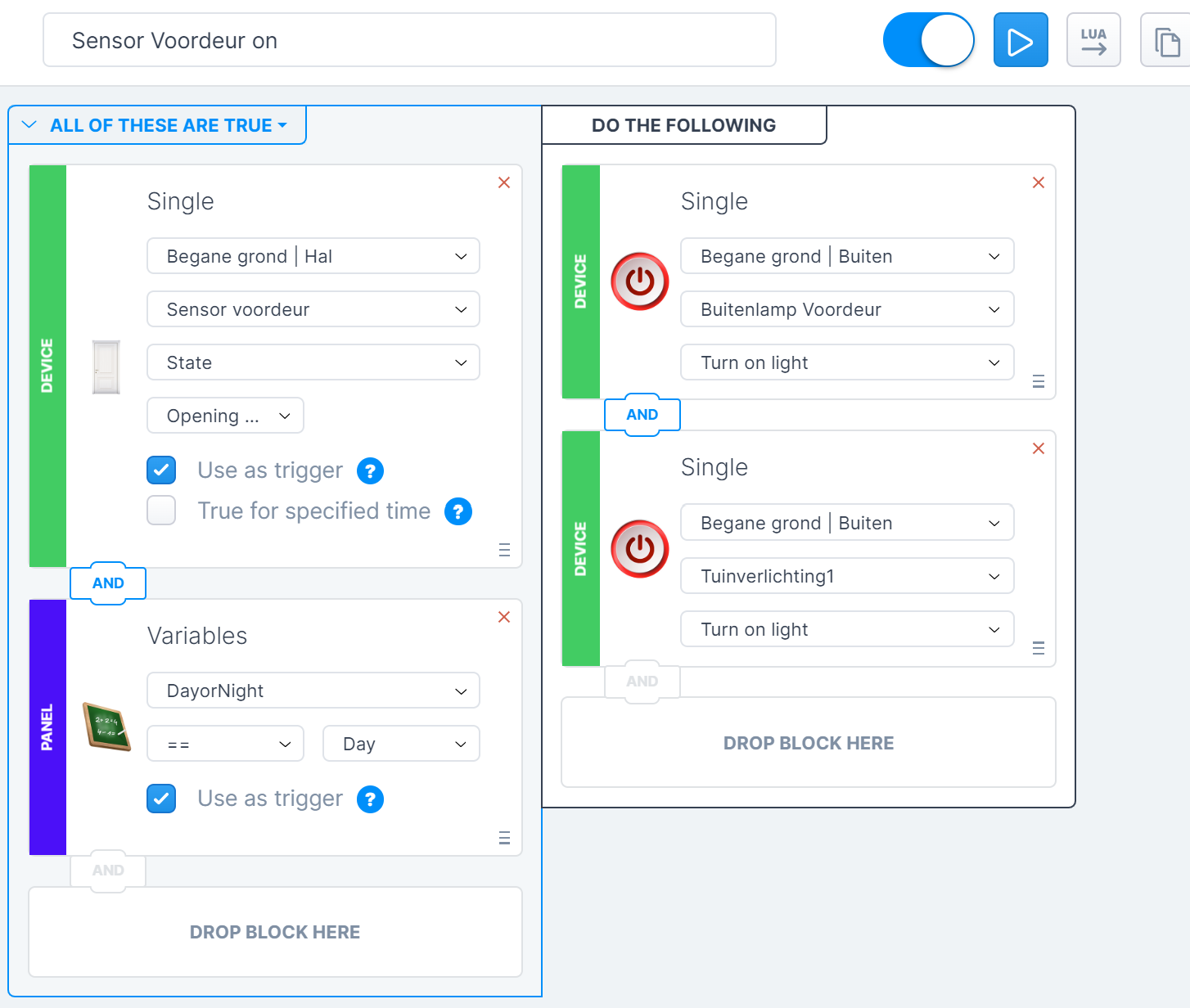
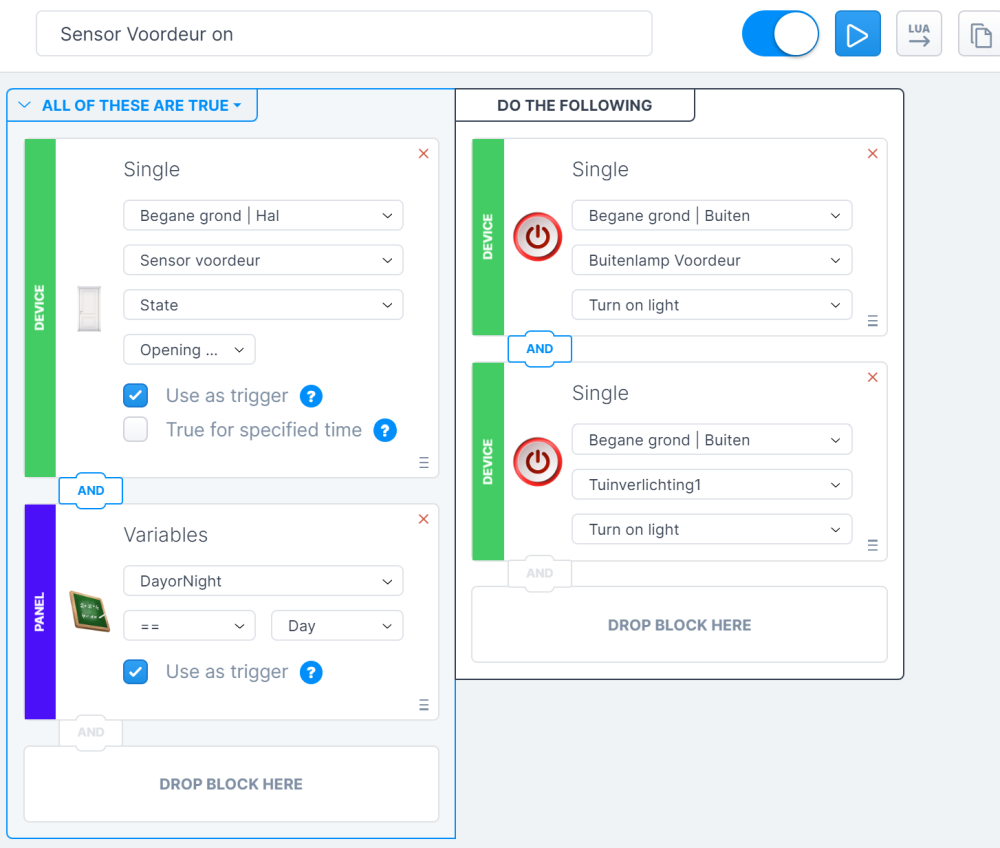
Hi I just migrated to HC3 and try to make a block scene with a doorsensor. See below my block scene (i do not know LUA), but it does not work. Any idea why? I saw a topic from 2020 that there were issues with doorsensors and scenes. can you help me?
-

Why does this block scene trigger (when it shouldn't)
janroger posted a question in Scenes and Interface
Why do I get push notifications during the day if the garage door opens with this block scene? (attached screenshot). The sensor is a Vision tilt sensor.. Converted to LUA it looks like this: --[[ %% autostart %% properties 250 value %% weather %% events %% globals --]] local sourceTrigger = fibaro:getSourceTrigger(); function tempFunc() local currentDate = os.date("*t"); local startSource = fibaro:getSourceTrigger(); if ( ( ((currentDate.wday == 1 or currentDate.wday == 2 or currentDate.wday == 3 or currentDate.wday == 4 or currentDate.wday == 5 or currentDate.wday == 6 or currentDate.wday == 7) and string.format("%02d", currentDate.hour) .. ":" .. string.format("%02d", currentDate.min) == "22:30") ) and ( tonumber(fibaro:getValue(250, "value")) > 0 ) ) then fibaro:call(55, "sendDefinedPushNotification", "247"); end setTimeout(tempFunc, 60*1000) end if (sourceTrigger["type"] == "autostart") then tempFunc() else local currentDate = os.date("*t"); local startSource = fibaro:getSourceTrigger(); if ( ( (currentDate.wday == 1 or currentDate.wday == 2 or currentDate.wday == 3 or currentDate.wday == 4 or currentDate.wday == 5 or currentDate.wday == 6 or currentDate.wday == 7) ) and ( tonumber(fibaro:getValue(250, "value")) > 0 ) or startSource["type"] == "other" ) then fibaro:call(55, "sendDefinedPushNotification", "247"); end end Guess I would be better off if I could make anything out of this LUA code... :-/ //JR
-
Please, can someone tell me the email account the Verification Code is sent from when you follow the wizard to create a Fibaro account. My ISP must be blocking this address and I need to ask them to release. Thanks Brent
-
Hello I have already found a topic on my subject, but this one is now too old and the proposed options are not anymore available in last version of the HCL (4.110). Https://forum.fibaro.com/index.php?/topic/12691-power-consumption-options- in-block-scenes I cannot make report of coherent value with a scene in mode block, somebody could he help me on this matter? He shall seem that Aeon Labs Power Meter gift t adjournment how he should, but I do not know how to make postponed the good values. Thank you has you

-

Can someone help me understand this code? Block scene.
rajp posted a question in Scenes and Interface
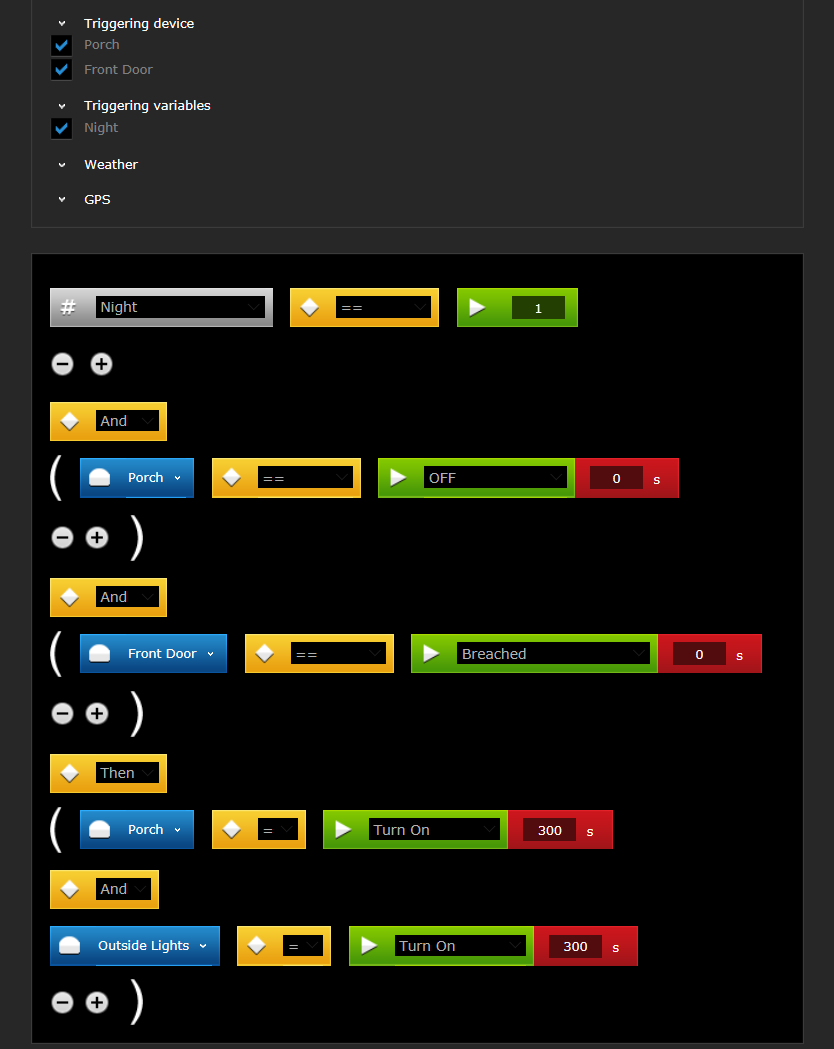
Hi all I have a simple scene that says that if the night variable is set and if the Porch and Driveway lights are off and if front door is breached, it should switch the Porch and Driveway light on for 300 seconds. I have put the 300 as a value in the device.. however, when I opened the door in the morning, the lights didn't switch on at 6AM but when I returned home at 7AM, they were on. That would mean that what I thought was a setting to keep the lights on for 300 seconds is not really that but is a delay of 300 seconds. Am I correct in understanding this ?? Haven't touched the scenes for a while and need to get back into this. I have attached a screenshot of the scene and also the LUA code it generated. How can I change the code to keep the lights on for 300 seconds and then switch off? Thanks in advance. FibaroTestSceneLua.txt
-
I am using the universal binary sensor from fibaro for my doorbell. One of the outputs are connected to a relay for the doorbell to sound. Input is connected by the doorbell. How can i make a scene where i can block the output from the sensor in the evening, so that the doorbell will not sound... but for example a light will flash in the livingroom?
-
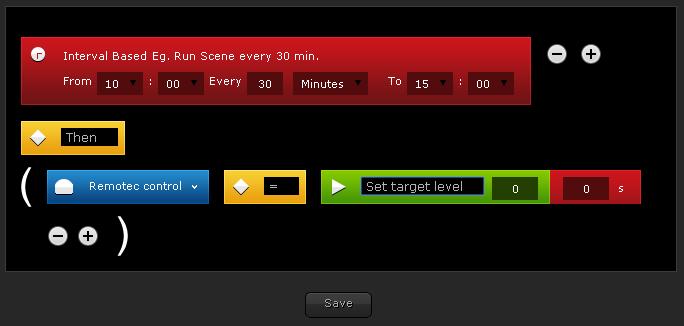
Hi, i'm trying to create a block scene with my Remotec ZXT-120. I set some time schedules but i can't set temperature, mode and fan option into the device It's a bug? Regards
-
I'm a new HC2 user and having some trouble getting scenes to work. Can someone take a look at the attached image and provide some feedback? Thanks in advance for your help. It seems like the IF/THEN logic of scenes is completely broken. Time-based scenes don't run when the "IF" condition is TRUE. Then, when I manually "RUN" a scene, it runs even if the "IF" condition is FALSE. What the heck am I doing wrong?? Scene.tiff
-
I'm experimenting with configuring BLOCK scenes with GPS locations, and it isn't working. See the attached image of my scene. I've confirmed (through other IOS apps) that the 100m buffer and location are correct. I have the HOME address and GPS coordinates correct. I have LOCATION SERVICE enabled on my iPhone/iOS and allowing Fibaro access to location services. My iPhone is sending updates of my location every 5 minutes. Is anyone else having issues with this feature?