Welcome to Smart Home Forum by FIBARO
Dear Guest,
as you can notice parts of Smart Home Forum by FIBARO is not available for you. You have to register in order to view all content and post in our community. Don't worry! Registration is a simple free process that requires minimal information for you to sign up. Become a part of of Smart Home Forum by FIBARO by creating an account.
As a member you can:
- Start new topics and reply to others
- Follow topics and users to get email updates
- Get your own profile page and make new friends
- Send personal messages
- ... and learn a lot about our system!
Regards,
Smart Home Forum by FIBARO Team
Search the Community
Showing results for tags 'Help'.
-
Dear fibaro Comunity, I bought two Blauberg VENTO Expert A50-1 W ( http://blaubergventilatoren.de/en/series/vento-expert-a50-1-w ) and I would try to connect to my HC2. This system is connected to wifi and is possible controll it with a blauberg app. Anybody could help me? thanks Simone
-
Hi everybody, I intend to install my entire house with Fibaro Walli family. I already use Dimmer and Switches but I have an issue with connection on of the dimmers. I removed the old switch from my bathroom and it had L (was live wire connected to it), L1 (was neural wire connected to it) and L2 (was ground wire connected to it) markings on it. The room has an extractor fan and smart LED which is managed by this single switch. Can anyone help me get it back? Thanks all!
-
is there a way to make home or away Variables by using your wifi at home so the Fibaro system nows when I ip dress comes into the area it know someone is home
-

[INFO] HC2 Recovery and Backup/Restore - 4.180 back
AutoFrank posted a topic in FIBARO System Update
Hi This post started off because I had an issue with my HC2 and I had to do a recovery. There was a lot of great suggestions from many people including @Sankotronic, @RH_Dreambox, @Jamie mccrostie, @jimicr, @tinman, @petergebruers, @Bodyart, @Rafael Suarez, @DAWO so I decided to turn it into a [INFO] Recovery and Backup/Restore type post. If I have any part wrong or misleading please let me know and I'll edit . This is not an absolute guide and not meant to be solution but more of a structured way to document what worked for me and what was shared as I worked through the process. I've pulled it all into the first post should some of it be useful to other forum users. **Trying any of this should be your judgement call when you weigh up your specific situation and risks** Some general comments that I found helpful HC2 will power on without the recovery stick in the USB slot. The HC2 runs perfect, but you can't make or restore backups. The boot process runs from an internal drive. HC2 RECOVERY boots from stick and that's where your backups are. Z-wave led (4th from left) shold flicker and is rarely solidly 'on' IDs are unlimited. Number of physical devices (with a Z-Wave chip) talking to each other in one network is 232 (if you need more, you need extra controllers). But scene IDs and device IDs are unlimited. As of 4.120 all custom icons after a recovery will NOT show in the Web UI but show okay on Android Phone, Andoid Tablet and iOS iPad. In case restore was necessary to fix zwave / modules not configured and / or other zwave related things (which might happend e.g. after firmware update) then definitely do "yes" to purge zwave database. After restore, all modules will get anyway recognized. you might do run soft reconfiguration to get latest templates Sometimes it takes a while after entering recovery for HC IP to connect, @Jamie mccrostie had to wait 5 to 10 minutes until it would reconnect. Up to that it just said something like "device unavailable" with a white browser screen even though all three leds on the front panel are back up Try and not have too many backups - The unofficial advice from Fibaro Support was to only keep between 4 and 6 backup versions. I had 50 backups at one stage consuming 74% of storage and I started to see performance issues. After recovery, please go to each device's "Advanced" page and click on "Read configuration", then, after a few seconds, refresh the page. Start with mains powered devices. What happened, during recovery, is this: some devices have been reconfigured (and parameters get default values). Then, the database was restored. Now, the contents of the database and the parameters stored on the device are no longer in sync. If you still have one device that doesn't act as expected, please try it. After "Read configuration" you'll see that the (refreshed) parameters page explains/matches its behavior HC2 IP address FYI a HC2 can have several possible IP: The DHCP assigned address used last time. A new DHCP address. The static IP you assigned. The static IP 192.168.81.1 = "recovery IP". This happens if you hold the "Learn Mode Button" too long (I think > 2 seconds). To recover from this situation, you have to give your PC the address 192.168.81.2 netmask 255.255.0.0 and browse to 192.168.81.1. Then you can put back the original IP or set the unit to DHCP. The Fibaro Finder doesn't find all possible IPs Backup seemed to go on a bit longer than expected. power down HC2 using power button - I didn't pull out the plug but the next time I would (after I had completed an orderly shutdown using the button) I would then power back up and see if the UI came available. If not then you may need to take the recovery route (Which is what I had to do) Recovery and Restore steps I found worked for me Power down system using power button, unplug HC2 briefly) hold recovery button (button next to power button) press power button (and keep holding recovery button) When the first led on front of HC2 ( on the right side ) stays on solid release the recovery button back to browser - clear cache, wait about 20 seconds for recovery mode to activate open up UI at IP address (if usual IP address doesn't work search for HC2 using Fing or something similar) Recovery screen will be displayed Select Recovery (first box on left) Reset Zwave - Click no if you want to keep your devices and restore on top of that - Click Yes if you want to clear everything. All devices will be added back in if you have a good backup available Let recovery complete and it will reboot Close browser and clear cache and open browser at IP address If IP address has changed use Fing again to find My HC recovered to 4.036 (which is pre wizard and email logins) Open browser and login using admin/admin All your devices wont be there but ignore that for now Select upgrade to 4.120 (which is the latest fw for me when this happended) Allow the upgrade to complete close browser and clear cache try and login using admin/admin but if this doesn't work you could try the wizard. Reopen browser and you may find your email login doesn't work (if you try and generate a new password - this wont work either as your email wont be recognised) Activate the wizard (not sure how I did this) Complete the required steps (email, password and confirmation code sent to email) Log into Web UI using email and password just created during wizard The system is now at 4.120 but doesn't have your setup Now go to the backups/restore section in the UI and select a backup to restore (I selected the second last one mainly because I had a suspicion that something went won't with my last backup) let this restore complete close browser, clear cache and log in All should be okay, give the system the once over depending on how old your last backup was you may need to reinstate the changes you made between the backup you restored and now I had two issues at this stage but just minor 1) All my custom icons were missing (this was expected) 2) Some of my fibaro dimmers (dimmer 1) had parameter 14 (switch type) a bit messed up and I had to fix. Another post about a Factory Reset -
Hello, I have created multiple virtual devices but never found out how to change the main icon. I have used: fibaro:call({id of VD}, "setProperty", "currentIcon", {id of icon}) but it doesn't work. I need a solution to setup an icon that stys unchanged, even if buttons are pressed. Thank you!
-
This is probably zwave basics but i don't know how zwave networking works in depth and I have an issue Sometimes the HC2 does not get a status change (close) of a fibaro door/window sensor the first time, if not after 10 seconds the signal is getting through. How can I reconfigure the path from the sensor to the HC2 (through other sensors?) Is this what "Mesh network reconfigure" in the ZWave section under settings means? and do I have to Mesh reconfigure that particular sensor only? I have a system with 95 physical modules
-
I brought HC2 last year in December. Because of my work I had just little bit more than four months to play with it in all this time. HC2 came with 4.056 firmware and as soon as I took it out of the box and connected to it, it was offering upgrade to 4.070 so I did it. Despite some problems, system was growing pretty fast, but programming was (and still is) quite challenging. Thanks to many members of this forum on their work and help that I manage to do something useful. I use jompa68's Alarm Clock, and Boomx's script to collect data for Netatmo wind and rain gauges. I also use cag014 solution for devices and scenes ID to be stored in global variable, and krikroff's Sonos remote and many many other solution given here by members petergebruers, chaicka and many others. Thank you, thank all of you for all good ideas, solutions, code and help! So, here it is in one picture, and it wouldn't be possible without your help on this forum. It is now on 4.100 with 72 modules included and the rest is in my signature I promised some members here that I will share what I have done and I will keep my promise, but just not yet. I have to go to my work again and I have to leave my "Angelina" to wait for me to come home to clear some bugs in code that I made and to give her more abilities. Luckily for me my wife is very supportive so I get list of her wishes and improvements that I can make every time when I came home. Thank you all and see you soon! Here is updated layout of my Angelina on 28th March 2017: To see it in all it's beauty click on picture, then on "Full size" in lower left corner.
-
Hello, I would like to integrate my Hue Motion sensors with Fibaro so I can use the for scene. Unfortunately, I do not know if there is a possibility why I ask here and try my luck. Kind regards SerrII
-
Hi all I'm hoping that someone can help me out. I was setting some new block scenes earlier and the HC2 seemed to crash, I just got the floating circles as if the interface was loading. So I went for a shower and then ended up going out. While I was out I got quite a few emails saying the IP address of my laptop had been blocked due to incorrect logins. So when I have got home I have tried to log back into the system. I was greeted with incorrect username/password. Which was very strange considering these are saved in my browser. So I had no choice but to reset my password. When I logged in, to my horror all of my devices have gone, and all of the scenes. I then realised that I have limited privileges. The password which I reset was for the superuser account (the only account on the home centre). But the HC2 has given me a standard user account instead?! I can log into Fibaro ID. I can log into the home centre but as a standard user. I have tried to log in with the old admin admin. No luck at all, I really don't want to rebuild my system. can anyone help? thanks in advance!
-
I just bought a driver of occasion, when trying to register it gives me a message that says that this device is already registered, as I must do to be able to activate it, since when I log in with my account, it gives me an authentication error
-

Camera Ip hikvision DS-2CD2020F-I not work in hc2?
Rafael Vera posted a question in Scenes and Interface
Has anyone ever operated this model of cameras in home center 2? -
I have two Fibaro sensor on my drive one at each end. i am trying to make a scene that says if sensor a is trigged first and then sensor b is trigged turn on lights but if sensor b is trigged first and then sensor a is trigged don't turn on lights not sure how to right it in Lua code
-
my new fibaro relay is not adding to my fibaro system does anyone know if there is a propel with them
-
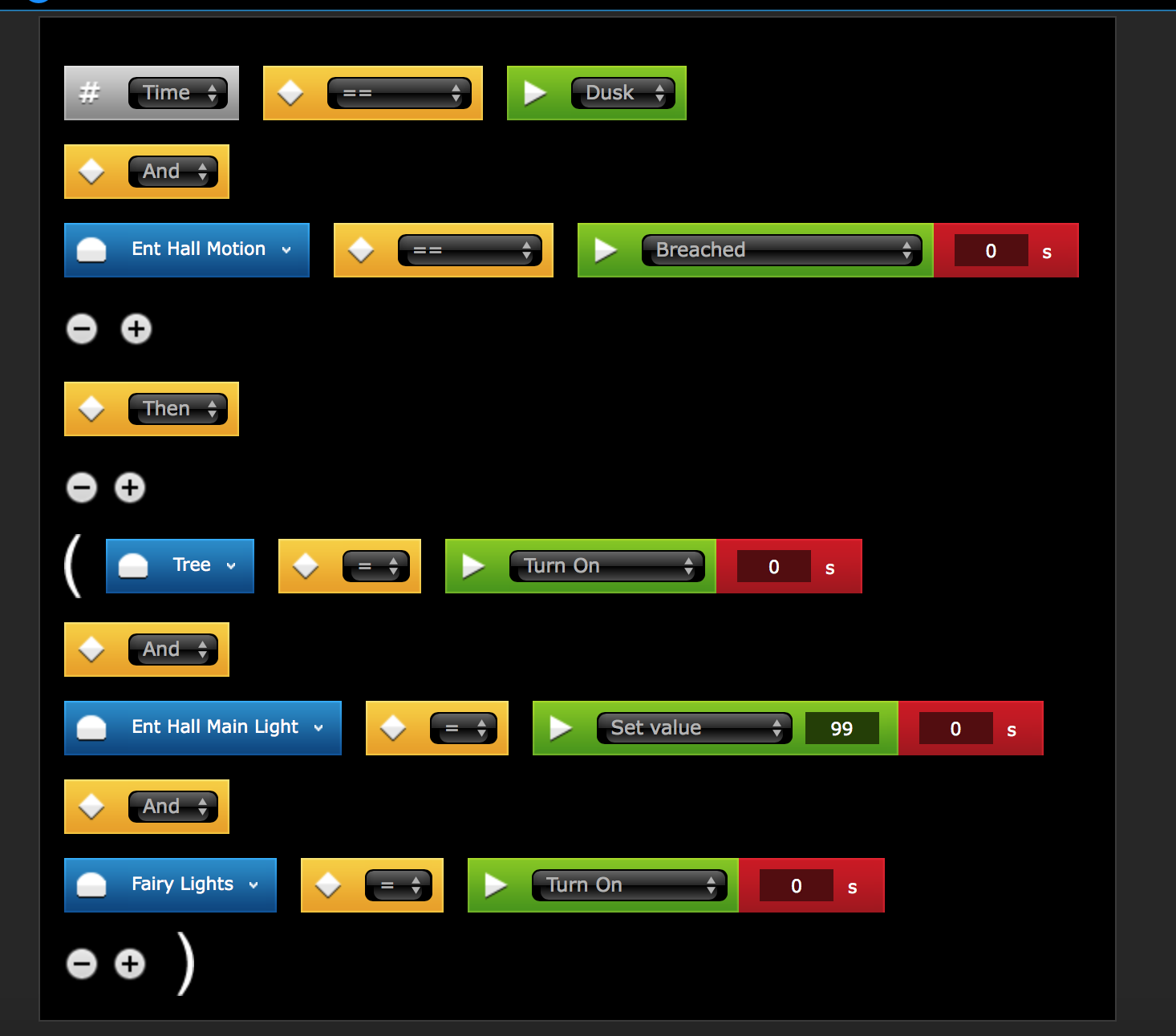
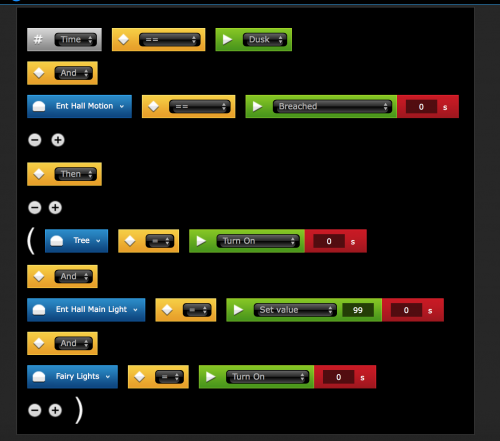
Hey guys, I thought it would be a nice idea to share some of the new scenes which people are using. This way it could potentially give people inspiration on what the system can do while also helping people with similar scenes to perfect them of use them in a more efficient way. So I suppose I will start... Today I have put together a lighting scene, it took quite a while because it's two scenes per room. I started by adding 3 variables called time: Day, Dusk & Night. I have set a scene to trigger the variable depending on the time, so Daytime starts at 8am, Dusk becomes active at dusk (set by Fibaro's time clock) and finally night becomes active at 10pm. The break down is: Day - No lights Dusk - Lights at 100% brightness Night - Lights at 10% brightness I have attached the block scenes below. I can't wait to see what you have all been up to with your HC.

-
I need help making a Virtual device work what this is, is a virtual device it has a button which I want to turn on device 61 however when I click the button its not working at all. I have this in the LUA: local http = Net.FHttp("w******@hotmail.com:F*******[email protected]", 80); local response = http:GET("/api/callAction?deviceID=61&name=turnOn"); local http = Net.FHttp("w******@hotmail.com:F*******[email protected]", 80); local response = http:POST("/api/callAction?deviceID=61&name=turnOn"); I have tried these two and all I want to do is on device 61 which works if I type this link in internet explorer, so I know the link works fine: http://w******@hotmail.com:F*******[email protected]/api/callAction?deviceID=61&name=turnOn I just want it so if I click one of the buttons in the virtual device it turns on the device (61) thanks.
-
Hello, not sure if it should be here or other topics.. I need some help with creating a virtual device for Anthem MRX 720. I am just after basic working out the format, i will create the control after.. I have tried it like below and doesn't work. the amp freezes and wont take any more input by remote or physical on panel.. i have to unplug after i tried fibaro command and the reset. I am new to virtual device for AVR so i have taken some code from DENON remote (Device ip 192.168.1.7 and port is 14999) - should i use this port, or port 80? Thanks fibaro:log("Connecting..."); local selfId = fibaro:getSelfId(); local icon = fibaro:get(selfId, "deviceIcon"); fibaro:call(selfId, "setProperty", "currentIcon", icon) local ip = fibaro:get(selfId, 'IPAddress'); local port = fibaro:get(selfId, 'TCPPort'); tcpSocket = Net.FTcpSocket(ip, port); tcpSocket:setReadTimeout(2000); tcpSocket:write("Z1POW1") fibaro:sleep(1000); result, err = tcpSocket:read(); tcpSocket:disconnect(); if (err == 0) then fibaro:log("transfer OK"); fibaro:debug("transfer OK"); else fibaro:log("transfer failed"); fibaro:debug("transfer failed"); end MRX-x20-AVM-60-IP-RS-232 (2).xls
-
Hello everyone, I've big issue I can't solve, maybe you guys can help. I have a door/window sensor which is (checkboxes) "hidden in the system" and "device is unabled". Now the problem is, this sensor is Armed... but I cannot Disarm it because it's greyed out in the interface, because it's is unabled. But I cannot enable the device because of the 403 error I get. Also removing from the system is not possible because of the 403 error. Is there, for example, a way to force all devices (no matter if they unabled or hidden) to disarm? In the alarmpanel of my Homecenter says that the alarm is completely disarmed, but I see in 192.168.1.20/api/devices that my sensor is armed. How can I get out of this problem? It drives me crazy! Thank you guys!
-
Hi I need it in a script not in VD. Please help with the scrip. My response is always nil. thank you function statusVU(); local http = net.HTTPClient(); http:request('http://192.168.11.11:80/web/powerstate', {success = function(resp) local vuStatusAus = (string.match (resp.data, "true")); if vuStatusAus == "true" then; return true; else; VuEinAus = "aus"; return false; end; end}) end print(statusVU())
-
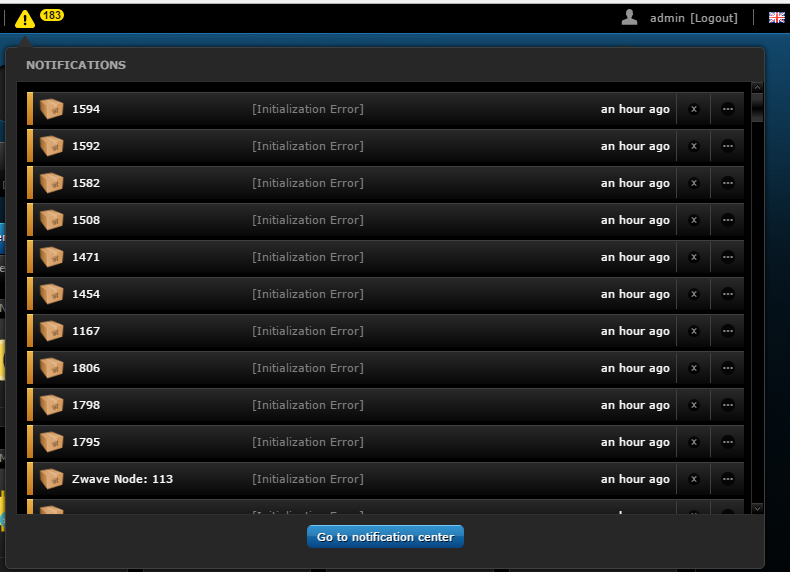
Hi, From various failed device pairings/inclusions I now have 163 initialisation errors when I restart or backup my HC2 I tried deleting the devices but they appear to delete but when I backup or restart the devices re-appear Does anybody know how I might get rid of these ? Thanks -f


-
Hi How can i implement it for a script. It works in a VD thank you
-
Hope someone can help on it I have the problem that some lights doesn't switch off and some randomly switch on. In detail: I have an ON Scene and an OFF Scene for the lights. They are triggered by Motion Sensor. I can see after the Motion Sensor is save again, the OFF scene is running, after a while it's not running anymore and the light is still on. The thing is it happens only sometimes, but too often. Here is an OFF Scene: --[[ %% properties 262 value 97 value %% events %% globals CRLED --]] --CR_LED_OFF ID 156 local date = os.date( '*t' ) local time = tonumber( string.format( '%02d%02d', date.hour , date.min ) ) local startSource = fibaro:getSourceTrigger(); if(startSource["type"] == "other") then fibaro:call(28, "turnOff"); else if (( tonumber(fibaro:getValue(262, "value")) == 0 ) --Motion Dressroom and ( tonumber(fibaro:getValue(97, "value")) == 0 )) --Motion Bedroom then setTimeout(function() local delayedCheck0 = false; local tempDeviceState0, deviceLastModification0 = fibaro:get(262, "value"); if (( tonumber(fibaro:getValue(262, "value")) == 0 ) and (os.time() - deviceLastModification0) >= 120) then delayedCheck0 = true; end local delayedCheck1 = false; local tempDeviceState1, deviceLastModification1 = fibaro:get(97, "value"); if (( tonumber(fibaro:getValue(97, "value")) == 0 ) and (os.time() - deviceLastModification1) >= 120) then delayedCheck1 = true; end local startSource = fibaro:getSourceTrigger(); if ( ( delayedCheck0 == true and delayedCheck1 == true and fibaro:getGlobalValue("CRLED") == "Active" ) or startSource["type"] == "other" ) then fibaro:call(28, "turnOff"); --Light Changeroom end end, 2*60000) --delay 2min end end ******************************************************************************** BTW I'm sure and double confirm the variable CRLED is Active Here is an ON Scene: --[[ %% properties 262 value %% events %% globals CRLED Mode --]] --CRBF_LED_ON 150 local startSource = fibaro:getSourceTrigger(); if ( ( tonumber(fibaro:getValue(262, "value")) > 0 ) --Motion Dressroom and ( fibaro:getGlobalValue("CRLED") == "Active" and ( fibaro:getGlobalValue("Mode") == "Day" or fibaro:getGlobalValue("Mode") == "Evening" )) or startSource["type"] == "other" ) then fibaro:call(28, "turnOn"); --LED ON end
-
Hi folks, I have a bit of a puzzler. I have a scene that sets to global variables based on light level from a sensor (device 217 ) The two options within the code are either 'day' or 'night' but sometimes it gets set to 'normal' Could anybody offer an explanation Scene code below... Thanks Frank --[[ %% autostart %% properties 217 value %% events %% globals --]] -- Configuration - Scene Info sceneName = "GV Time of Day, inside and outside" sceneVersion = "1.0.1" -- Scene Description -- Sets a global variable called TOD_LightMode depending on lux level from an outside sensor -- Configuration - Device IDs local OutsideLuxSensorID = 217 -- Validate Number of Scene Instance if (fibaro:countScenes()>1) then --fibaro:debug("stop scene") fibaro:abort() end function UpdateEventLog(eventStr) local currDate = (os.date("%b %d - %H:%M")) local updStr = (fibaro:getGlobal("Log_Event") .."".. currDate .." ".. eventStr .." \n") fibaro:setGlobal("Log_Event", updStr) end -- Main Code for the Scene function tempFunc() --set reference for outside lights if tonumber(fibaro:getValue(OutsideLuxSensorID, "value")) == 0 then fibaro:setGlobal("TOD_LightMode", "night") fibaro:debug("Outside = 0 - "..fibaro:getGlobal("TOD_LightMode")) UpdateEventLog("Outside mode set - night mode") else fibaro:setGlobal("TOD_LightMode", "day") fibaro:debug("Outside > 0 - "..fibaro:getGlobal("TOD_LightMode")) UpdateEventLog("Outside mode set - day mode") end fibaro:sleep(5000) fibaro:debug(fibaro:getValue(OutsideLuxSensorID, "value")) -- set refernce for inside lights if tonumber(fibaro:getValue(OutsideLuxSensorID, "value")) < 50 then fibaro:setGlobal("TODModeInside", "night") fibaro:debug("Inside <40 - "..fibaro:getGlobal("TODModeInside")) UpdateEventLog("Inside mode set - night") else fibaro:setGlobal("TODModeInside", "day") fibaro:debug("Inside >40 - "..fibaro:getGlobal("TODModeInside")) UpdateEventLog("Inside mode set - day") end fibaro:debug("Inside - "..fibaro:getGlobal("TODModeInside")) fibaro:debug("Outside - "..fibaro:getGlobal("TOD_LightMode")) end -- Trigger Management local currentDate = os.date("*t") local startSource = fibaro:getSourceTrigger() --Start of Scene Execution if (startSource["type"] == 'property') then fibaro:debug("Started through property") tempFunc() -- this is calling the the function if something happens. elseif (startSource["type"] == 'global') then fibaro:debug("Started through variable") tempFunc() -- this is calling the the function if something happens. elseif (startSource["type"] == "autostart") then fibaro:debug("Started through autostart") tempFunc() -- this is calling the the function if something happens. elseif (startSource["type"] == "other") then fibaro:debug("Scene not started, this can only be started through property, global or autostart!"); end -- End of Scene Execution fibaro:debug("Scene, " .. sceneName .. " v" .. sceneVersion .. " completed.")
-
 Hi everyone I want to start a complaint about the Qubino flush relay's still not supported by Fibaro. Still templates are not available for these modules. I do not know why Fibaro still are not supporting these modules but to my opninion they should starting supporting these by now. Especially keeping in mind all other brands are supported much better. I did sent templates to Fibaro several times. A lot of customer have these units, probably because they support energy metering. So Fibaro, what's goinig on here? Please reply so we have as many as qustumers possible to put some pressure in Fibaro!
 -
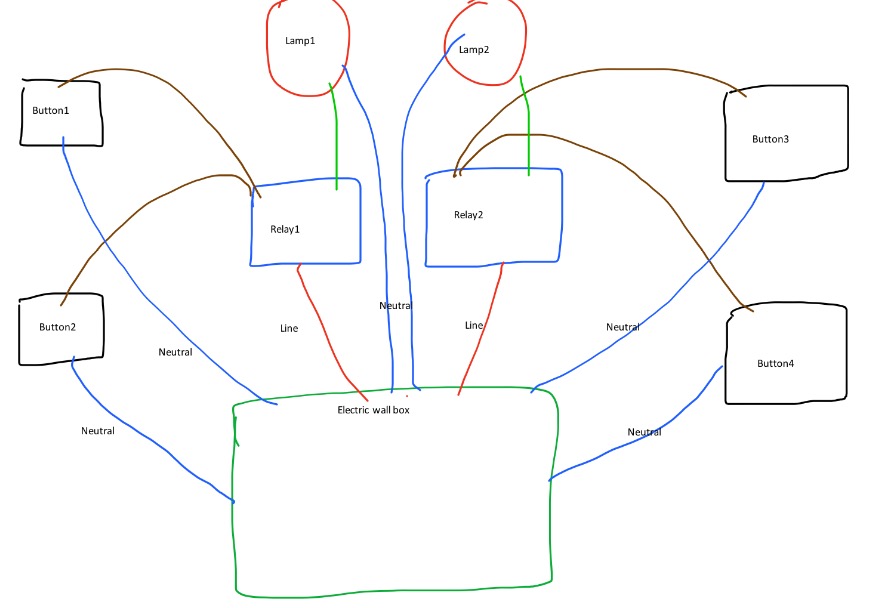
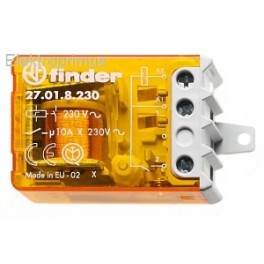
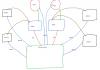
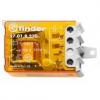
Hi, thank you in advance for your patience and hopefully support. I'm a good programmer, I've limited electrician skills but I successfully installed 4 fibaro roller shutters following online tutorials and done some other small electric changes in my home Now I would like to modify my electrical system adding one Fibaro double relay switch, in order to remotely control two lamps. Actually each lamp is controlled by two push buttons and one Finder Relay like this one On each button there are 2 wires attached: 1 common neutral and 1 wire attached to the Finder relay. What I would like to achieve: replace the two Finder relays with one Fibaro Double Relay in the electric box, and have all 4 buttons still working. Do you think this is possible? I attach also a draw made by me with my actual system. If this is possible, do you have some hints for needed wiring? Sorry for my non-technical schema Thanks in advance for your time Best regards
-

With a script that the ONECLICK html on the Click??
parip69 posted a question in Scenes and Interface
With a script that the ONECLICK html on the Click??? ??????????????????????????????????????????????????? local url = 'http://127.0.0.1:11111' response = url:call("mainData.scenes[44].clear()") ?????????????????????????????????????????????????? From: http://192.168.11.111/fibaro/de/scenes/edit.html?id=44#bookmark-advanced <a id="clearDebugButton" href="#" onclick="mainData.scenes[44].clear(); return false;">